How to Minimize Admin Effort When Deploying Firewall Rules in AD?
Your network contains an Active Directory Domain Services (AD DS) domain. The domain contains the servers shown in the following table. You need to deploy inbound firewall rules to the servers. The solution must minimize administrative effort. What should you use? - 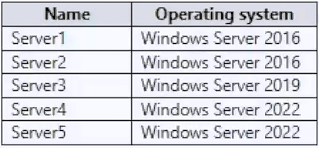
Community Votes
100% of anonymous learners picked answer C. Votes are pick records left by other test-takers — they are not the verified answer.
Community Insight
This question tests your ability to select the right centralized management tool for AD environments, with the common trap being confusion between modern cloud tools like Intune and traditional on-premises GPOs.
Deploying Windows Defender Firewall rules across multiple domain-joined servers requires centralized configuration to reduce manual overhead. The community unanimously agrees that Group Policy Objects provide the most efficient and scalable solution for this task.
PowerShell Desired State Configuration (DSC) is often chosen incorrectly because it also allows automation, but it introduces significant scripting complexity and maintenance overhead compared to native GPO firewall settings.
Community Discussion (3 comments)
Comments & Corrections
No comments yet — spotted an error or have a note? Share it below.
Expert Analysis
Why the Answer Is Correct
Group Policy Objects (GPOs) are specifically designed for centralized administration within an Active Directory Domain Services environment. By configuring Windows Firewall settings through GPO templates, administrators can push inbound rules to all targeted servers simultaneously without manual intervention. This approach drastically reduces administrative effort while ensuring consistent policy enforcement across the domain. As noted by community members, GPOs streamline bulk configuration tasks effectively [1].Why the Other Options Are Wrong
Local security objects require individual server access, which directly violates the goal of minimizing administrative effort. PowerShell DSC offers powerful automation but demands extensive script development, state management, and ongoing maintenance, making it overkill for simple firewall rule deployment. Microsoft Intune primarily targets cloud-managed or hybrid endpoints rather than traditional on-premises AD servers, adding unnecessary complexity for this specific scenario.Community Comment Notes
Test-takers consistently highlight GPOs as the standard choice for AD-centric infrastructure management tasks. Commenters emphasize that GPOs allow simultaneous application of settings regardless of minor OS version differences within the domain [2]. Multiple users confirm that the exam heavily favors native AD tools when the environment explicitly states an on-premises AD DS domain [3].Official Reference
Exam Strategy
Always prioritize native Active Directory tools like Group Policy when the question specifies an on-premises AD DS environment and emphasizes reducing administrative overhead. Reserve cloud management platforms like Intune for hybrid or internet-connected workloads, and avoid complex automation frameworks unless scripting is explicitly required.