Which Users Can Establish Default PowerShell Remoting Sessions?

Your network contains an Active Directory Domain Services (AD DS) domain. The domain contains two servers named Server1 and Server2 and the users shown in the following table. Which users can establish a PowerShell remoting session from Server1 to Server2? - image
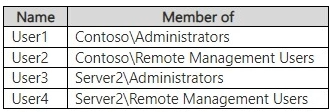
  1. User1 and User3 only Source Reference Answer
  2. User2 and User4 only
  3. User3 and User4 only
  4. User1, User3, and User4 only
  5. User1, User2, User3, and User4

Community Votes

A
57%
E
43%

57% of anonymous learners picked answer A. Votes are pick records left by other test-takers — they are not the verified answer.

Community Insight

Tests knowledge of default WinRM/PSRemoting security boundaries, with the common trap being confusion between the Remote Management Users group and actual PowerShell execution permissions.

PowerShell remoting defaults to restricting access exclusively to local Administrators on the target server. Candidates must distinguish between administrative groups that grant direct remoting access versus those intended for other management consoles.

Selecting Option E (All Users) by assuming Domain Admins and Remote Management Users automatically bypass the local Administrators requirement for PowerShell remoting.

Community Discussion (14 comments)

zuzmo483 👍 2 Selected: A
https://learn.microsoft.com/en-us/windows-server/identity/ad-ds/manage/understand-security-groups#remote-management-users Use the Remote Management Users group to allow users to manage servers through the Server Manager console. Use the WinRMRemoteWMIUsers\_ group to allow users to remotely run Windows PowerShell commands.
RayFXWang 👍 1 Selected: C
User1 and User1 have permission on domain controller only, no permission on server1 and server2.
brunosilvam 👍 1 Selected: A
To create remote sessions and run remote commands, by default, the current user must be a member of the Administrators group on the remote computer or provide the credentials of an administrator. Otherwise, the command fails. https://learn.microsoft.com/en-us/powershell/module/microsoft.powershell.core/about/about_remote_requirements?view=powershell-7.5
ltkiller 👍 1 Selected: A
User1 and User3 only, default ONLY administrators. https://learn.microsoft.com/en-us/powershell/module/microsoft.powershell.core/about/about_remote_requirements?view=powershell-7.5#user-permissions
FERNFHIT 👍 1 Selected: D
User1: Benutzer, die in einer Domänen-Administratoren-Gruppe sind, verfügen in der Regel über lokale Administratorrechte auf allen Domänenservern (sofern dies nicht explizit entzogen wurde). Somit kann User1 sich per PowerShell Remoting mit Server2 verbinden. User3: Als lokaler Administrator auf Server2 hat User3 standardmäßig Zugriff auf PowerShell-Remoting-Sessions zu Server2. User4: Mitglieder dieser lokalen Gruppe dürfen standardmäßig auf Server2 per PowerShell remoten. Da User4 in dieser Gruppe ist, erhält er ebenfalls Zugriff. User2: Die reine Mitgliedschaft in einer Domänen-Remote-Management-Gruppe bedeutet nicht automatisch lokale Rechte auf Server2. Da User2 nicht in der lokalen "Remote Management Users"-Gruppe von Server2 ist, erhält er keinen Zugriff.
formacaotismic 👍 2 Selected: E
User1 (contoso/administrators): Pode estabelecer uma sessão remota, pois é membro do grupo Administrators no domínio contoso. User2 (contoso/Remote Management Users): Pode estabelecer uma sessão remota, pois é membro do grupo Remote Management Users no domínio contoso. User3 (Server2/administrators): Pode estabelecer uma sessão remota, pois é membro do grupo Administrators no Server2. User4 (Server2/Remote Management Users): Pode estabelecer uma sessão remota, pois é membro do grupo Remote Management Users no Server2.
formacaotismic 👍 1
E User1 (contoso/administrators): Pode estabelecer uma sessão remota, pois é membro do grupo Administrators no domínio contoso. User2 (contoso/Remote Management Users): Pode estabelecer uma sessão remota, pois é membro do grupo Remote Management Users no domínio contoso. User3 (Server2/administrators): Pode estabelecer uma sessão remota, pois é membro do grupo Administrators no Server2. User4 (Server2/Remote Management Users): Pode estabelecer uma sessão remota, pois é membro do grupo Remote Management Users no Server2.
Krayzr 👍 1 Selected: E
By default, members of the Administrators group and the Remote Management Users group can initiate PowerShell remoting sessions
Jothar 👍 1
Change that. A because contoso admins would have the same rights. so both admins could remote in.
Jothar 👍 1
C. From google ai: User Permissions: By default, only members of the Administrators group on the remote computer have permission to use PowerShell remoting. However, you can configure it to allow non-administrative users by granting them Execute permissions to the appropriate session configurations.
Ksk08 👍 1
D is correct
0b2ca83 👍 1
D right?
Ksk08 👍 1
Answer is A. user 1 and 3 since they have the administrator right
Ksk08 👍 1
Answer is E

Comments & Corrections

No comments yet — spotted an error or have a note? Share it below.

Log in to comment, report an error, or add a note about this question.

Submitted for moderation before publishing. Keep it helpful and respectful.

Expert Analysis

Why the Answer Is Correct

By default, Windows PowerShell remoting strictly limits session initiation to members of the local Administrators group on the destination computer. User3 holds the local Server2\Administrators role, granting immediate access. User1 belongs to the contoso\Administrators group; in standard AD deployments, Domain Admins inherit local Administrator privileges on member servers through default domain-wide policies, satisfying the remoting requirement.

Why the Other Options Are Wrong

Options including User2 and User4 are incorrect because membership in the Remote Management Users group only permits management via the Server Manager console, not PowerShell remoting. Similarly, the WinRMRemoteWMIUsers_ group is specifically for WMI-based remote commands, not native PSRemoting. Without explicit configuration changes to WinRM ACLs or custom session configurations, non-Administrators cannot initiate sessions.

Community Comment Notes

The community debate highlights a frequent point of confusion regarding Domain Admin privileges versus local group memberships. Highly upvoted comments correctly cite Microsoft documentation stating that default permissions require local Administrator status [4][5]. Several users initially chose E, overlooking that Remote Management Users does not equate to PowerShell execution rights. One discussion thread clarifies that while Domain Admins technically possess these rights, exam scenarios expect strict adherence to the documented default requirement for local Administrative group membership.

Official Reference

Exam Strategy

Memorize the default permission model for core Windows services: PowerShell remoting requires local Administrators, while Remote Management Users is strictly for Server Manager. When an exam question asks about default behaviors without mentioning explicit WinRM configuration, always filter options through the local Administrators group lens first.

Related Analysis

← Back to AZ-800 Study Guide