Which NIC Teaming Mode Supports d.VMMQ in Windows Server 2022?
You have a server that runs Windows Server 2022 and has the network adapters shown in the following table. You need to configure NIC teaming for LAN2 and LAN3. The solution must support Dynamic Virtual Machine Multi-Queue (d.VMMQ). What should you use? - 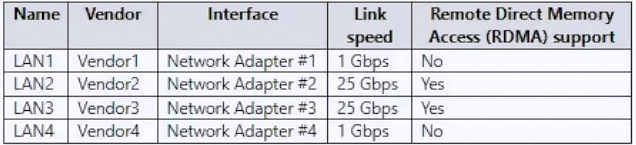
Community Votes
100% of anonymous learners picked answer B. Votes are pick records left by other test-takers — they are not the verified answer.
Community Insight
The exam tests your knowledge of modern Windows Server networking features, specifically that Switch Embedded Teaming (SET) is required to support d.VMMQ, whereas traditional LBFO does not.
Configure Switch Embedded Teaming (SET) to enable d.VMMQ and optimize Hyper-V network performance in Windows Server 2022. Community consensus strongly confirms SET as the only viable solution among the options for supporting dynamic VM multi-queue scaling.
Candidates often select Load Balancing and Failover (LBFO) because it is the legacy NIC teaming feature, but it lacks native support for d.VMMQ and has been superseded by SET in Windows Server 2016 and later.
Community Discussion (3 comments)
Comments & Corrections
No comments yet — spotted an error or have a note? Share it below.
Expert Analysis
Why the Answer Is Correct
Switch Embedded Teaming (SET) is the modern network abstraction layer introduced in Windows Server 2016 and fully supported in Windows Server 2022. It natively integrates with the Hyper-V virtual switch and is explicitly designed to support Dynamic Virtual Machine Multi-Queue (d.VMMQ), which automatically scales network queues based on active VM workloads. By using SET, administrators can group physical adapters into a single logical interface while leveraging advanced offloading and scaling features. This makes it the only correct architectural choice for the stated requirements.Why the Other Options Are Wrong
LACP and Static teaming are merely operational modes that define how traffic distributes across member adapters, not the underlying teaming framework itself. Traditional Load Balancing and Failover (LBFO) represents the legacy NIC teaming technology that lacks native d.VMMQ support and does not integrate seamlessly with the Hyper-V VMSwitch. Selecting LBFO or standalone modes ignores the fundamental shift toward embedded switching in modern Windows Server versions.Community Comment Notes
Community contributors unanimously confirm SET as the correct answer, noting its availability starting with Windows Server 2016 and its role in creating software-based virtual adapters. One highly rated comment highlights that SET groups physical Ethernet adapters to deliver equivalent or enhanced functionality compared to older teaming solutions. Another contributor shares a direct Microsoft documentation link validating SET implementation alongside Hyper-V configurations in Windows Server 2022. These insights align perfectly with official Microsoft guidance on modern server networking.Official Reference
- https://learn.microsoft.com/en-us/answers/questions/1538625/windows-server-2022-set-nic-teaming-and-hyper-v
- https://learn.microsoft.com/en-us/windows-server/networking/technologies/set/set-overview
- https://learn.microsoft.com/en-us/windows-hardware/drivers/network/dynamic-virtual-machine-multi-queue-dvmmq
Exam Strategy
Focus on distinguishing between teaming frameworks (SET vs. LBFO) and teaming modes (LACP, Static, Dynamic). For any Windows Server 2016+ scenario involving Hyper-V or d.VMMQ, immediately prioritize SET over legacy LBFO options.