Which Servers Qualify as DFS Folder Targets?
Your network contains an Active Directory Domain Services (AD DS) domain named contoso.com. The domain contains the servers shown in the following table. You need to create a Distributed File System (DFS) namespace that will contain the following: • A domain-based namespace named \\contoso.com\Public • A folder named Finance Which servers can you configure as folder targets for the Finance folder? - 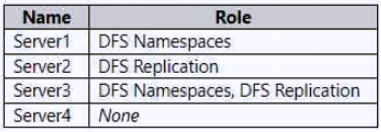
Community Votes
100% of anonymous learners picked answer E. Votes are pick records left by other test-takers — they are not the verified answer.
Community Insight
Tests understanding of DFS folder target requirements versus namespace root roles, where candidates frequently fall into the trap of believing the DFS Namespaces role must be installed on every target server.
Identifies prerequisites for configuring Distributed File System (DFS) folder targets in a domain environment. Community consensus confirms that any domain-joined server with properly configured shared folders qualifies, regardless of installed DFS-specific roles.
Option C is the most frequent incorrect choice, as test-takers mistakenly limit targets to servers explicitly assigned the DFS Namespaces role, overlooking that standard file sharing suffices.
Community Discussion (9 comments)
Comments & Corrections
No comments yet — spotted an error or have a note? Share it below.
Expert Analysis
Why the Answer Is Correct
Configuring a DFS folder target does not require installing the DFS Namespaces role service on the target server. According to Microsoft documentation, any domain-joined Windows Server that hosts a properly secured and accessible shared folder can function as a folder target. The primary requirements are administrative privileges, a supported OS version, and valid NTFS/share permissions. Therefore, all four servers listed in the scenario meet the baseline criteria to host the Finance folder target.Why the Other Options Are Wrong
Options restricting targets to specific servers incorrectly conflate namespace hosting requirements with folder target prerequisites. The DFS Namespaces role is primarily needed for the server(s) publishing the namespace root, not for storing the actual data. Similarly, the DFS Replication role is only mandatory when enabling multi-master replication across targets, which is not stated as a requirement here. Eliminating servers based solely on missing DFS roles violates the fundamental design of DFS, which decouples namespace routing from data storage.Community Comment Notes
The community discussion reveals a significant split between practical knowledge and role-based misconceptions. Several users correctly selected Option E by emphasizing that shared folder availability is the sole determinant [1][3][4], while others incorrectly filtered results based on installed DFS roles [2][7][9]. Comment [6] cites official prerequisites but paradoxically concludes that only Server1 and Server3 qualify, highlighting a common reading comprehension error during exams. Expert validation aligns with Option E, reinforcing that DFS architecture intentionally separates namespace management from file serving capabilities [5].Official Reference
Exam Strategy
Always differentiate between the roles required to publish a DFS namespace versus those needed to store its data. Focus your exam preparation on SMB share permissions, domain membership, and OS compatibility rather than assuming DFS-specific role installations are mandatory for every component. This architectural distinction frequently appears in hybrid administration scenarios.