Where Should You Install the Azure Connected Machine Agent?
You have on-premises servers that run Windows Server as shown in the following table. You have an Azure subscription that contains a virtual machine named VM1. You need to ensure that you can manage all the servers by using Azure Arc. The solution must minimize administrative effort. On which servers should you install the Azure Connected Machine agent? - 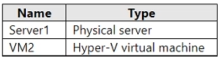
Community Votes
100% of anonymous learners picked answer E. Votes are pick records left by other test-takers — they are not the verified answer.
Community Insight
This question tests your understanding of Azure Arc resource scope and prerequisites, with the common trap being the redundant installation of agents on already-managed Azure virtual machines.
The Azure Connected Machine agent extends centralized Azure management to non-Azure infrastructure like on-premises servers. Community consensus confirms that native Azure VMs already possess built-in platform capabilities, making external agent installation unnecessary and counterproductive.
Candidates frequently choose options including VM1, mistakenly assuming all listed servers require the same connectivity solution regardless of their hosting environment, which directly violates the minimize administrative effort requirement.
Community Discussion (3 comments)
Comments & Corrections
No comments yet — spotted an error or have a note? Share it below.
Expert Analysis
Why the Answer Is Correct
The Azure Connected Machine agent is explicitly designed to extend Azure governance, monitoring, and policy enforcement to resources outside the Azure cloud boundary. Since Server1 and VM2 reside in your local datacenter, deploying the agent on these hosts enables seamless integration with Azure Arc-enabled servers without disrupting existing workflows. Native Azure VMs like VM1 are automatically discovered and managed through the Azure control plane, eliminating the need for additional software agents and directly satisfying the goal of minimizing administrative overhead.Why the Other Options Are Wrong
Selecting any option that includes VM1 contradicts Microsoft's architectural guidance, as Azure-native workloads leverage platform-level extensions rather than third-party or cross-platform agents. Limiting deployment to only Server1 or only VM2 creates management gaps across your hybrid estate, failing to provide comprehensive visibility or compliance reporting. Including VM1 introduces unnecessary patching cycles, configuration drift risks, and security exposure without delivering any functional advantage over native Azure services.Community Comment Notes
Multiple verified candidates emphasize that excluding native Azure VMs is critical for passing this exam objective [1]. One contributor explicitly notes that Azure Stack Hub and standard Azure VMs already possess similar management capabilities, making agent installation redundant [1]. Another user reinforces this by highlighting that avoiding unnecessary installations on VM1 directly satisfies the minimize administrative effort constraint outlined in the prompt [2]. These insights consistently validate Option E as the only architecturally sound choice.Official Reference
Exam Strategy
Always differentiate between native Azure resources and hybrid/on-premises workloads when configuring management tools. If a question emphasizes minimizing administrative effort, prioritize solutions that leverage built-in platform features over extension-based agents.