How to Assign Drive D to a Persistent Data Disk on an Azure VM?
You have an Azure virtual machine named VM1 that contains the drives shown in the following table. On VM1, you plan to install an app named App1. The data for App1 must be stored on a persistent data disk assigned to drive D. You need assign the data disk to drive D. What should you do on VM1 first? - 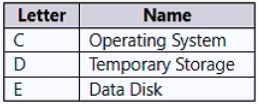
Community Votes
100% of anonymous learners picked answer B. Votes are pick records left by other test-takers — they are not the verified answer.
Community Insight
Tests the prerequisite step for reassigning drive letters in Azure Windows VMs, where candidates often overlook the locked state of the system page file on the temporary disk.
To assign drive D to a new persistent data disk in Azure, you must first move the pagefile.sys off drive D. Community consensus confirms this prerequisite based on official Microsoft documentation for Azure VM disk management.
Option A is chosen by some who assume simply renaming the temporary disk frees up drive D, but the active pagefile.sys locks the volume until it is relocated to the OS drive.
Community Discussion (6 comments)
Comments & Corrections
No comments yet — spotted an error or have a note? Share it below.
Expert Analysis
Why the Answer Is Correct
Azure Windows VMs automatically configure the system page file on the temporary storage drive, typically assigned as D:. Because the operating system actively uses pagefile.sys, drive D: remains locked and cannot be reassigned or overwritten. Moving the page file to the OS drive (C:) releases the lock, allowing administrators to safely change drive letters or attach a new persistent managed disk to D:Why the Other Options Are Wrong
Option A fails because the temporary disk's drive letter cannot be changed while the page file is still occupying it. Option C is unnecessary since drive letter modifications are performed online without requiring VM deallocation or downtime. Option D is invalid because Azure temporary storage disks are fixed-size scratch volumes that cannot be expanded, nor does resizing address the drive letter conflict.Community Comment Notes
Multiple voters confirmed option B by directly referencing the official Microsoft guide for changing Azure VM drive letters. Comment [1] and [3] validate this approach by linking to the official documentation, emphasizing that moving the page file is mandatory before any drive letter changes. One dissenting comment suggested option A, but the overwhelming consensus correctly identifies page file relocation as the required first step.Official Reference
Exam Strategy
When attaching or reassigning drives in Azure Windows VMs, always verify if the target drive letter hosts the page file or hibernation file. Relocating these system files is a mandatory prerequisite that frequently appears as the correct first step in disk configuration scenarios.