Azure Traffic Analytics Aggregated Flow Entries
Short answer
C Traffic Analytics identifies 5 aggregated flow entries based on unique source/destination IP and port combinations.
Question
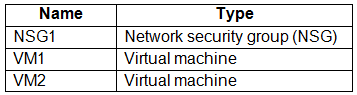 -
- 
Key Takeaways
Traffic Analytics reduces log volume by aggregating flows with common source IP, destination IP, destination port, and protocol, rather than logging every individual packet or session instance separately.
This question tests how Azure Network Watcher's Traffic Analytics aggregates NSG flow logs. The correct answer is C (5), as the service groups flows by unique source/destination IP and port combinations, resulting in two RDP entries and three SSH entries.
Common mistake: Candidates often choose D (10) by counting each individual connection attempt as a separate entry, failing to realize that Traffic Analytics aggregates these into fewer logical flow records based on the five-tuple.
Expert Analysis
Why the Answer Is Correct
Traffic Analytics aggregates raw NSG flow logs into summary records. A single aggregated flow entry represents all packets sharing the same five-tuple: Source IP, Destination IP, Source Port, Destination Port, and Protocol. In this scenario, there are two distinct RDP sessions from VM1 to VM2 initiated from different source ports; since the source ports differ, these create two separate aggregated flow entries. Similarly, there are three SSH sessions from VM2 to VM1, each from a different source port, creating three additional entries. Therefore, 2 + 3 = 5 aggregated flow entries.Why the Other Options Are Wrong
Option A (1) is incorrect because it assumes all traffic is merged into a single record regardless of port differences. Option B (2) incorrectly counts only the RDP sessions or the unique destination ports while ignoring the directionality or source port changes for SSH. Option D (10) is the result of misinterpreting the question as asking for total connection attempts without aggregation, or perhaps counting both directions for each session incorrectly.Community Comment Notes
The community consensus strongly supports answer C. Users noted that "NSG flow logs capture each unique flow" defined by the five-tuple. One commenter explained that "Traffic analytics... reduces the log volume by aggregating flows that have a common source IP address, destination IP address, destination port, and protocol." Another user broke down the math clearly: "Two RDP sessions... Total RDP flow entries: 2" and "Three SSH sessions... Total SSH flow entries: 3", summing to 5.Official Reference
https://learn.microsoft.com/en-us/azure/network-watcher/network-watcher-traffic-analytics
This link opens the official vendor documentation in a new tab.
Exam Strategy
When dealing with Traffic Analytics questions, always look for unique combinations of IPs and Ports. Do not count every packet or session instance; instead, group them by their unique five-tuple signature to find the number of aggregated entries.
Frequently Asked Questions
Does Traffic Analytics aggregate by destination port only?
Why are different source ports significant?
Community Votes
100% of anonymous learners picked answer C. Votes are pick records left by other test-takers — they are not the verified answer.
Discussion 3 contributions
Compiled from public community threads and reader submissions, lightly edited for clarity. Handles and vote tallies are shown as recorded, and comments reflect the views of individual contributors.
From public community threads 3
-
QzLP2P 👍 5 Answered CNSG flow logs capture each unique flow, which is defined by the combination of the following: - Source IP - Source port - Destination IP - Destination port - Protocol The answer is 5
-
juancarlosdlar 👍 3 Answered CHow traffic analytics works Traffic analytics examines raw flow logs. It then reduces the log volume by aggregating flows that have a common source IP address, destination IP address, destination port, and protocol. An example might involve Host 1 at IP address 10.10.10.10 and Host 2 at IP address 10.10.20.10. Suppose these two hosts communicate 100 times over a period of one hour. The raw flow log has 100 entries in this case. If these hosts use the HTTP protocol on port 80 for each of those 100 interactions, the reduced log has one entry. That entry states that Host 1 and Host 2 communicated 100 times over a period of one hour by using the HTTP protocol on port 80.
-
flejur 👍 3 Answered CBased on the information provided in the image and the analysis of the NSG flow logs, Traffic Analytics in Azure Network Watcher will identify 5 aggregated flow entries. To break this down: RDP Sessions: Two RDP sessions from VM1 to VM2 Each initiated from a different TCP port Total RDP flow entries: 2 SSH Sessions: Three SSH sessions from VM2 to VM1 Each initiated from a different TCP port Total SSH flow entries: 3 The total number of aggregated flow entries is the sum of RDP and SSH sessions: 2 + 3 = 5.
Reader comments & corrections
No reader corrections yet — spotted an error or have a note? Share it below.
Related Analysis
Practice All AZ-700 Questions
Access 100 questions with complete answers and detailed explanations.
View Full AZ-700 Practice Test →