Azure Private Link Service Configuration Limits
Short answer
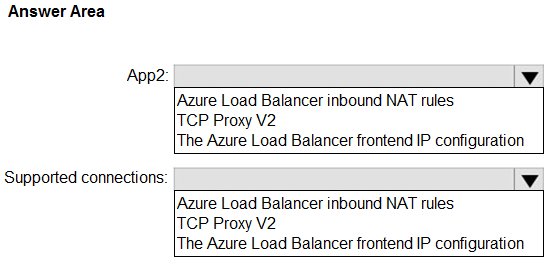
Provide access to App2 by modifying the Azure Load Balancer frontend IP configuration (or associated backend pool/rules). Increase supported connections by enabling TCP Proxy V2 on the Private Link service.
Question
You have an Azure subscription. The subscription contains two virtual machine scale sets that host two apps named App1 and App2, an Azure Private Link service named PLS1, and an Azure load balancer named LB1. PLS1 uses LB1 and has TCP Proxy V2 disabled. PLS1 provides access to App1 only.
You need to perform the following actions:
• Provide access to App1 and App2.
• Increase the number of supported private endpoint connections.
What should you modify to provide access to App2, and what should you modify to increase the number of supported connections? To answer, select the appropriate options in the answer area.
NOTE: Each correct selection is worth one point.
Key Takeaways
Enabling TCP Proxy V2 on an Azure Private Link service is the specific action required to raise the private endpoint connection limit from 100 to 5,000.
Learn how to expand Azure Private Link Service access and connection limits by configuring Load Balancer frontend IPs and enabling TCP Proxy V2.
Common mistake: Learners often confuse network configuration tasks, such as trying to increase connection limits by adding more frontend IPs or changing NAT rules, instead of recognizing that TCP Proxy V2 is the sole determinant for the connection quota.
Expert Analysis
To provide access to App2, you must modify the Azure Load Balancer frontend IP configuration. Currently, PLS1 is bound to LB1 and exposes only App1. To expose App2 via the same Private Link service or a new one on the same load balancer, you need an additional frontend IP configuration (or a corresponding backend pool/rule) that directs traffic to App2's instances. The key mechanism for routing traffic from the Private Link service to specific backend resources in this context involves configuring the load balancer's frontend IP and associated rules.
To increase the number of supported private endpoint connections, you must enable TCP Proxy V2 on the Private Link service. According to Microsoft documentation, enabling TCP Proxy V2 on a Private Link service increases the maximum number of supported private endpoint connections from 100 to 5,000. This is a specific architectural constraint and feature of Azure Private Link services backed by a Standard Load Balancer.
The common trap here is confusing the mechanism for adding access with the mechanism for increasing capacity. Some learners might suggest creating a new Private Link service for App2, but the question asks what to modify to provide access to App2 within the existing setup context, often implying leveraging the existing infrastructure (LB1) more effectively or simply identifying the correct component responsible for binding the app. However, the most direct answer for "providing access" in many similar exam contexts involves ensuring the Load Balancer Frontend IP is correctly configured to route to the desired backend. More critically, the limit increase is exclusively tied to TCP Proxy V2. The comment suggesting "Frontend IP config" for connections is incorrect; frontend IPs do not dictate connection limits. The comment suggesting "NAT rules" for App2 access might be valid if App2 is accessed differently, but typically, Private Link Services connect to backend pools. If PLS1 is already using LB1, adding App2 usually requires configuring LB1 to include App2's instances in a backend pool and potentially adjusting the PLS1 configuration to point to that pool or using another frontend IP if distinct networks are needed. However, the definitive part of this HOTSPOT is the connection limit: TCP Proxy V2 is the only setting that changes the quota.
Official Reference
https://learn.microsoft.com/en-us/azure/private-link/private-link-service-overview#tcp-proxy-v2
This link opens the official vendor documentation in a new tab.
Exam Strategy
When asked about scaling Private Link endpoints, immediately look for 'TCP Proxy V2' as the solution for increasing the connection count. For adding applications to a Private Link service, focus on the underlying Load Balancer's backend pool and frontend IP bindings.
Frequently Asked Questions
What is the default limit for private endpoint connections?
How does TCP Proxy V2 help?
Discussion 3 contributions
Compiled from public community threads and reader submissions, lightly edited for clarity. Handles and vote tallies are shown as recorded, and comments reflect the views of individual contributors.
From public community threads 3
-
northgaterebel 👍 6App2: Azure Load Balancer inbound NAT rules Supported connections: The Azure Load Balancer frontend IP configuration To increase the number of supported private endpoint connections on a standard Azure load balancer, you can create multiple Private Link Services on the same load balancer. Create new Private Link services while specifying the existing standard load balancer as the target, ensuring you select the appropriate frontend IP configuration for each new service within the load balancer settings. https://learn.microsoft.com/en-us/azure/private-link/create-private-link-service-portal?tabs=dynamic-ip#create-private-endpoint
-
Zorro2003 👍 5App2: The Azure Load Balancer frontend IP configuration (Add another frontend IP configuration/rule on LB1 and attach it to PLS1 so PLS can publish App2 as well.) Supported connections: TCP Proxy v2 (Enable TCP Proxy v2 on the Private Link service to raise the limit on the number of supported private endpoint connections.)
-
GohanF2 👍 1The answer is both Azure Load Balanced Fronted IP configuration. It cannot be TCP Proxy V2. The Microsoft documentation for TCP Proxy v2 states that it is used to preserve and pass client connection metadata (such as the original client IP address) to the service provider application. It is not the mechanism for increasing the number of Private Endpoint connections. The number of supported Private Endpoint connections is tied to the frontend IP configurations associated with the Private Link Service. Each frontend IP configuration can support additional connection scaling. The excerpt you shared confirms TCP Proxy v2 is about client IP visibility, not connection capacity.
Reader comments & corrections
No reader corrections yet — spotted an error or have a note? Share it below.
Related Analysis
Practice All AZ-700 Questions
Access 100 questions with complete answers and detailed explanations.
View Full AZ-700 Practice Test →