Azure Network Watcher: Flow Logs vs. Connection Monitor
Short answer
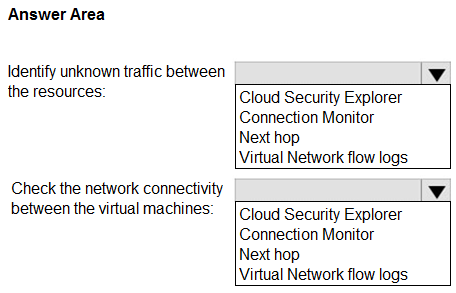
To identify unknown traffic, use Virtual Network flow logs. To check network connectivity between virtual machines, use Connection Monitor.
Question
You have an Azure subscription that contains virtual networks, network security groups (NSGs), and virtual machines.
You need to perform the following actions:
• Identify unknown traffic between the resources.
• Check the network connectivity between the virtual machines.
What should you use to perform each action? To answer, select the appropriate options in the answer area.
NOTE: Each correct selection is worth one point.
Key Takeaways
The main trap is confusing passive traffic logging (Flow Logs) with active connectivity testing (Connection Monitor); one identifies what traffic exists, the other verifies if it can connect.
This page explains how to use Azure Network Watcher tools to identify unknown traffic with Virtual Network flow logs and verify VM connectivity with Connection Monitor for AZ-700.
Common mistake: Learners often select Azure Firewall or Diagnostic Settings instead of Flow Logs because they associate 'traffic identification' with security filtering rather than NSG-level flow recording. They may also choose NSGs themselves for connectivity checks, which only filter traffic rather than test reachability.
Expert Analysis
Network Watcher Capabilities: Flow Logs vs. Connection Monitor
This question tests the specific diagnostic functions within Azure Network Watcher, focusing on the precise boundary between traffic visibility and connectivity verification. The scenario requires two distinct actions: identifying unknown traffic and checking connectivity between virtual machines.
For the first action, "Identify unknown traffic between the resources," the correct tool is Virtual Network flow logs. Flow logs capture information about IP traffic flowing through Network Security Groups (NSGs). They provide a detailed record of allowed and denied traffic flows, including source/destination IPs, ports, and protocols. This historical data is essential for security analysis, forensics, and identifying unexpected or "unknown" traffic patterns that may indicate a security threat or misconfiguration. It does not actively test connectivity but rather observes what is already happening.
For the second action, "Check the network connectivity between the virtual machines," the correct tool is Connection Monitor. Connection Monitor performs active end-to-end network connectivity checks from configured sources to destinations. It simulates TCP, HTTP, or ICMP connections to verify if traffic can successfully traverse the network path. This is crucial for troubleshooting latency, packet loss, or connection failures between VMs, providing real-time health status rather than just logging existing flows.
Common Confusion: Learners often confuse these with Azure Firewall (which filters traffic but doesn't primarily log all flows for identification) or Diagnostic Settings (a broader category). The key distinction is that Flow Logs are passive observers of NSG traffic (visibility), while Connection Monitor is an active tester of reachability (verification).
Official References:
- [Virtual Network Flow Logs Overview](https://learn.microsoft.com/en-us/azure/network-watcher/vnet-flow-logs-overview)
- [Connection Monitor Overview](https://learn.microsoft.com/en-us/azure/network-watcher/connection-monitor-overview)
Official Reference
- https://learn.microsoft.com/en-us/azure/network-watcher/vnet-flow-logs-overview
- https://learn.microsoft.com/en-us/azure/network-watcher/connection-monitor-overview
These links open the official vendor documentation in a new tab.
Exam Strategy
When asked to 'identify' or 'monitor' traffic patterns, look for logging solutions like Flow Logs or Diagnostics. When asked to 'test', 'verify', or 'check' connectivity, look for active monitoring tools like Connection Monitor or Probes. Distinguish between observing existing state versus actively probing for success/failure.
Frequently Asked Questions
What is the difference between Virtual Network flow logs and Connection Monitor?
Can I use NSGs to identify unknown traffic?
Discussion 3 contributions
Compiled from public community threads and reader submissions, lightly edited for clarity. Handles and vote tallies are shown as recorded, and comments reflect the views of individual contributors.
From public community threads 3
-
northgaterebel 👍 4Virtual network flow logs Connection Monitor https://learn.microsoft.com/en-us/azure/network-watcher/vnet-flow-logs-overview https://learn.microsoft.com/en-us/azure/network-watcher/connection-monitor-overview
-
Silverpro29 👍 3Identify unknown traffic between the resources: Answer: Virtual Network flow logs Why: Flow logs capture information about IP traffic flowing through NSGs. They help identify unknown or unexpected traffic between resources, which is essential for security analysis and troubleshooting. Check the network connectivity between the virtual machines: Answer: Connection Monitor Why: Connection Monitor (part of Azure Network Watcher) allows you to actively test and monitor connectivity between virtual machines, including latency, packet loss, and reachability.
-
GohanF2 👍 1I agreed with Siverpro. Cloud Security Explorer is for investigating security risks , attack paths...
Reader comments & corrections
No reader corrections yet — spotted an error or have a note? Share it below.
Related Analysis
Practice All AZ-700 Questions
Access 100 questions with complete answers and detailed explanations.
View Full AZ-700 Practice Test →