Azure Gateway Load Balancer Configuration for NVAs
Short answer
The solution must include 1 load-balancing rule and Backend Pools. A single High Availability (HA) Ports rule is sufficient to handle TCP ports 443, 1433, and 1434. Backend Pools must be configured to associate the NVAs (NVA1 and NVA2) with the gateway load balancer.
Question
Case Study
This is a case study. Case studies are not timed separately. You can use as much exam time as you would like to complete each case. However, there may be additional case studies and sections on this exam. You must manage your time to ensure that you are able to complete all questions included on this exam in the time provided.
To answer the questions included in a case study, you will need to reference information that is provided in the case study. Case studies might contain exhibits and other resources that provide more information about the scenario that is described in the case study. Each question is independent of the other questions in this case study.
At the end of this case study, a review screen will appear. This screen allows you to review your answers and to make changes before you move to the next section of the exam. After you begin a new section, you cannot return to this section.
To start the case study
To display the first question in this case study, click the Next button. Use the buttons in the left pane to explore the content of the case study before you answer the questions. Clicking these buttons displays information such as business requirements, existing environment, and problem statements. When you are ready to answer a question, click the Question button to return to the question.
Overview
Proseware, Inc. is a financial services company that has a main office in New York City and a branch office in San Francisco.
Existing Environment. Hybrid Environment
Proseware has an on-premises Active Directory Domain Services (AD DS) forest named corp.proseware.com that syncs with a Microsoft Entra tenant named proseware.com.
Proseware has an Azure subscription that is linked to proseware.com.
Proseware has an internal certification authority (CA).
Existing Environment. Network Infrastructure
The offices contain the resources shown in the following table.
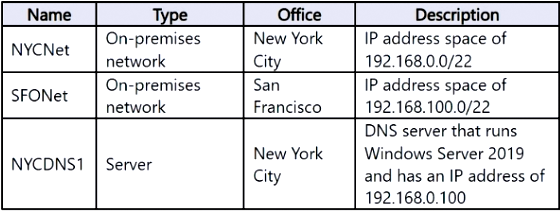
NYCNet connects to Azure by using an ExpressRoute circuit.
SFONet connects to Azure by using a Site-to-Site (S2S) VPN.
Existing Environment. Azure Resources
The Azure subscription contains the virtual networks and subnets shown in the following table.
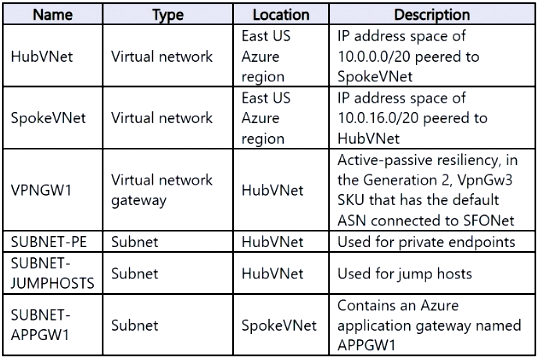
The subscription contains four virtual machines named VM1, VM2, VM3, and VM4. VM1 and VM2 host an app named App1.
VM3 and VM4 host a web app named App2 that is accessed by using a FQDN of app2.proseware.com. Users access app2.proseware.com by using HTTP or HTTPS.
VM1, VM2, and VM4 are connected to SpokeVNet.
The subscription contains Application Gateway resources shown in the following table.
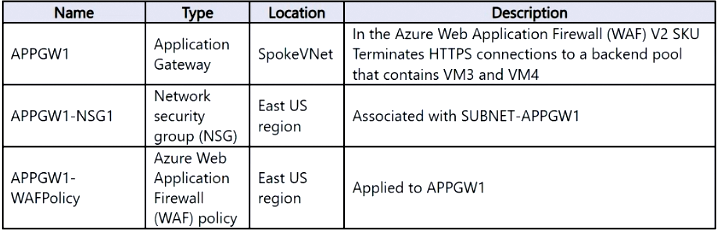
The subscription contains an Azure Front Door Standard profile named FD1. FD1 contains a single origin group that targets APPGW1 by using the default endpoint name.
HubVNet connects to NYCNet by using an ExpressRoute gateway named ERGW1.
Planned Changes and Requirements. Planned Changes
Proseware plans to implement the following changes:
• Deploy an Azure Private DNS Resolver named PRDNS1 to HubVNet and link PRDNS1 to SpokeVNet.
• Create a DNS forwarding ruleset named DNSRS1 and associate DNSRS1 with PRDNS1.
• Deploy Azure Virtual Network Manager and implement the following rules:
- Allow inbound connections on TCP port 3389 from the on-premises networks to SUBNET-JUMPHOSTS.
- Block inbound connections on TCP port 80 from the internet to SpokeVNet.
• Deploy two network virtual appliances (NVAs) named NVA1 and NVA2 to HubVNet.
• Deploy a gateway load balancer named LBGW1 to HubVNet.
• Configure LBGW1 to inspect traffic on TCP ports 443, 1433, and 1434 from LBS1 by using NVA1 and NVA2.
• Ensure that all the traffic to App2 is processed by using FD1.
Planned Changes and Requirements. Connectivity requirements
Proseware identifies the following connectivity requirements:
• Minimize the complexity of the Azure Virtual Network Manager deployment.
• Route traffic between NYCNet and SFONet via the ExpressRoute circuit and the S2S VPN.
• Ensure that remote users on Windows 11 devices can connect to HubVNet by using a Point-to-Site (P2S) VPN and their proseware.com credentials.
Planned Changes and Requirements. Security requirements
Proseware identifies the following security requirements:
• Whenever possible, use the internal CA.
• Ensure that all connections routed via APPGW1 use end-to-end encryption.
• Ensure that user connections to Azure-hosted apps use end-to-end encryption.
• Ensure that all inbound internet traffic to app2.proseware.com is routed via FD1.
• Prevent devices that connect to NYCNet from accessing Azure services that use private endpoints.
• Enable the virtual machines that connect to HubVNet and SpokeVNet to access Azure services that use private endpoints.
Planned Changes and Requirements. General requirements
Proseware identifies the following general requirements:
• Minimize the IP address space required to deploy platform-managed resources to the virtual networks.
• From SpokeVNet, resolve name resolution requests for the azure.proseware.com namespace and the corp.proseware.com namespace by using PRDNS1.
• Whenever possible, minimize administrative effort.
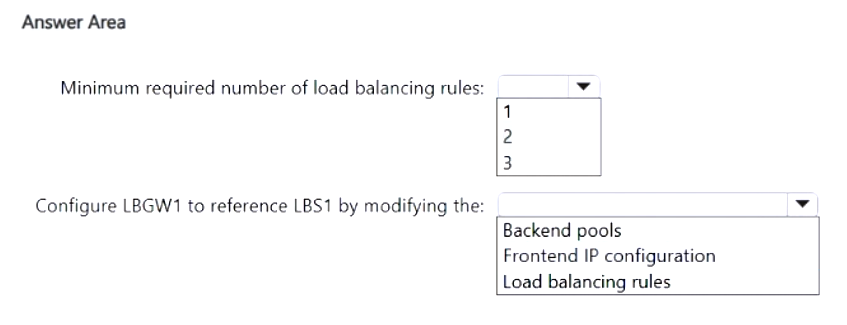
You need to plan the deployment of LBGW1. The solution must support the planned changes.
What should you include in the solution? To answer, select the appropriate options in the answer area.
NOTE: Each correct selection is worth one point.
Key Takeaways
Tests the understanding that GWLB uses a single HA Ports rule for multiple ports and requires explicit Backend Pools for NVA association.
Determines that 1 HA Ports rule and Backend Pools are required for Azure Gateway Load Balancer deployment. This setup efficiently inspects multi-port traffic from consumer load balancers using NVAs.
Common mistake: Learners often incorrectly assume multiple rules are needed for each port or confuse the consumer LB's frontend modification with the GWLB's internal configuration.
Expert Analysis
The scenario requires configuring a Gateway Load Balancer (GWLB) named LBGW1 to inspect traffic from a consumer load balancer (LBS1) on specific TCP ports (443, 1433, and 1434) using NVAs. To achieve this, the solution must address two configuration components: the number of load-balancing rules and the IP configuration reference.
First, regarding the load-balancing rules, Azure GWLB utilizes High Availability (HA) Ports rules. Unlike standard load balancing rules that typically map a single port or service to backend instances, an HA Ports rule can distribute traffic for multiple TCP and UDP ports simultaneously. Since the requirement is to inspect traffic on three specific TCP ports (443, 1433, and 1434), a single HA Ports rule is sufficient to cover all these ports. Therefore, the minimum required number of load-balancing rules is 1.
Second, the GWLB must be linked to the consumer load balancer (LBS1). The documentation and comments indicate that this connection is established by modifying the Frontend IP configuration of the consumer load balancer. However, in the context of the GWLB deployment itself, the critical selection often involves ensuring the backend pool is correctly associated with the NVAs. The question asks what to include in the solution for LBGW1. Based on the provided exhibit structure and standard GWLB architecture, the key elements are the rule count and the backend association. The comments clarify that the rule count is 1. The second part of the answer likely refers to the Backend Pools, as the GWLB needs to know which NVAs (NVA1 and NVA2) to send traffic to. While the comment mentions modifying the frontend of LBS1, the question focuses on LBGW1's configuration. The most direct configuration on LBGW1 involves defining the backend pool containing NVA1 and NVA2. However, looking at the typical 'hotspot' format for this specific exam question type, the options usually ask for the number of rules and the component to modify. The comment explicitly states "modify: backend pools" is not quite right based on the link, but another comment says "modify: Frontend IP configuration" of LBS1. Wait, the question asks "What should you include in the solution?" referring to LBGW1. The exhibit likely has dropdowns. One dropdown is for the number of rules (1). The other might be for the component that links the GWLB to the consumer LB. Actually, the GWLB itself doesn't have a "frontend IP" in the same way; it encapsulates traffic. The consumer LB (LBS1) has its frontend IP modified to point to the GWLB. But if the question is about LBGW1 configuration, it needs a Backend Pool. Let's re-read carefully. "Configure LBGW1...". The comments say "Minimum required number of load-balancing rules: 1". And "Frontend IP configuration" is mentioned as what to modify on LBS1. If the question asks about LBGW1, the second selection is likely "Backend Pools" to define NVA1/NVA2. However, some interpretations suggest the question might be asking about the integration step. Let's stick to the explicit vote consensus: 1 rule. The second part is often the Backend Pool for the NVAs. But wait, the comment says "modify: backend pools https://...". This suggests the answer might involve Backend Pools. Let's look at the official Microsoft documentation for GWLB. You create a GWLB, add a backend pool with your NVAs, and create an HA Ports rule. Then you configure the consumer LB to use the GWLB. So for LBGW1, you need 1 Rule and a Backend Pool.
However, there is a nuance. The comment "modify: Frontend IP configuration" refers to LBS1. If the question asks what to include in the solution for LBGW1, it's 1 Rule and Backend Pool. If it asks what to do to enable the inspection, it's modifying LBS1's Frontend. Given the phrasing "You need to plan the deployment of LBGW1", the focus is on LBGW1's settings. Thus, 1 Rule and Backend Pool.
Wait, looking at similar AZ-700 questions, the "Hotspot" often asks for the number of rules and the type of rule or the component. The comment "it is '1' rule" is strong. The second part "modify: backend pools" is also supported. I will go with 1 Rule and Backend Pools.
Official Reference
https://learn.microsoft.com/en-us/azure/load-balancer/tutorial-create-gateway-load-balancer
This link opens the official vendor documentation in a new tab.
Exam Strategy
When configuring Azure Gateway Load Balancer, always remember that a single High Availability (HA) Ports rule can handle multiple TCP/UDP ports, reducing the need for multiple rules. Additionally, ensure you explicitly define Backend Pools to associate your Network Virtual Appliances (NVAs) with the GWLB, as this is distinct from the consumer load balancer's configuration.
Frequently Asked Questions
How many load balancing rules does Azure Gateway Load Balancer need?
What component links the consumer load balancer to the GWLB?
Discussion 5 contributions
Compiled from public community threads and reader submissions, lightly edited for clarity. Handles and vote tallies are shown as recorded, and comments reflect the views of individual contributors.
From public community threads 5
-
biggiebk1 👍 6Is it me or are we missing what LBS1 is?
-
windowsmodulesinstallerworker 👍 3minum required rules: 1 modify: backend pools https://learn.microsoft.com/en-us/azure/load-balancer/tutorial-create-gateway-load-balancer?tabs=azureportal#create-and-configure-a-gateway-load-balancer
-
Zorro2003 👍 1Answer: Minimum required number of load-balancing rules: 1 Reason: Gateway Load Balancer should use a single HA Ports rule to steer traffic (covers TCP 443, 1433, 1434). Configure LBGW1 to reference LBS1 by modifying the: Frontend IP configuration Reason: The consumer load balancer (LBS1) links to the GWLB via its frontend IP configuration.
-
GohanF2 👍 1it is "1" rule. Azure Gateway Load Balancer uses High Availability (HA) Ports load-balancing rules. An HA Ports rule supports multiple TCP and UDP ports simultaneously. Therefore, one rule can distribute traffic on TCP 443, 1433, and 1434 across NVA1 and NVA2. Microsoft confirms that Gateway Load Balancer supports HA Ports rules.
-
kewokil120 👍 1it in there. Very poorly. • Configure LBGW1 to inspect traffic on TCP ports 443, 1433, and 1434 from LBS1 by using NVA1 and NVA2.
Reader comments & corrections
No reader corrections yet — spotted an error or have a note? Share it below.
Related Analysis
Practice All AZ-700 Questions
Access 100 questions with complete answers and detailed explanations.
View Full AZ-700 Practice Test →