Which Files Fit the Cosmos DB for NoSQL 2 MB Item Limit?
Short answer
B Only File1 and File2 stay within the 2 MB per-item limit enforced by Azure Cosmos DB for NoSQL; larger files trigger 413 Entity too large.
Question
Key Takeaways
Tests whether you know the Cosmos DB for NoSQL per-item size limit (2 MB) versus the 2 GB logical partition limit — the trap is treating the 2 MB cap as a batch total and concluding only the single smallest file qualifies.
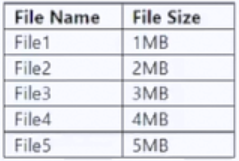
Azure Cosmos DB for NoSQL caps a single item at 2 MB, so uploading a document larger than that returns "413 Entity too large" from the .NET SDK v3. Working through the file table, only File1 and File2 stay under that per-item ceiling, which makes option B the answer.
Common mistake: Picking E (File1 only) by assuming the 2 MB limit applies to the combined upload batch, so that File1 plus File2 would exceed it — but the cap applies to each individual item, not the sum of documents.
Expert Analysis
Why the Answer Is Correct
Azure Cosmos DB for NoSQL enforces a hard per-item limit of 2 MB, measured as the UTF-8 byte length of the JSON representation of the document. Looking at the file table, File1 and File2 are the only entries whose documents stay at or below that 2 MB ceiling; everything above it fails at write time with the "413 Entity too large" error returned by the.NET SDK v3. Option B is therefore the set of files that can actually be uploaded — a partial success with the remaining files rejected is exactly the behaviour the error message describes. Note that this is separate from the 2 GB logical partition key limit, which governs how much data a partition can hold, not how large one document may be.
Why the Other Options Are Wrong
Option A assumes all five files upload, which contradicts the 413 error the uploader already received. Options C and D include File3 and File4, which exceed the per-item cap and would be rejected on insert. Option E (File1 only) is the most tempting distractor: it treats 2 MB as a budget shared across the batch, but Cosmos DB charges that limit against each individual item, so File2 is perfectly valid on its own. Community answers split exactly along this line — one learner reasoned "the total size for File1 and File2 will be 3 MB", while another correctly noted "Maximum size of an item = 2 MB (UTF-8 length of JSON representation)".
Community Comment Notes
The dominant community position matches the per-item reading: Jedi cites the 2 MB limit and links the Cosmos DB limits documentation, and emysa341 simply states the answer is B. MasonZ reinforces the point by quoting the documentation line that "Azure Cosmos DB limits single request's size to 2MB" from the Data Factory connector page, and Ushakanth summarises it as each file having a maximum size of 2 MB so "File 1, File 2 Only can be uploaded". The dissenting camp, including sky_may and AzDeveloper, applies the 2 MB figure to the combined request and argues for E or a reduced batch — a valid concern for stored-procedure or batch writes, but not for individual document uploads via the SDK. One learner also reported passing the exam with this answer, which is consistent but not by itself proof.
Official Reference
https://learn.microsoft.com/en-us/azure/cosmos-db/concepts-limits
This link opens the official vendor documentation in a new tab.
Exam Strategy
When a Cosmos DB question mentions an error code like 413, immediately translate it into the documented numeric limit: 2 MB per item, 2 GB per logical partition, 50 GB per container by default. Then check each option against the per-item figure rather than the sum of a batch, since AZ-204 distractors almost always exploit that confusion.
Frequently Asked Questions
Does the Cosmos DB for NoSQL 2 MB limit apply per document or to the whole upload batch?
Why do some learners answer File1 only for this 413 error?
Could these larger files be stored in Cosmos DB for MongoDB instead?
Community Votes
100% of anonymous learners picked answer B. Votes are pick records left by other test-takers — they are not the verified answer.
Discussion 9 contributions
Compiled from public community threads and reader submissions, lightly edited for clarity. Handles and vote tallies are shown as recorded, and comments reflect the views of individual contributors.
From public community threads 9
-
Jedi 👍 10 Answered BCorrect - 2MB limit -https://learn.microsoft.com/en-us/azure/cosmos-db/concepts-limits#per-item-limits
-
jobolesonihal 👍 5 Answered B2 GB it is. Maximum size of an item = 2 MB (UTF-8 length of JSON representation) ¹ ¹ Large document sizes up to 16 MB are supported with Azure Cosmos DB for MongoDB only.
-
Ushakanth 👍 3 Answered BOption B is correct. Each file has a maximum size of 2 MB. So File 1, File 2 Only can be uploaded.
-
sky_may 👍 2Correct Answer is E: Azure Cosmos DB limits single request's size to 2MB. The formula is Request Size = Single Document Size * Write Batch Size. If you hit error saying "Request size is too large.", reduce the writeBatchSize value in copy sink configuration https://learn.microsoft.com/en-us/azure/data-factory/connector-azure-cosmos-db?tabs=data-factory
-
MasonZ 👍 1 Answered BSelect B. "Azure Cosmos DB limits single request's size to 2MB." https://learn.microsoft.com/en-us/azure/data-factory/connector-azure-cosmos-db?tabs=data-factory#sink-transformation
Show 4 more comments
-
AzDeveloper 👍 1 Answered EI think the correct answer is E not B because the total size for File1 and File2 will be 3 MB
-
manopeydakon 👍 1E, because the total of files in the batch will exceed 2 MB
-
f09229d 👍 1 Answered BIn exam 30/3/2025 with this answer, I scored 907/1000
-
emysa341 👍 1 Answered BB is correct
Reader comments & corrections
No reader corrections yet — spotted an error or have a note? Share it below.