How Do You Mitigate Azure Cache for Redis Maintenance Performance Issues?
Short answer
AB Recreate and redistribute client connections to Azure Cache for Redis by rebooting the app, and configure client retries with exponential backoff.
Question
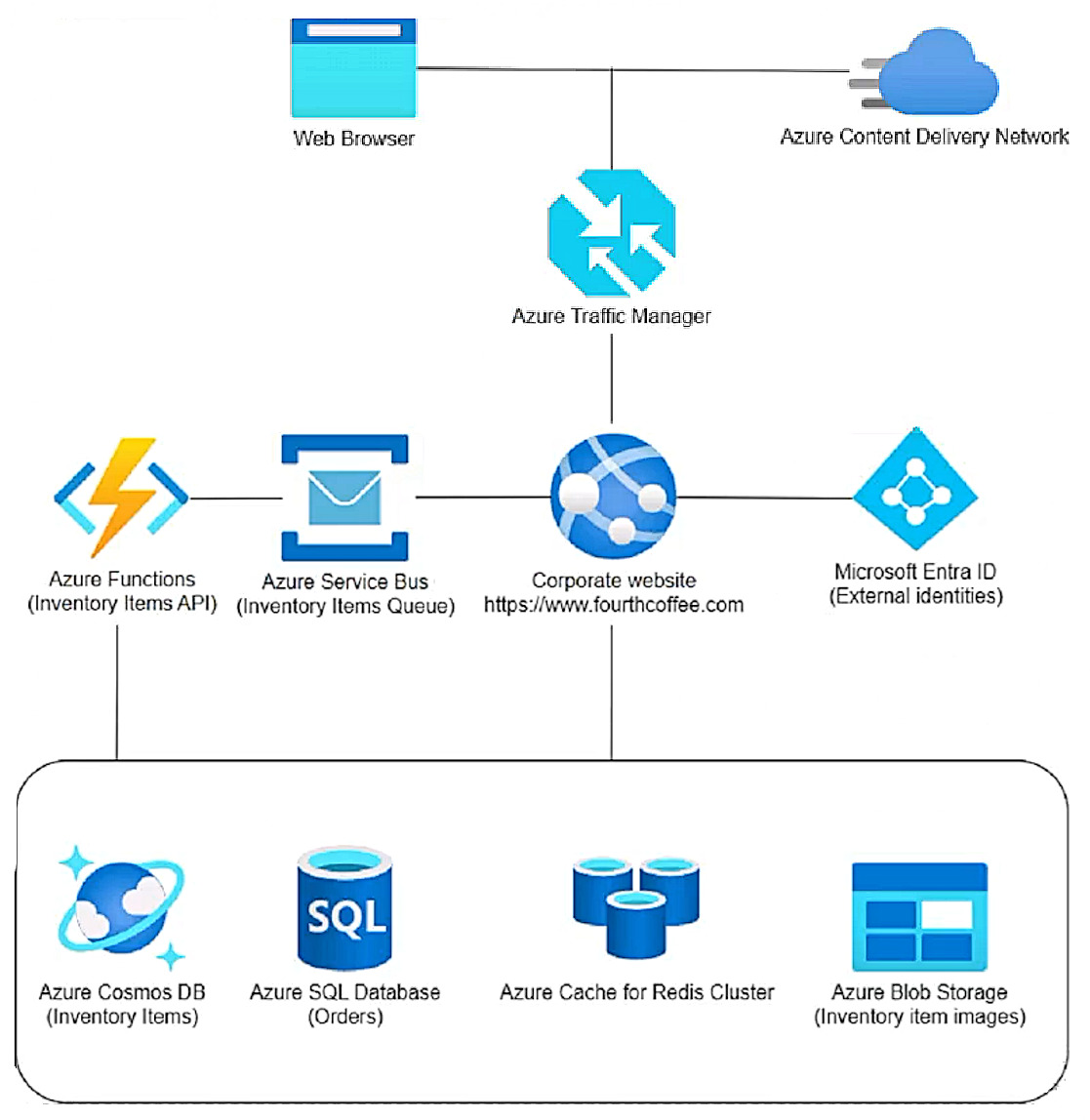
Key Takeaways
The question tests how to restore Azure Cache for Redis performance after a maintenance-induced failover; the trap is choosing memory-tuning or eviction options that never address the connection spike on the surviving node.
Azure Cache for Redis maintenance forces a failover that moves every client connection onto the surviving node and spikes server load. This page establishes that the correct AZ-204 answer is to recreate and redistribute client connections and to configure client retries with exponential backoff.
Common mistake: The most common wrong picks are C (allkeys-lfu eviction) and D (raising maxmemory-reserved / maxfragmentationmemory-reserved), because both sound like cache performance tuning; neither reduces the server load created when a failed-over node's connections all land on the remaining node.
Expert Analysis
Why the Answer Is Correct
Azure Cache for Redis maintenance forces a failover: every client connection held by the node that goes down is transferred to the node still running, and the surviving node's server load spikes. Microsoft's documented mitigation is to recreate those connections so they are redistributed across both nodes — exactly the remediation captured by option A — and to make the client resilient so commands are not lost during the blip, which is option B's retry-with-exponential-backoff pattern. Option A is also framed as validating the fix in the test environment, which is the safe way to prove the connection-recreation approach before touching production. Together, A and B address both halves of the maintenance impact: connection redistribution and transient command failure.Why the Other Options Are Wrong
Option C changes the maxmemory policy to allkeys-lfu, which evicts least-frequently-used keys; the maintenance incident is a momentary connection and load spike, not a memory-pressure problem, and evicting keys would additionally shrink the cached SQL Database result set. Option D raises maxmemory-reserved and maxfragmentationmemory-reserved, which set aside memory for non-cache operations and fragmentation — useful when memory is fragmented, but irrelevant to a failover-driven connection surge. Option E purges the cache in the test environment, which destroys the cached query results the workload depends on and proves nothing about production resilience. None of C, D or E recreates and redistributes the connections that moved during the failover.Community Comment Notes
smetr pointed straight at Microsoft's server-maintenance guidance, quoting that "all the client connections get recreated and redistributed among the two nodes", which is the core of option A. Vichu_1607 and fivestarfrog both selected the same A/B pairing, with fivestarfrog calling out that smetr's explanation was on point. Zezere disagreed, rating BD and insisting that "Eviction is not pertinent since all keys are correct at this point in time" and that rebooting a test instance cannot fix production — a fair objection, but option A is about recreating client connections rather than restarting the cache nodes. Mattt backed B and argued for C to retain the most relevant data, yet that reasoning targets memory pressure rather than the maintenance-induced connection spike that B actually remedies.Official Reference
- https://learn.microsoft.com/en-us/azure/azure-cache-for-redis/cache-failover
- https://learn.microsoft.com/en-us/azure/azure-cache-for-redis/cache-best-practices-connection
These links open the official vendor documentation in a new tab.
Exam Strategy
In case-study items, anchor the answer to the exact symptom in the Issues list — here, 'maintenance has negatively affected performance' — and match it to the documented resilience guidance for that service, not to generic tuning knobs. Remember that questions saying 'Each correct answer presents part of the solution' require two selections that cover different mechanisms, so one connection fix plus one retry fix is a strong signal.
Frequently Asked Questions
Why is raising maxmemory-reserved and maxfragmentationmemory-reserved wrong here?
Why does rebooting the app help after Azure Cache for Redis maintenance?
Community Votes
40% of anonymous learners picked answer AB. Votes are pick records left by other test-takers — they are not the verified answer.
Discussion 5 contributions
Compiled from public community threads and reader submissions, lightly edited for clarity. Handles and vote tallies are shown as recorded, and comments reflect the views of individual contributors.
From public community threads 5
-
Zezere 👍 3A: cannot be true. Rebooting the test instance will not imrpov the state of prod. B: true (https://learn.microsoft.com/en-us/azure/azure-cache-for-redis/cache-failover) C: The failover is due to too much load, at one point in time (during the maintenance). Eviction is not pertinent since all keys are correct at this point in time D: Correct (A: cannot be true. Rebooting the test instance will not imrpov the state of prod. B: true (https://learn.microsoft.com/en-us/azure/azure-cache-for-redis/cache-failover) C: ) E: Testing something will not solve the problem
-
smetr 👍 3A-B Server maintenance If your Azure Cache for Redis underwent a failover, all client connections from the node that went down are transferred to the node that is still running. The server load could spike because of the increased connections. You can try rebooting your client applications so that all the client connections get recreated and redistributed among the two nodes. See Server maintenance section in following link https://learn.microsoft.com/en-us/azure/azure-cache-for-redis/cache-troubleshoot-server
-
Mattt 👍 3issue: • Production Azure Cache for Redis maintenance has negatively affected application performance. B is correct C. Modify the maxmemory policy to evict the least frequently used keys out of all keys. By configuring the (LFU) keys, you can ensure that the cache retains the most relevant data while removing less frequently accessed data. This can help maintain cache performance and availability during maintenance windows.
-
Vichu_1607 👍 3A. Test application code by rebooting all nodes in the test environment. B. Configure client connections to retry commands with exponential backoff.
-
fivestarfrog 👍 1Correct answer should be A & B. smetr has provided good explanation of this issue.
Reader comments & corrections
No reader corrections yet — spotted an error or have a note? Share it below.