Azure Service Bus FIFO Processing Order
Short answer
C Use a Session identifier to enforce FIFO processing order for enqueued inventory items in Azure Service Bus.
Question
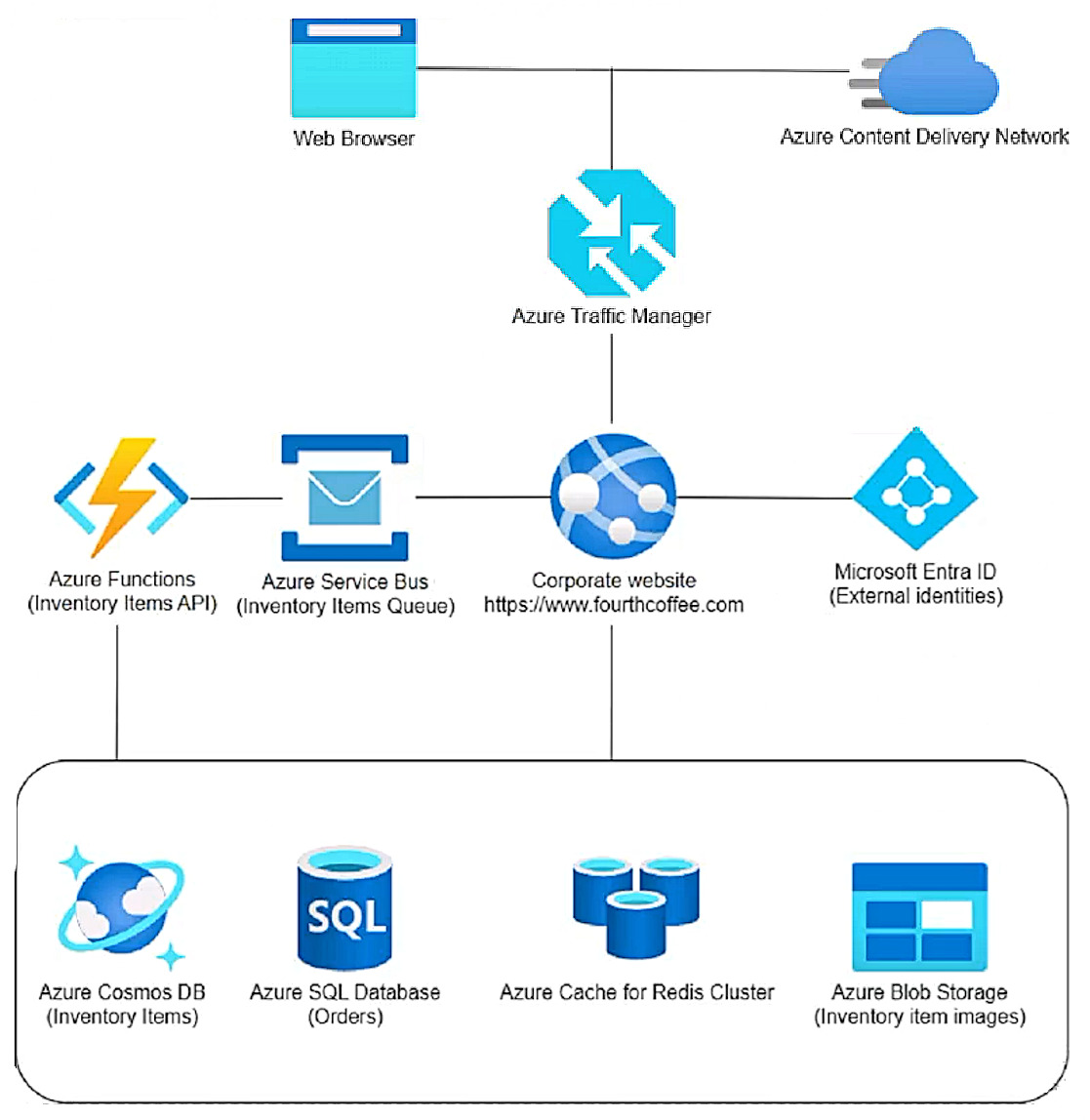
Key Takeaways
Azure Service Bus requires message sessions to guarantee FIFO processing order, as sequence numbers only guarantee queuing and extraction order, not execution order across concurrent consumers.
This scenario tests implementing Azure Service Bus message ordering for inventory item processing. The page establishes that to guarantee strict FIFO processing order in a queue, you must use message sessions rather than relying on sequence numbers.
Common mistake: Choosing Sequence number because it implies ordering, but sequence numbers only guarantee the order messages are enqueued and extracted, not the order they are processed if multiple consumers are involved.
Expert Analysis
Why the Answer Is Correct
To guarantee that Azure Service Bus messages are processed in the exact order they were enqueued (FIFO), you must use message sessions. By assigning a Session identifier (SessionId) to related messages, Service Bus enforces exclusive, ordered handling of those messages. This ensures that concurrent consumers do not process messages out of sequence. The requirement explicitly states that inventory items must be processed in the order they were placed, which strictly necessitates the use of sessions.Why the Other Options Are Wrong
Sequence number (A) only guarantees the queuing order and the order in which messages are extracted from the queue, but it does not guarantee the processing order if multiple consumers are handling messages concurrently. Timestamp (B) is generally used for deadline evaluation or time-to-live settings, not for strict FIFO processing. Partition key (D) is used to route messages to specific partitions for scalability, but it does not inherently enforce ordered processing like sessions do.Community Comment Notes
Several community members correctly highlighted the distinction between retrieval and processing order, referencing the official documentation which states, "If messages need to be processed in order, use sessions." As lamvit pointed out, "Sequence number on its own guarantees the queuing order... but not the processing order, which requires sessions." Another user, d90b583, echoed this by quoting the docs directly, reinforcing that sequence numbers are insufficient for processing guarantees.Official Reference
https://learn.microsoft.com/en-us/azure/service-bus-messaging/message-sessions
This link opens the official vendor documentation in a new tab.
Exam Strategy
Distinguish between queuing/extraction order and processing order in Azure Service Bus. If the requirement explicitly says 'processed in order' or requires a FIFO guarantee, look for Session identifier; if it only says 'retrieved in order', sequence number might suffice.
Community Votes
50% of anonymous learners picked answer A. Votes are pick records left by other test-takers — they are not the verified answer.
Discussion 5 contributions
Compiled from public community threads and reader submissions, lightly edited for clarity. Handles and vote tallies are shown as recorded, and comments reflect the views of individual contributors.
From public community threads 5
-
Mattt 👍 3 Answered A
- inventory items must be processed in the order they were placed in the queue Sequence Number: Using a sequence number ensures that each message can be uniquely identified and processed in the exact order it was enqueued. This is crucial for maintaining the correct processing order of inventory items, especially when multiple items may be processed simultaneously or when they are related to a single user session.
-
examtopicsLogin123 👍 2 Answered AOn the one hand, documentation says: "Sequence number ... is more precise than a time stamp as an order criterion" And Timestamp is more for cases when we need to check whether a work item was submitted before a deadline. https://learn.microsoft.com/en-us/azure/service-bus-messaging/message-sequencing#sequence-number On the other hand, they can use partitioned queue for Azure Service Bus, because: "Fourth Coffee operates thousands of stores worldwide" Documentation says: "For partitioned entities, the sequence number is issued relative to the partition." https://learn.microsoft.com/en-us/azure/service-bus-messaging/service-bus-partitioning#how-it-works https://learn.microsoft.com/en-us/azure/service-bus-messaging/message-sequencing The case study says nothing about the partitions, so I'll hope they aren't used.
-
lamvit 👍 2 Answered COne of the requirements is "Inventory items must be processed in the order they were placed in the queue." So the sequence number is not sufficient, since "Sequence number on its own guarantees the queuing order and the extractor order of messages, but not the processing order, which requires sessions." https://learn.microsoft.com/en-us/azure/service-bus-messaging/message-sequencing#sequence-number We have to use sessions here https://learn.microsoft.com/en-us/azure/service-bus-messaging/message-sessions
-
d90b583 👍 2 Answered Chttps://learn.microsoft.com/en-us/azure/service-bus-messaging/message-sessions#sequencing-vs-sessions Written in above link - If messages just need to be retrieved in order, you don't need to use sessions. If messages need to be processed in order, use sessions.
-
Zezere 👍 1 Answered CAzure documentation (not chatGPT bullshit): "To create a first-in, first-out (FIFO) guarantee in Service Bus, use sessions. Message sessions enable exclusive, ordered handling of unbounded sequences of related messages. To allow for handling sessions in high-scale, high-availability systems, the session feature also allows for storing session state, which allows sessions to safely move between handlers. For more information, see Message sessions: first in, first out (FIFO)."
Reader comments & corrections
No reader corrections yet — spotted an error or have a note? Share it below.