Maximizing Git Clone Performance in Azure ML Workspace
Short answer
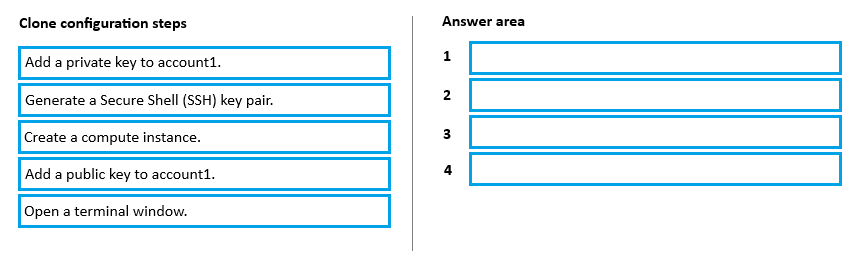
Create a compute instance, open a terminal window, generate a Secure Shell (SSH) key pair, and add the public key to the GitHub account's public key settings.
Question
You have an Azure Machine Learning workspace named WS1 and a GitHub account named account1 that hosts a private repository named repo1.
You need to clone repo1 to make it available directly from WS1. The configuration must maximize the performance of the repo1 clone.
Which four actions should you perform in sequence?
Key Takeaways
The question tests the specific workflow for authenticating Git operations in Azure ML using SSH keys to ensure secure and high-performance cloning from private repositories.
To maximize performance when cloning a private GitHub repo to Azure ML WS1, create a compute instance, open a terminal, generate an SSH key pair, and add the public key to GitHub.
Common mistake: Learners often attempt to use HTTPS credentials directly in the terminal without setting up SSH keys, or they try to clone before creating the compute instance, leading to permission denied errors or slow performance due to repeated credential prompts.
Expert Analysis
The goal is to clone a private GitHub repository into an Azure Machine Learning workspace while maximizing performance. The optimal strategy involves using SSH keys for secure, efficient authentication rather than HTTPS or interactive prompts. The sequence begins by establishing the compute environment where the cloning will occur. A Compute Instance must be created first, as it provides the necessary Linux-based virtual machine with pre-configured tools. Once the instance is running, access is gained via a Terminal window, which serves as the interface for executing command-line operations.
Authentication is the critical step for performance and security. Instead of entering credentials manually each time, an SSH key pair should be generated on the Compute Instance. This creates a local private key that remains secure on the machine and a public key that must be added to the GitHub account (account1) under its Public Key settings. This setup enables passwordless, encrypted communication between the Azure environment and GitHub, significantly reducing latency compared to standard HTTPS clones and avoiding manual input errors. Finally, with the key configured, the actual cloning action occurs. Although the exhibit likely shows a 'Clone' or 'Git Clone' button/command as the final step, the core logic relies on the preceding three steps: provisioning the compute, opening the terminal, and configuring SSH authentication. The drag-and-drop nature implies ordering these four distinct actions: Create Compute Instance → Open Terminal → Generate SSH Key Pair → Add Public Key to GitHub.
Official Reference
https://learn.microsoft.com/en-us/azure/machine-learning/how-to-github-integration
This link opens the official vendor documentation in a new tab.
Exam Strategy
When dealing with integration tasks involving external services like GitHub, always look for authentication methods that support automation and speed. SSH keys are preferred over passwords for CLI-based workflows because they eliminate interactive prompts and provide faster, encrypted connections. Prioritize setting up the infrastructure (compute instance) before attempting any data transfer or configuration commands.
Frequently Asked Questions
Why use SSH instead of HTTPS for cloning in Azure ML?
Can I clone a repo without a compute instance?
Discussion 1 contributions
Compiled from public community threads and reader submissions, lightly edited for clarity. Handles and vote tallies are shown as recorded, and comments reflect the views of individual contributors.
From public community threads 1
-
exam_upskill 👍 11 → Create a compute instance 2 → Open a terminal window 3 → Generate a Secure Shell (SSH) key pair 4 → Add a public key to account1 Public key → GitHub. Private key → stays securely on the machine.
Reader comments & corrections
No reader corrections yet — spotted an error or have a note? Share it below.