Implementing RAG Flow with Microsoft Foundry and Azure OpenAI
Short answer
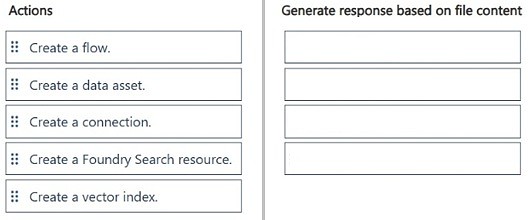
The correct sequence is: 1. Create a data asset, 2. Create a Foundry Search resource, 3. Create a vector index, 4. Create a flow.
Question
You have a Microsoft Foundry project with a connected Azure OpenAI Service model.
You have a set of text files stored locally on your computer.
You must set up a flow that will generate responses based on the content of your local files.
You need to implement a solution.
Which four actions should you perform in sequence? To answer, move the appropriate actions from the list of actions to the answer area and arrange them in the correct order.
Key Takeaways
The question tests the logical dependency chain of RAG infrastructure: you cannot index data without first registering it as an asset, and you cannot create a vector index without an underlying search resource to host it.
This scenario tests the correct sequence for building a Retrieval-Augmented Generation (RAG) solution in Microsoft Foundry using local text files and Azure OpenAI. The page establishes that data assets must precede vector indexing, which requires a search resource.
Common mistake: Learners often place 'Create a flow' before setting up the index or mistakenly try to create a vector index before establishing the Azure AI Search resource, violating the platform's architectural dependencies.
Expert Analysis
Why the Answer Is Correct
The correct sequence is: 1. Create a data asset, 2. Create a Foundry Search resource, 3. Create a vector index, 4. Create a flow. This order respects the technical dependencies: local files must be ingested into Foundry as a Data Asset first. A Search Resource (Azure AI Search) is required to host the index. The Vector Index is then created on top of that resource to handle embeddings and retrieval. Finally, the Flow connects the LLM to the indexed data to generate responses.Why Other Candidate Answers Are Wrong
Placing 'Create a flow' earlier fails because there is no indexed data source for the flow to query. Creating a 'Vector Index' before the 'Search Resource' is invalid because the index needs a hosting environment. 'Create a connection' is incorrect because the prompt states the model is already connected.Community Comment Notes
Community consensus strongly supports this sequence. As user rveney noted, the order is Data Asset -> Vector Index -> Search Resource -> Flow, though technically the Search Resource usually hosts the Index. User wwowow clarified that the Search Resource hosts the index, confirming the dependency: Data Asset -> Search Resource -> Vector Index -> Flow.Exam Strategy
Always identify the 'host' resource before the 'content' resource. In RAG questions, if you see 'Index', look for its 'Host' (Search/AKS) immediately preceding or following it in the setup phase. Never build the application logic (Flow/App) until the data retrieval layer is fully constructed.
Frequently Asked Questions
Why must I create a Data Asset before a Vector Index?
Can I create a Vector Index without an Azure AI Search resource?
Discussion 3 contributions
Compiled from public community threads and reader submissions, lightly edited for clarity. Handles and vote tallies are shown as recorded, and comments reflect the views of individual contributors.
From public community threads 3
-
rveney 👍 2Create an Azure AI Search resource Create a data asset Create a vector index Create a flow
-
DAgoGi 👍 1According to GPT5.6: The correct sequence is: 1-Create a data asset. 2-Create a vector index. 3-Create a Foundry Search resource. 4-Create a flow. Why? Create a data asset: Register the local text files as a data source in Microsoft Foundry. Create a vector index: Index the file content so it can be retrieved based on semantic similarity. Create a Foundry Search resource: Provide the search capability needed to retrieve relevant information from the indexed documents. Create a flow: Orchestrate retrieval and the connected Azure OpenAI model to generate responses based on the file content. Do not select Create a connection; the Azure OpenAI model is already connected.
-
wwowow 👍 1Per Fable 5: Create a data asset (upload the local files) Create a Foundry Search resource (hosts the index) Create a vector index (chunk and embed into Search) Create a flow (query the index, generate responses) Unused: Create a connection, already done per the scenario.
Reader comments & corrections
No reader corrections yet — spotted an error or have a note? Share it below.