Generating Summary Statistics with Pandas Describe in Azure ML
Short answer
Select the code segment that calls .describe() on the pandas DataFrame or Series containing the numerical data to generate count, mean, std, min, max, and percentile statistics.
Question
You download a .csv file from a notebook in an Azure Machine Learning workspace to a data/sample.csv folder on a compute instance. The file contains 10,000 records.
You must generate the summary statistics for the data in the file. The statistics must include the following for each numerical column:
• number of non-empty values
• average value
• standard deviation
• minimum and maximum values
• 25th, 50th, and 75th percentiles
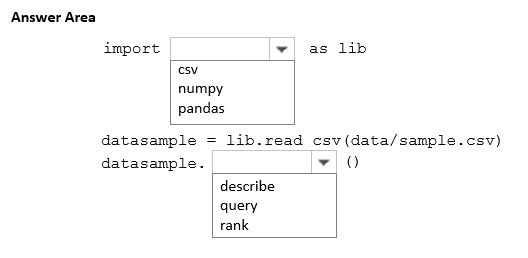
You need to complete the Python code that will generate the summary statistics.
Which code segments should you use? To answer, select the appropriate options in the answer area.
NOTE: Each correct selection is worth one point.
Key Takeaways
The main trap is overcomplicating the solution by trying to calculate each statistic individually instead of recognizing that .describe() provides all required metrics (count, mean, std, min, max, quartiles) in a single call.
Learn how to use the pandas .describe() method in Azure Machine Learning notebooks to efficiently generate comprehensive summary statistics including mean, std, and percentiles for numerical data.
Common mistake: Candidates often mistakenly try to write multiple lines of code using individual functions like .mean(), .std(), .min(), and .max() separately, failing to recognize the efficiency and completeness of the .describe() method.
Expert Analysis
The core concept tested here is the correct usage of pandas data analysis functions to generate descriptive statistics for numerical columns in a dataset. The requirement specifies calculating number of non-empty values, average (mean), standard deviation, min/max, and percentiles (25th, 50th, 75th). In Azure Machine Learning notebooks, data is typically loaded into a pandas.DataFrame. The most efficient and standard method to achieve all these requirements simultaneously is using the .describe method on the DataFrame or specific numerical columns. The .describe function automatically computes count (non-empty values), mean, std, min, max, and provides quartile information (which includes the 25th, 50th, and 75th percentiles) by default.
A common trap is attempting to manually calculate each statistic using separate functions like .mean, .std, etc., which is verbose and prone to error in an exam context where efficiency is key. Another potential mistake is confusing pandas methods with other libraries or incorrect syntax. The question asks to complete Python code, implying the selection of the correct pandas command. Since this is a HOTSPOT question without explicit option letters, the answer is the specific code snippet that invokes .describe on the relevant DataFrame column(s).
This scenario falls squarely within the domain of implementing MLOps infrastructure, specifically managing assets and preparing data within a Machine Learning workspace. The precise boundary often confused is between raw data manipulation and statistical summary generation; .describe is the specialized tool for the latter.
Official Reference
https://learn.microsoft.com/en-us/azure/machine-learning/how-to-dataframe
This link opens the official vendor documentation in a new tab.
Exam Strategy
When asked to generate multiple descriptive statistics (count, mean, std, min, max, percentiles) in an Azure ML notebook context, immediately look for the .describe() method as the primary solution. Avoid writing manual calculations for each metric unless explicitly required, as .describe() is optimized for this exact purpose and covers all standard quartile and dispersion metrics out-of-the-box.
Frequently Asked Questions
Does .describe() include non-empty values?
How can I get only numerical columns for describe?
What percentiles does .describe() provide by default?
Discussion 1 contributions
Compiled from public community threads and reader submissions, lightly edited for clarity. Handles and vote tallies are shown as recorded, and comments reflect the views of individual contributors.
From public community threads 1
-
exam_upskill 👍 11. pandas 2. describe
Reader comments & corrections
No reader corrections yet — spotted an error or have a note? Share it below.