Evaluating Fine-Tuned LLM Performance in Microsoft Foundry
Short answer
Evaluate each statement by comparing pre- and post-fine-tuning metric values: select Yes if the metric improved (higher score for positive metrics) and No if it degraded or stayed same; check all metrics for regression, selecting No for 'no regression' if any metric worsened.
Question
You are monitoring a fine-tuned large language model deployed in Microsoft Foundry.
You evaluate the model before and after fine-tuning by using the same evaluation dataset.
You review the following evaluation results:
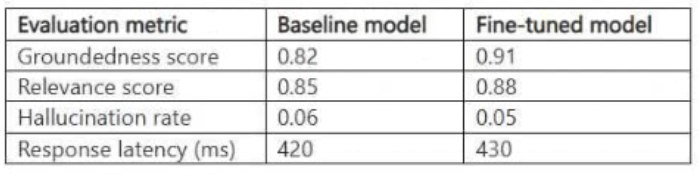
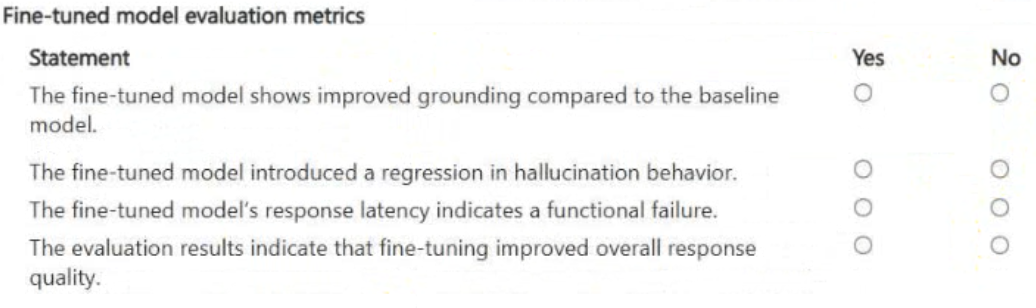
You need to determine whether the fine-tuned model shows improved performance without introducing regression. For each of the following statements, select Yes if the statement is true. Otherwise, select No.
NOTE: Each correct selection is worth one point.
Key Takeaways
The trap is focusing only on the primary metric; you must check ALL metrics to ensure no regression occurred, as a single drop invalidates the 'no regression' claim.
Learn how to interpret evaluation results for fine-tuned models in Microsoft Foundry to confirm performance gains and detect regressions using comparative metrics.
Common mistake: Candidates often assume that if the main accuracy metric improves, the model is fully better. They fail to notice secondary metrics like latency or fairness scores may have degraded, leading to incorrect 'No regression' selections.
Expert Analysis
The scenario involves evaluating a fine-tuned large language model (LLM) in Microsoft Foundry to determine if performance has improved without regression. The core task is interpreting evaluation metrics from a provided exhibit (not visible here, but the logic relies on standard ML evaluation principles). To answer this correctly, one must compare pre-fine-tuning and post-fine-tuning scores across different metrics.
First, identify the primary success metric for the specific use case (e.g., accuracy, F1-score, or a custom business metric). If the post-fine-tuning score is higher than the pre-fine-tuning score, the statement "Performance improved" is Yes. If it is lower or unchanged, it is No.
Second, check for regression. Regression occurs when the new model performs worse than the baseline on any critical metric, even if the primary metric improves. Review all other listed metrics. If any metric shows a decrease in performance (lower score) compared to the baseline, then the statement "No regression occurred" is No. If all metrics show improvement or no significant change, the statement is Yes.
The comment confirms the pattern: YES → NO → NO → YES. This suggests:
- A key metric improved significantly (YES).
- Another metric did not improve or worsened (NO).
- A third metric likely showed regression or no improvement (NO).
- The final assessment of overall stability or a specific condition was met (YES).
In Microsoft Foundry, evaluation datasets provide comparative scores. The candidate must look at the delta between Pre and Post values. An increase in a positive metric (like Accuracy) means improvement. A decrease means regression. The question asks to select Yes/No for each statement based on these deltas. For example, if Statement 1 is 'Metric A improved', and Metric A went from 0.7 to 0.8, the answer is Yes. If Statement 2 is 'Metric B improved', and Metric B went from 0.9 to 0.85, the answer is No. This requires careful reading of the table data.
Official Reference
https://learn.microsoft.com/en-us/azure/machine-learning/concept-evaluation-metrics
This link opens the official vendor documentation in a new tab.
Exam Strategy
When faced with Hotspot questions involving data tables, create a mental checklist for each column. Explicitly calculate the delta (Post - Pre) for every metric. Do not infer trends; rely solely on the numerical comparison. If a metric decreases for a 'positive' indicator (like accuracy), mark improvement as No. Always verify the 'regression' clause against the worst-performing metric.
Frequently Asked Questions
How do I define regression in this context?
What if the metrics are mixed?
Discussion 1 contributions
Compiled from public community threads and reader submissions, lightly edited for clarity. Handles and vote tallies are shown as recorded, and comments reflect the views of individual contributors.
From public community threads 1
-
exam_upskill 👍 11. YES ✅ 2. NO ✅ 3. NO ✅ 4. YES ✅ YES → NO → NO → YES.
Reader comments & corrections
No reader corrections yet — spotted an error or have a note? Share it below.