Configuring Time-Limited Azure Blob Datastore Access in SDK v2
Short answer
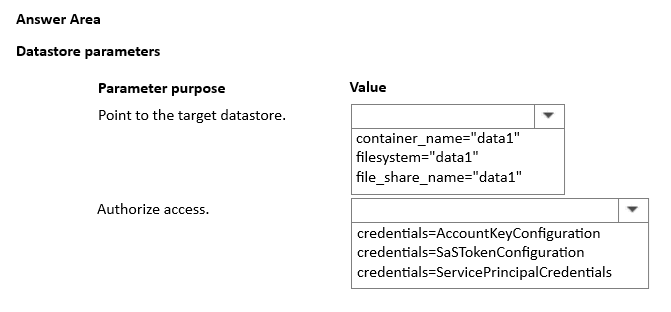
Use container_name="data1" and credentials=SaSTokenConfiguration. The container name is extracted from the URL path, and SaSTokenConfiguration provides the required time-limited access authorization.
Question
You manage an Azure Machine Learning workspace named Workspace1 and an Azure Blob Storage accessed by using the URL https://storage1.blob.core.windows.net/data1.
You plan to create an Azure Blob datastore in Workspace1. The datastore must target the Blob Storage by using Azure Machine Learning Python SDK v2. Access authorization to the datastore must be limited to a specific amount of time.
You need to select the parameters of the AzureBlobDatastore class that will point to the target datastore and authorize access to it.
Which parameters should you use? To answer, select the appropriate options in the answer area.
NOTE: Each correct selection is worth one point.
Key Takeaways
The phrase 'limited to a specific amount of time' mandates the use of SaSTokenConfiguration over AccountKeyConfiguration.
Learn how to configure an Azure Blob datastore in Azure ML SDK v2 using the correct container name and time-limited SAS token credentials.
Common mistake: Learners often select AccountKeyConfiguration because it is simpler, but it provides permanent access, failing the time-limitation constraint.
Expert Analysis
The question requires configuring an Azure Blob Datastore within an Azure Machine Learning workspace using the Python SDK v2, with a specific constraint: access authorization must be limited to a specific amount of time. This temporal limitation is the critical discriminator for selecting the correct credential type.
First, identify the target storage location. The URL provided is https://storage1.blob.core.windows.net/data1. In Azure Blob Storage URLs, the segment immediately following the account name (storage1) and the .blob.core.windows.net domain is the container name. Therefore, the container_name parameter must be set to "data1". Selecting anything else would point to the wrong logical partition of the storage account.
Second, select the appropriate authentication method. The requirement specifies that access should be "limited to a specific amount of time." Standard account keys provide permanent, unrestricted access, which violates this security constraint. Shared Access Signatures (SAS) tokens, however, are designed specifically for this purpose; they grant temporary, scoped permissions. In the Azure ML SDK v2, temporary credentials are implemented using the SaSTokenConfiguration class. This class allows you to specify the SAS token string, which inherently contains the expiry timestamp defined by the issuer. Using AccountKeyConfiguration or ManagedIdentityConfiguration would not satisfy the time-limited requirement.
Therefore, the correct configuration pairs the extracted container identifier with the temporary credential mechanism. The parameters are container_name="data1" and credentials=SaSTokenConfiguration(sas_token="<your_sas_token>"). Comments confirming this selection highlight the direct mapping between the URL structure and the SDK's security classes, reinforcing that SAS is the only option compatible with time-bound access.
Official Reference
https://learn.microsoft.com/en-us/python/api/azureml-core/azureml.data.azure_blob_datastore
This link opens the official vendor documentation in a new tab.
Exam Strategy
When faced with 'time-limited', 'temporary', or 'scoped' access requirements in cloud certification exams, immediately eliminate permanent credential types like account keys or default managed identities. Look for options involving tokens, signatures, or explicit expiration settings, as these are the standard mechanisms for enforcing temporal constraints on resource access.
Frequently Asked Questions
How do I extract the container name from an Azure Blob Storage URL?
Why can't I use AccountKeyConfiguration for time-limited access?
Discussion 1 contributions
Compiled from public community threads and reader submissions, lightly edited for clarity. Handles and vote tallies are shown as recorded, and comments reflect the views of individual contributors.
From public community threads 1
-
exam_upskill 👍 11. Container_name="data1" 2. Credentials=SaSTokenConfiguration
Reader comments & corrections
No reader corrections yet — spotted an error or have a note? Share it below.