Configuring MLflow Experiment Tracking in Azure Machine Learning
Short answer
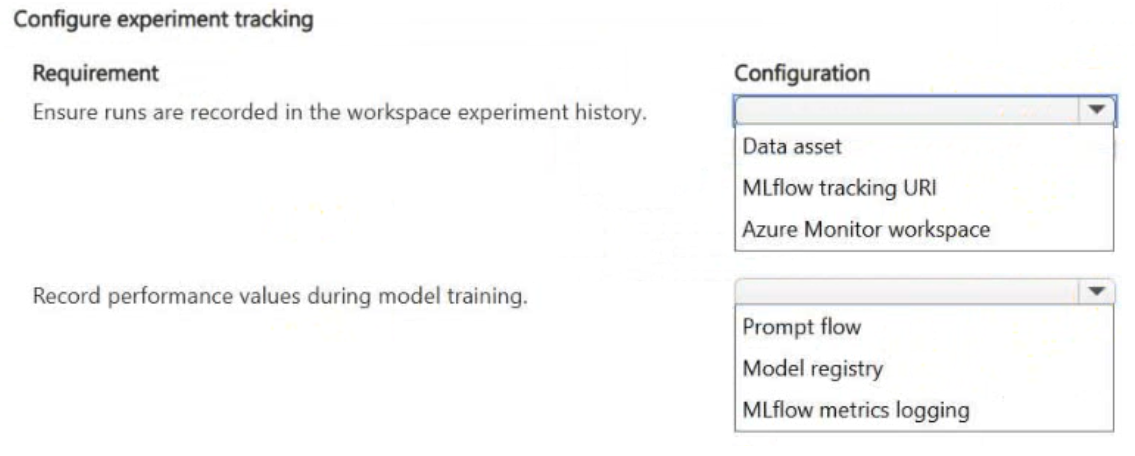
Configure MLflow Tracking URI for centralized run recording and MLflow Metrics Logging for capturing performance values in the run history.
Question
You use Azure Machine Learning to train models across multiple experiments by using the same workspace.
You must record training runs in a centralized location to compare results from different jobs.
During training, performance values must be captured so they appear in the experiment run history.
You need to configure experiment tracking.
What should you configure for each requirement? To answer, select the appropriate options in the answer area.
NOTE: Each correct selection is worth one point.
Key Takeaways
Distinguishes between the storage location for runs (Tracking URI) and the mechanism for recording specific performance data (Metrics Logging) within AML's MLflow integration.
Learn how to configure MLflow Tracking URI for centralized run storage and MLflow Metrics Logging for performance value capture in Azure Machine Learning experiments.
Common mistake: Confusing the Tracking URI with general data storage paths or failing to distinguish between autologging and explicit metric logging, leading to incorrect identification of how performance values are specifically captured.
Expert Analysis
The scenario requires configuring Azure Machine Learning (AML) to centralize training runs and capture performance metrics for comparison. The core concept is MLflow experiment tracking, which is the standard mechanism in AML for recording run metadata and metrics.
For the first requirement—recording training runs in a centralized location to compare results—the correct configuration is the MLflow Tracking URI. In AML, setting the MLflow tracking URI ensures that all experiment runs are logged to the workspace's default data store, providing a unified view of history across jobs. This is distinct from local logging or other storage accounts unless explicitly pointed to via this URI.
For the second requirement—capturing performance values so they appear in the run history—the correct configuration is MLflow Metrics Logging (specifically using mlflow.log_metric). While autologging can capture some metrics automatically, explicit metric logging is the precise method to ensure specific performance values are recorded and visible in the run history for comparison. This allows for direct querying and visualization of hyperparameters and metrics.
Comments often confuse the general concept of "logging" with the specific AML components. The distinction lies between where the data is stored (Tracking URI) and what data is captured (Metrics). Centralized storage is handled by the URI pointing to the workspace, while the actual performance values are captured via the metrics logging function.
Official Reference
https://learn.microsoft.com/en-us/azure/machine-learning/how-to-track-experiments-metrics
This link opens the official vendor documentation in a new tab.
Exam Strategy
When asked about experiment tracking in AML, always look for 'MLflow' as the underlying technology. Differentiate between 'where' runs are stored (Tracking URI points to the workspace) and 'what' is recorded (Metrics/Parameters). If the question asks about comparing results across jobs, prioritize the centralized nature of the Workspace's MLflow backend accessed via the Tracking URI.
Frequently Asked Questions
What is the role of MLflow Tracking URI in Azure ML?
How do I ensure performance values appear in run history?
Discussion 2 contributions
Compiled from public community threads and reader submissions, lightly edited for clarity. Handles and vote tallies are shown as recorded, and comments reflect the views of individual contributors.
From public community threads 2
-
RICHARDALEX007 👍 1Centralized run recording uses MLflow experiment tracking; logging metrics that appear in run history uses mlflow.log_metric (autolog also valid). This is the native AML experiment-tracking pattern.
-
exam_upskill 👍 11 → MLflow tracking URI ✅ 2 → MLflow metrics logging ✅ Where should runs go? → Tracking URI What records performance values? → Metrics logging
Reader comments & corrections
No reader corrections yet — spotted an error or have a note? Share it below.