Configuring Data Drift Monitoring and Alerts in Azure ML
Short answer
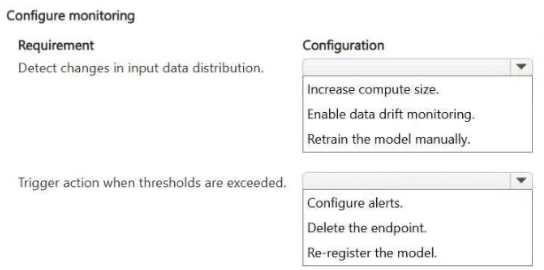
Enable data drift monitoring to detect changes in input data distribution, and configure alerts to trigger appropriate actions when predefined thresholds are exceeded.
Question
A machine learning model is deployed to production in Azure Machine Learning and is actively serving predictions for a business application. The model was trained by using a historical dataset that represented expected input patterns at the time of deployment.
The team working on the model must ensure the following:
Changes in input data distribution are detected.
Appropriate actions are triggered when predefined thresholds are exceeded.
You need to configure monitoring to meet the requirements.
Which configuration should you use for each requirement? To answer, select the appropriate options in the answer area.
NOTE: Each correct selection is worth one point.
Key Takeaways
The question tests the distinction between passive metric collection (data drift monitoring) and active response mechanisms (alerts/automations) in AML production environments.
Learn how to configure Azure Machine Learning monitoring by enabling data drift detection and setting up alert-based automations for production models.
Common mistake: Learners often select only data drift monitoring, forgetting that drift metrics require explicit alert configurations to trigger actions or notifications when thresholds are crossed.
Expert Analysis
The scenario requires configuring Azure Machine Learning (AML) monitoring for a production model to address two distinct operational needs: detecting statistical changes in input data and triggering automated responses when specific limits are breached. In AML, these requirements map directly to the platform's built-in monitoring capabilities.
First, to detect "changes in input data distribution," you must enable Data Drift Monitoring. This feature continuously compares the incoming production data against the baseline training dataset to identify shifts in statistical properties, such as mean or variance. Without this configuration, the system cannot quantify whether the model is encountering unfamiliar patterns that might degrade performance.
Second, to trigger "appropriate actions when predefined thresholds are exceeded," you must configure Alerts based on the drift metrics collected by the monitor. Data drift alone is passive; it generates reports but does not act. Alerts allow you to define specific threshold values (e.g., if drift exceeds 0.5) and connect them to automation workflows, such as sending notifications via email, integrating with Logic Apps for remediation, or triggering retraining pipelines.
Comments correctly identify this mapping: enabling data drift monitoring addresses the detection requirement, while configuring alerts addresses the action requirement. Confusing these two leads to incomplete solutions where drift is tracked but no one is notified or acted upon.
Official Reference
https://learn.microsoft.com/en-us/azure/machine-learning/how-to-monitor-machine-learning-models
This link opens the official vendor documentation in a new tab.
Exam Strategy
When asked about monitoring requirements, always separate 'detection' from 'reaction'. Detection involves metrics like data drift or prediction drift, while reaction involves alerts, emails, or automated triggers like retraining jobs. Ensure both components are selected if the scenario demands visibility and action.
Frequently Asked Questions
What is the difference between data drift and prediction drift in AML?
Can I automate retraining using AML monitoring?
Discussion 2 contributions
Compiled from public community threads and reader submissions, lightly edited for clarity. Handles and vote tallies are shown as recorded, and comments reflect the views of individual contributors.
From public community threads 2
-
RICHARDALEX007 👍 1Input-distribution change detection is data drift monitoring on the deployed model; the threshold-based response is an alert/automated action. This matches the AML production monitoring model.
-
exam_upskill 👍 11 → Enable data drift monitoring 2 → Configure alerts
Reader comments & corrections
No reader corrections yet — spotted an error or have a note? Share it below.