Configure ML Model Monitoring and Automated Retraining in Azure ML
Short answer
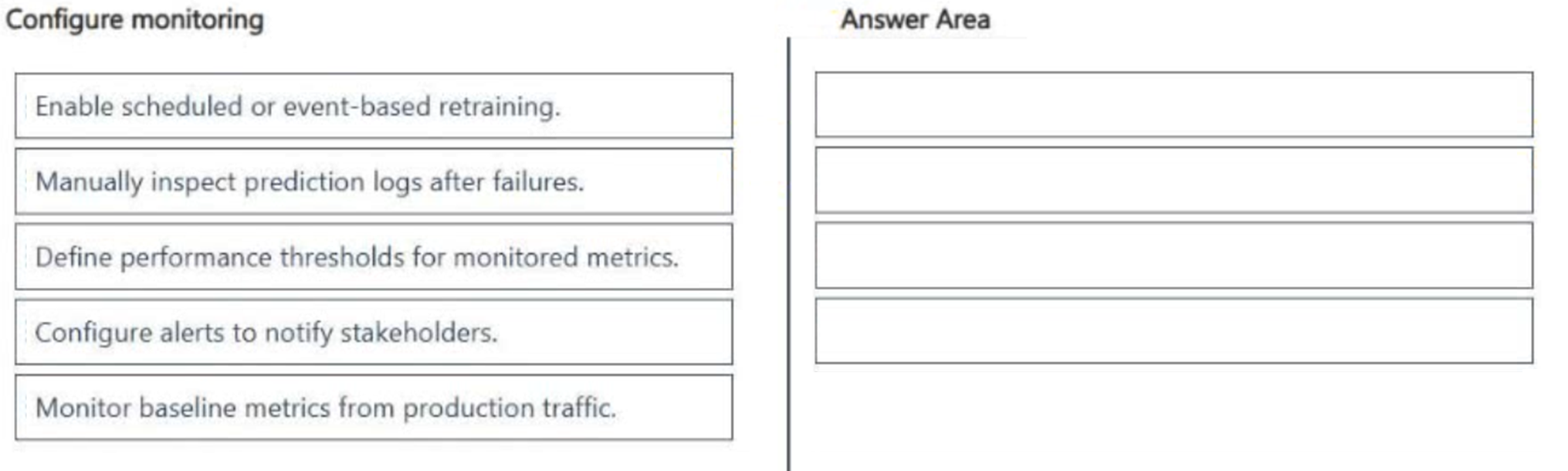
1. Monitor baseline metrics from production traffic 2. Define performance thresholds for monitored metrics 3. Configure alerts to notify stakeholders 4. Enable scheduled or event-based retraining
Question
A team deploys a classification model to production and monitors performance and data changes.
The team wants to ensure that significant drops in prediction accuracy automatically trigger the following:
Stakeholders must be notified of the drops.
Retraining must be initiated when thresholds are exceeded
You need to configure monitoring to meet the requirements.
Which four actions should you perform in sequence? To answer, move the appropriate actions from the list of actions to the answer area and arrange them in the correct order.
Key Takeaways
The sequence follows a logical dependency: you must observe data (monitor) and set rules (thresholds) before you can react (alerts/retraining).
Learn the correct sequence for configuring Azure Machine Learning monitoring: monitor baselines, define thresholds, configure alerts, and enable automated retraining to maintain production model accuracy.
Common mistake: Starting with 'Enable retraining' or 'Configure alerts' without first monitoring baselines and defining thresholds, which leads to unconfigured or meaningless automation triggers.
Expert Analysis
Monitoring Foundation and Threshold Definition The process begins with establishing a baseline. You must first monitor baseline metrics from production traffic to understand normal model behavior. Without this data, no deviation can be detected.
Threshold Configuration Next, you must define performance thresholds for monitored metrics. This step establishes the quantitative boundaries (e.g., accuracy < 85%) that determine when a "drop" is significant enough to warrant action. Defining these before monitoring ensures the system knows what to look for.
Alerting Mechanism Once metrics are flowing and thresholds are set, you configure alerts to notify stakeholders. This satisfies the requirement for human notification when limits are breached. Alerts act as the bridge between passive monitoring and active intervention.
Automated Remediation Finally, you enable scheduled or event-based retraining. This is the automated response triggered by the threshold breach (often via the alert pipeline). It addresses the requirement to initiate retraining automatically when thresholds are exceeded.
Why the Reverse Order Fails A common trap is starting with retraining or alerts without baseline monitoring. You cannot configure meaningful alerts or thresholds without first understanding the production metric stream. Similarly, retraining should not precede monitoring because there is no signal to trigger it.
Official Reference
https://learn.microsoft.com/en-us/azure/machine-learning/concept-model-monitoring
This link opens the official vendor documentation in a new tab.
Exam Strategy
When asked to sequence monitoring tasks, always start with data collection (monitoring baselines), then rule definition (thresholds), then communication (alerts), and finally action (retraining/deployment). This mirrors the standard MLOps lifecycle of Observe -> Decide -> Act.
Frequently Asked Questions
Can I skip defining thresholds and use default values?
Why does monitoring come before threshold definition?
Discussion 3 contributions
Compiled from public community threads and reader submissions, lightly edited for clarity. Handles and vote tallies are shown as recorded, and comments reflect the views of individual contributors.
From public community threads 3
-
03f65a8 👍 3Define thresholds ↓ Monitor production metrics ↓ Trigger alerts ↓ Automated retraining
-
exam_upskill 👍 11. Monitor baseline metrics from production traffic 2. Define performance thresholds for monitored metrics 3. Configure alerts to notify stakeholders 4. Enable scheduled or event-based retraining
-
DAgoGi 👍 1Settings: 1. Define thresholds 2. Trigger alerts 3. Automated retraining Execution: 4. Monitor production metrics
Reader comments & corrections
No reader corrections yet — spotted an error or have a note? Share it below.