Azure ML SDK v2: Registering Components via YAML
Short answer
Use load_component to parse the ./components/train/train.yml file into a component object, then call ml_client.components.create_or_update to register that object in the workspace.
Question
You have an Azure Machine Learning workspace.
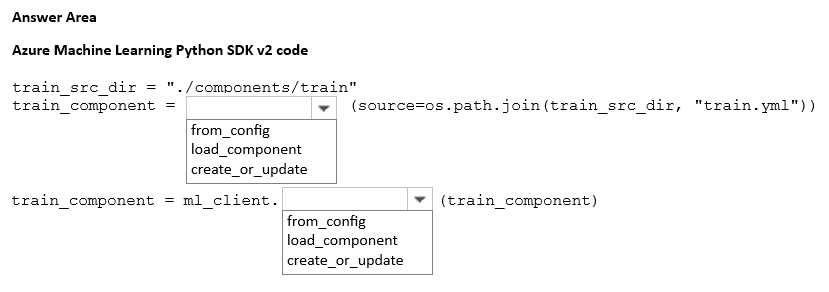
You plan to use Azure Machine Learning Python SDK v2 to register a component in the workspace. The component definition is stored in the local file ./components/train/train.yml.
You write code to connect to the workspace by using the ml_client object and import all required libraries.
You need to complete the remaining code.
How should you complete the code? To answer, select the appropriate options in the answer area.
NOTE: Each correct selection is worth one point.
Key Takeaways
The question tests the specific SDK v2 API methods for loading a local component definition file versus registering it in the cloud, distinguishing between parsing and persistence actions.
This page explains how to register an Azure Machine Learning component using the Python SDK v2 by loading a YAML definition with load_component and creating it in the workspace with create_or_update.
Common mistake: Learners often confuse load_component with other creation methods or attempt to pass the file path directly to create_or_update without first loading the YAML object, leading to type errors or failed registrations.
Expert Analysis
The objective is to register a machine learning component in Azure Machine Learning using the Python SDK v2. The scenario specifies that the component definition is stored locally at ./components/train/train.yml. To achieve this, two distinct steps are required: loading the component definition from the file and then creating or updating it in the workspace.
First, the code must load the YAML definition into an object that the SDK can understand. In Azure ML SDK v2, the function responsible for parsing a local YAML file containing a component definition is load_component. This function takes the path to the YAML file as its argument (e.g., path='./components/train/train.yml'). It returns a Component object representing the definition. Common distractors might include functions like create_component or register_component, but these do not handle the initial file parsing/loading step correctly in the context of the SDK v2 API structure.
Second, once the component object is loaded, it must be persisted in the Azure Machine Learning workspace. The correct method on the ml_client object to perform this action is create_or_update. This method accepts the component object and registers it, overwriting any existing version if necessary. Using a method like delete or get would clearly fail to achieve the goal of registration.
Therefore, the first blank should be filled with load_component to parse the YAML, and the second blank should be filled with create_or_update to persist the component in the workspace. This sequence ensures the local definition is correctly interpreted and then made available for pipeline use within the cloud environment.
Official Reference
- https://learn.microsoft.com/en-us/python/api/azure-ai-ml/azure.ai.ml.entities.component?view=azure-python-preview
- https://learn.microsoft.com/en-us/azure/machine-learning/how-to-manage-components
These links open the official vendor documentation in a new tab.
Exam Strategy
When facing hotspot questions involving SDK APIs, identify the data transformation step (loading/parsing) separate from the resource management step (creating/updating). For Azure ML SDK v2, always look for 'load' functions for YAML/JSON definitions before applying 'create' or 'update' clients.
Frequently Asked Questions
What is the difference between load_component and create_or_update?
Can I register a component without a YAML file?
Discussion 1 contributions
Compiled from public community threads and reader submissions, lightly edited for clarity. Handles and vote tallies are shown as recorded, and comments reflect the views of individual contributors.
From public community threads 1
-
exam_upskill 👍 11. load_component 2. components.create_or_update
Reader comments & corrections
No reader corrections yet — spotted an error or have a note? Share it below.