Azure ML Python SDK v2: Importing Labeled Image Data for Automated ML
Short answer
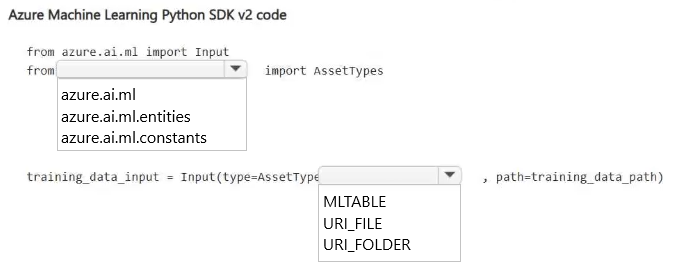
The first box should contain 'azure.ai.ml.entities' and the second box should contain 'AssetTypes.URI_FOLDER'.
Question
You have an Azure Machine Learning workspace named Workspace1.
You plan to train an image classification model by using Automated ML in Workspace1.
You need to complete the provided Azure Machine Learning Python SDK v2 code to bring labeled image data as input for model training.
How should you complete the code? To answer, select the appropriate options in the answer area.
NOTE: Each correct selection is worth one point.
Key Takeaways
The question tests knowledge of the
azure.ai.ml.entitiesmodule and specifically theAssetTypes.URI_FOLDERconstant, which is used to reference directories containing training data like images in SDK v2.
This scenario tests the correct Azure Machine Learning Python SDK v2 syntax for importing labeled image data as an input asset. The solution requires selecting the appropriate module and asset type to define a URI folder containing image files.
Common mistake: Learners often confuse SDK v1 patterns (like `Dataset`) with SDK v2 patterns (like `Input` and `AssetTypes`). Another common error is selecting `FILE` instead of `URI_FOLDER` when the data consists of multiple images organized in a directory structure.
Expert Analysis
Why the Answer Is Correct
In Azure Machine Learning Python SDK v2, data inputs are defined using theInput class from the azure.ai.ml module. To specify the type of data being imported, you must reference the AssetTypes enum found within the azure.ai.ml.entities module. Since the requirement is to bring in labeled image data, which typically exists as a collection of files within a directory structure, AssetTypes.URI_FOLDER is the correct choice. This tells the pipeline that the input is a folder located at a specific URI containing multiple image files.Why Other Candidate Answers Are Wrong
Selectingazure.ai.ml.data would refer to SDK v1 constructs or older dataset types, which are deprecated in favor of the v2 Input/Output model. Choosing AssetTypes.FILE would be incorrect because it implies a single file rather than a directory of images. Using AssetTypes.URI_FILE is also incorrect for the same reason; it points to a single object, not a folder of labeled data.Community Comment Notes
Community consensus correctly identifiesazure.ai.ml.entities and AssetTypes.URI_FOLDER as the right components. As one user noted, "AssetTypes.URI_FOLDER is appropriate because image-classification training data typically consists of a folder containing multiple labeled images," which accurately reflects standard ML data organization practices. Official Reference
This link opens the official vendor documentation in a new tab.
Exam Strategy
Focus on memorizing the key modules for SDK v2 data handling: azure.ai.ml for core classes like Input and Output, and azure.ai.ml.entities for enumerations like AssetTypes. Understand the difference between FILE and FOLDER asset types based on how your data is structured.
Frequently Asked Questions
What is the difference between AssetTypes.URI_FOLDER and FILE in Azure ML SDK v2?
Why use azure.ai.ml.entities instead of azure.ai.ml.data?
Discussion 1 contributions
Compiled from public community threads and reader submissions, lightly edited for clarity. Handles and vote tallies are shown as recorded, and comments reflect the views of individual contributors.
From public community threads 1
-
DAgoGi 👍 1The correct answers are: Import module: azure.ai.ml.entities Asset type: AssetTypes.URI_FOLDER Why? azure.ai.ml.entities provides the AssetTypes class used to specify the type of input data. AssetTypes.URI_FOLDER is appropriate because image-classification training data typically consists of a folder containing multiple labeled images, organized by class. P.S. The guys at a public community thread are real infamous, though—they make you pay for exam quizzes but don't even include the correct answers! Not to mention the explanations! Li mortacci vostra!
Reader comments & corrections
No reader corrections yet — spotted an error or have a note? Share it below.