Azure ML Python SDK v2 FAILED Status Interpretation
Short answer
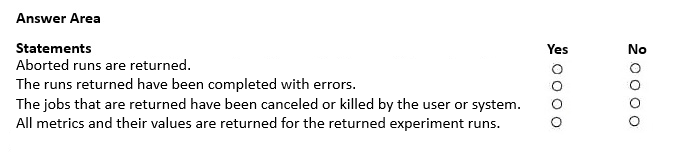
1. Aborted runs are returned: No. 2. The runs returned have been completed with errors: Yes. 3. The jobs returned have been canceled or killed by the user or system: No.
Question
You manage an Azure Machine Learning workspace. You create an experiment named experiment1 by using the Azure Machine Learning Python SDK v2 and MLflow.
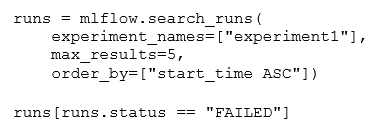
You are reviewing the results of experiment1 by using the following code segment:
For each of the following statements, select Yes if the statement is true. Otherwise, select No.
NOTE: Each correct selection is worth one point.
Key Takeaways
The core concept is that the 'FAILED' status indicates a run completed with errors, whereas 'KILLED' indicates cancellation or termination; confusing these leads to incorrect hotspot selections.
This question tests the interpretation of Azure Machine Learning experiment run statuses using the Python SDK v2, specifically distinguishing between FAILED and KILLED states.
Common mistake: Learners often incorrectly associate 'FAILED' with user/system cancellation, failing to recognize that Azure ML uses distinct statuses (FAILED vs. KILLED) for error completion versus intentional termination.
Expert Analysis
Why the Answer Is Correct
The code segment filters for runs wherestatus == "FAILED". In Azure Machine Learning, the FAILED status specifically indicates that a run was executed but terminated due to an error during execution. Therefore, the statement regarding runs completed with errors is true.Why Other Candidate Answers Are Wrong
Aborted runs and those canceled or killed by the user or system are assigned the KILLED status, not FAILED. Consequently, statements suggesting that FAILED status includes aborted or killed runs are false. It is critical to distinguish between failure (error) and termination (cancellation).Community Comment Notes
Community consensus aligns with the official behavior: as one commenter noted, "Aborted runs have the status KILLED, not FAILED," confirming that only error-completed runs match the filter.Official Reference
https://learn.microsoft.com/en-us/azure/machine-learning/how-to-manage-runs
This link opens the official vendor documentation in a new tab.
Exam Strategy
Memorize the specific lifecycle statuses of Azure ML runs (Completed, Failed, Canceled, Killed). When reviewing SDK code, carefully check if the filter matches the semantic meaning of the status string exactly.
Frequently Asked Questions
What is the difference between FAILED and KILLED in Azure ML?
Does Azure ML SDK v2 return cancelled runs with status FAILED?
Discussion 1 contributions
Compiled from public community threads and reader submissions, lightly edited for clarity. Handles and vote tallies are shown as recorded, and comments reflect the views of individual contributors.
From public community threads 1
-
DAgoGi 👍 1According to GPT 5.6: 1. Aborted runs are returned: No. Aborted runs have the status KILLED, not FAILED. 2. The runs returned have been completed with errors: Yes. The FAILED status indicates that a run failed during execution. 3. The jobs returned have been canceled or killed by the user or system: No. Canceled or terminated runs have the status KILLED, not FAILED. 4. All metrics and their values are returned for the returned experiment runs: No. The query returns run information, including logged metrics, but does not necessarily return every metric value recorded throughout training.
Reader comments & corrections
No reader corrections yet — spotted an error or have a note? Share it below.