Azure ML Monitoring: Alert Rules vs Autoscaling
Short answer
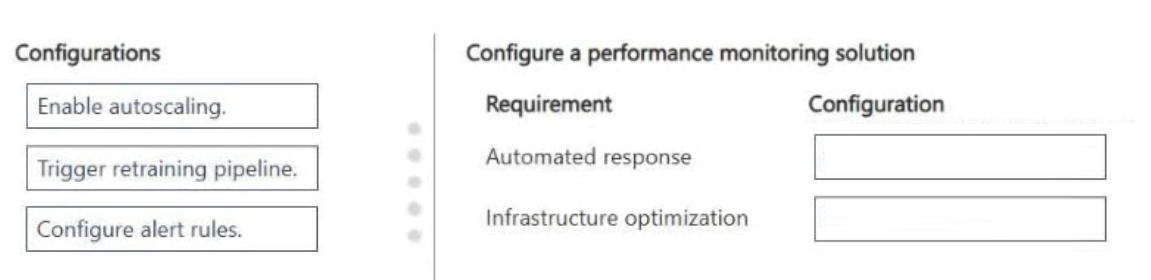
Associate Configure alert rules with Automated Response and Enable autoscaling with Infrastructure Optimization.
Question
A team deploys a machine learning model to a managed online endpoint. The team monitors model performance and data quality metrics in production.
When monitoring thresholds are exceeded, the team requires an automated operational response that notifies downstream systems.
You need to configure the monitoring solution to meet the requirements.
Which configuration should you associate with each requirement as a first step? To answer, move the appropriate configurations to the correct requirements. You may use each configuration once, more than once, or not at all. You may need to move the split bar between panes or scroll to view content.
NOTE: Each correct selection is worth one point.
Key Takeaways
Distinguish between operational notifications (alert rules) and capacity management (autoscaling) when configuring production monitoring solutions.
Learn how to configure Azure Machine Learning monitoring by mapping alert rules to automated responses and autoscaling to infrastructure optimization for production endpoints.
Common mistake: Selecting Trigger retraining pipeline for infrastructure optimization, which incorrectly conflates model update operations with compute scaling capabilities.
Expert Analysis
The scenario describes an Azure Machine Learning production environment where the primary goal is to handle exceeded monitoring thresholds with an automated operational response. The two distinct requirements are establishing the notification mechanism and optimizing the underlying infrastructure capacity.
For the Automated Response requirement, the correct configuration is Configure alert rules. In Azure ML, when monitoring metrics (such as latency or error rates) exceed defined thresholds, alert rules trigger notifications to downstream systems like email, webhooks, or incident management tools. This directly satisfies the need for immediate notification upon threshold breach. Other options like 'Trigger retraining pipeline' are operational actions taken after analysis, not the initial notification step itself.
For the Infrastructure Optimization requirement, the correct configuration is Enable autoscaling. Autoscaling automatically adjusts the compute instances associated with the online endpoint based on traffic load or resource utilization metrics. This ensures the endpoint can handle variable demand efficiently without manual intervention, which is the definition of infrastructure optimization in this context. While 'Trigger retraining' addresses model drift, it does not optimize the serving infrastructure's capacity.
A common trap is confusing 'Trigger retraining pipeline' with both scenarios because retraining is a key part of MLOps lifecycle. However, retraining updates the model artifact, whereas the question specifically asks for an operational response to monitoring thresholds (alerts) and infrastructure optimization (scaling). The comment noting that autoscaling adjusts capacity based on load correctly identifies the infrastructure component.
Official Reference
- https://learn.microsoft.com/en-us/azure/machine-learning/concept-monitor
- https://learn.microsoft.com/en-us/azure/machine-learning/how-to-setup-alerts
These links open the official vendor documentation in a new tab.
Exam Strategy
When faced with drag-and-drop questions on Azure ML monitoring, map 'notification' keywords to 'Alert Rules' and 'capacity/traffic/load' keywords to 'Autoscaling'. Always verify if the requirement is about communicating status (alerts) or adjusting resources (scaling), as these are distinct mechanisms in the Azure portal.
Frequently Asked Questions
Can autoscaling trigger a retraining pipeline?
What happens if no alert rules are configured?
Discussion 3 contributions
Compiled from public community threads and reader submissions, lightly edited for clarity. Handles and vote tallies are shown as recorded, and comments reflect the views of individual contributors.
From public community threads 3
-
cayenne06 👍 1the right choice is Enable autoscaling, because it automatically adjusts capacity based on traffic/load. Trigger retraining pipeline is for improving model quality after drift or performance degradation, not for optimizing endpoint infrastructure.
-
exam_upskill 👍 1Automated response → Configure alert rules ✅ Infrastructure optimization → Enable autoscaling ✅
-
03f65a8 👍 1Configure alert rules Enable autoscaling
Reader comments & corrections
No reader corrections yet — spotted an error or have a note? Share it below.