Azure ML Compute Targets for Experimentation vs Training
Short answer
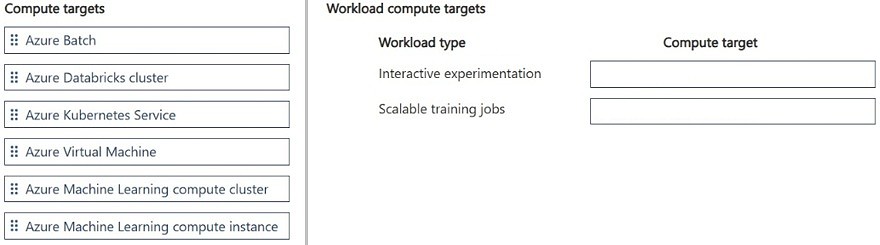
Interactive experimentation should be mapped to Azure Machine Learning compute instance, while scalable training jobs should be mapped to Azure Machine Learning compute cluster.
Question
A team performs interactive experimentation during development. The team also runs scalable jobs for model training.
The team must minimize costs while ensuring compute resources scale when needed. Different workloads require different compute behaviors within the same workspace.
You need to configure compute targets that support each workload.
Which compute targets should you use? To answer, move the appropriate compute targets to the correct workload types. You may use each compute target once, more than once, or not at all. You may need to move the split bar between panes or scroll to view content.
NOTE: Each correct selection is worth one point.
Key Takeaways
The question tests the distinction between persistent, interactive development environments (Compute Instances) and ephemeral, auto-scaling batch processing resources (Compute Clusters) within Azure Machine Learning.
This page explains how to map Azure Machine Learning workloads to appropriate compute targets. Interactive experimentation requires a Compute Instance for an integrated dev environment, while scalable training jobs require a Compute Cluster for elastic, cost-efficient scaling.
Common mistake: Learners often confuse the two by assigning Compute Cluster to experimentation because it sounds 'powerful,' or assigning Compute Instance to training because it seems simpler. This fails because instances do not auto-scale for large jobs, and clusters lack the persistent IDE integration needed for interactive debugging.
Expert Analysis
Interactive Experimentation Requires Persistent, IDE-Integrated Compute
The first workload involves interactive experimentation during development. In Azure Machine Learning (AML), this requirement is best satisfied by a Compute Instance. A compute instance is a managed, full-stack development environment provisioned on a virtual machine. It comes pre-installed with the Azure ML SDK and popular data science tools, providing an interactive Jupyter notebook or VS Code environment. This setup allows data scientists to explore data, write code, and debug iteratively without the overhead of provisioning resources for every single session. Unlike clusters, which are ephemeral and designed for batch processing, instances persist state and dependencies, making them ideal for the collaborative, hands-on nature of early-stage model development.
Scalable Training Demands Elastic, On-Demand Clusters
The second workload consists of scalable jobs for model training, where the primary constraints are cost minimization and the ability to scale compute resources dynamically. This scenario dictates the use of a Compute Cluster. A compute cluster is a resource that scales up automatically based on the number of queued jobs. It supports both CPU and GPU options and can scale from zero nodes up to a user-defined maximum. This elasticity ensures that you only pay for the compute time when jobs are actually running, directly addressing the goal of minimizing costs. Furthermore, because training jobs often require significant parallel processing power, the cluster’s ability to spin up multiple nodes simultaneously accelerates training times compared to a single-instance approach.
Distinguishing Workload Patterns in MLOps Infrastructure
The core principle tested here is the separation of concerns between development environments and production-grade training infrastructure. While one might consider using a compute cluster for experimentation, it lacks the persistent, integrated developer experience of an instance. Conversely, using an instance for scalable training would be inefficient and costly due to the lack of auto-scaling and higher idle costs. The official Azure ML documentation clearly delineates these roles: instances for interactive dev work and clusters for distributed, scalable training. Therefore, mapping interactive experimentation to Compute Instance and scalable training to Compute Cluster is the architecturally correct decision for balancing productivity and cost-efficiency.
Official Reference
https://learn.microsoft.com/en-us/azure/machine-learning/concept-compute-target
This link opens the official vendor documentation in a new tab.
Exam Strategy
When configuring MLOps infrastructure, always match the compute target to the workflow phase's interaction level and scaling needs. For any task requiring iterative debugging, notebooks, or persistent toolchains, select a Compute Instance. For any task involving heavy, parallelized computation that benefits from spinning up many nodes temporarily, select a Compute Cluster. Avoid using clusters for interactive dev as they lack pre-configured IDEs, and avoid instances for large-scale training as they cannot scale out automatically.
Frequently Asked Questions
Why not use a Compute Cluster for interactive experimentation?
Can I use a Compute Instance for model training?
Discussion 4 contributions
Compiled from public community threads and reader submissions, lightly edited for clarity. Handles and vote tallies are shown as recorded, and comments reflect the views of individual contributors.
From public community threads 4
-
rveney 👍 9Interactive experimentation → Azure Machine Learning compute instance Scalable training jobs → Azure Machine Learning compute cluster
-
exam_upskill 👍 11. Interactive experimentation: Azure Machine Learning compute instance 2. Scalable training jobs: Azure Machine Learning compute cluster Develop/Experiment → Compute Instance Train/Scale → Compute Cluster
-
adelina99 👍 1I also think that correct answers are: Interactive experimentation → Azure Machine Learning compute instance Scalable training jobs → Azure Machine Learning compute cluster
-
exam_upskill 👍 1Interactive experimentation: Azure Machine Learning compute instance Scalable training jobs: Azure Machine Learning compute cluster
Reader comments & corrections
No reader corrections yet — spotted an error or have a note? Share it below.