Secure Key Vault secret access from ACA in order
Short answer
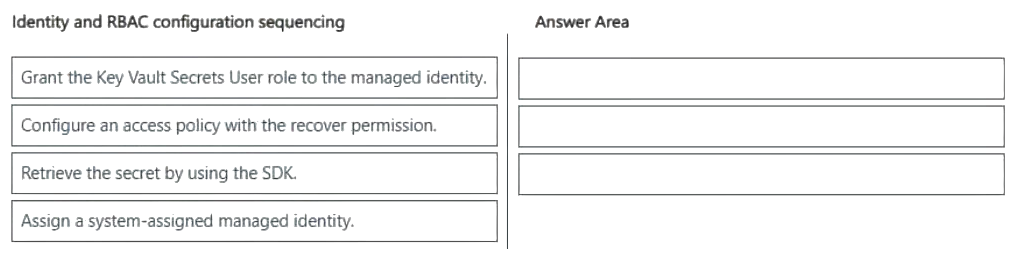
First assign a system-assigned managed identity to the container app, then grant that identity the Key Vault Secrets User role on the vault, and finally retrieve the secret from the application code using the SDK.
Question
You are deploying an AI service to ACA.
The service must retrieve secrets securely from Key Vault by using managed identity.
You need to configure secure access.
Which three actions should you perform in sequence? To answer, move the appropriate actions from the list of actions to the answer area and arrange them in the correct order.
Key Takeaways
It tests the dependency order of identity creation, RBAC authorisation and SDK retrieval — the trap is granting the role before an identity exists or to the wrong principal.
This AI-200 drag-drop tests the ordered path for letting an Azure Container App read Key Vault secrets: enable the system-assigned managed identity, grant it the Key Vault Secrets User role, then call the SDK to fetch the secret.
Common mistake: Assigning the Key Vault Secrets User role to your own user account or before creating the managed identity, which leaves the container app unauthorised at runtime and throws an authorisation error on the first secret read.
Expert Analysis
The required sequence The three steps must run in dependency order: (1) assign a system-assigned managed identity to the Azure Container App, (2) grant that identity the Key Vault Secrets User role on the Key Vault, and (3) retrieve the secret from code with the SDK, which then authenticates as that identity. Each step only becomes possible after the previous one exists.
Why identity comes first A comment captures the logic bluntly: "How can you retrieve the secrets if the identity has not been assigned yet?" Until the system-assigned identity is enabled on the container app, Azure has no principal to attach permissions to, and the app has no token source for Key Vault. Enabling the identity automatically creates a service principal whose credentials are rotated and held by Azure, so no secret ever appears in container environment variables or in the ACA revision definition.
Why role assignment — not an access policy
Key Vault access is authorised two ways: access policies or Azure RBAC. Modern Key Vault deployments, and the role name given here, point to RBAC. Key Vault Secrets User grants Get/List on secrets but deliberately excludes List on keys and certificates and excludes write operations. Choosing a broader role such as Key Vault Administrator, or configuring an access policy instead, breaks least-privilege and is a common distractor. Note also that the role must be granted to the managed identity of the container app, not to your own user account or to a client secret — assigning it to a human principal leaves the workload still unauthorised at runtime.
Where this breaks in production The typical failure mode is that deployment succeeds and the container starts, then the SDK call throws an authorisation error at first secret read. That is almost always a missing or mis-targeted role assignment, a wrong Key Vault name, or an identity granted on a different vault. Because RBAC assignments are eventually consistent, a retry/backoff in the SDK call matters. The adjacent decision is which identity type to use: a user-assigned identity would instead be created separately and referenced by resource ID, which changes step one but not steps two and three.
Operational consequence Getting the order wrong does not fail the deployment — it fails at runtime, after traffic is routed, which makes it a security and reliability incident rather than a build error.
Official Reference
- https://learn.microsoft.com/azure/container-apps/managed-identity
- https://learn.microsoft.com/azure/key-vault/general/rbac-guide
- https://learn.microsoft.com/azure/role-based-access-control/role-definitions
These links open the official vendor documentation in a new tab.
Exam Strategy
For sequence drag-drops, identify the resource that must exist before anything can reference it and place it first; permissions always follow the principal, and code execution follows both. Apply this to any identity question: creation → authorisation → usage. Also check whether the question names an RBAC role or an access policy, since that determines whether you are granting a role assignment or configuring vault settings.
Frequently Asked Questions
Why must the managed identity be assigned before the Key Vault role?
Which Key Vault role lets the container app read secrets only?
Would a user-assigned identity change the sequence?
Discussion 5 contributions
Compiled from public community threads and reader submissions, lightly edited for clarity. Handles and vote tallies are shown as recorded, and comments reflect the views of individual contributors.
From public community threads 5
-
bashrin 👍 22Assign managed identity → ACA gets an Azure identity. Grant Key Vault Secrets User role → that identity is authorized to read secrets. Retrieve the secret using the SDK → the application can now authenticate through the managed identity and access Key Vault.
-
joc_lefranc 👍 6How can you retrieve the secrets if the identity has not beed assigned yet? Duh
-
Yhohanes 👍 51. Assign system-assigned managed identity 2. Grant Key /vault Secrets User role to the managed Identity 3. Retrieve the secret using the SDK
-
LSCPY 👍 3Assign a system-assigned managed identity. Grant the Key Vault Secrets User role to the managed identity. Retrieve the secret by using the SDK.
-
kabeer_ 👍 1Correct options must be 1) Assign system-assigned managed identity 2) Grant Key /vault Secrets User role to the managed Identity 3) Retrieve the secret using the SDK
Reader comments & corrections
No reader corrections yet — spotted an error or have a note? Share it below.
Related Analysis
Practice All AI-200 Questions
Access 69 questions with complete answers and detailed explanations.
View Full AI-200 Practice Test →