Azure CLI Sequence for Container App Jobs
Short answer
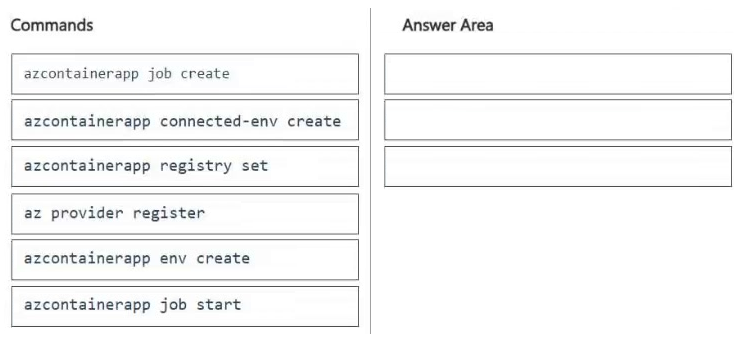
The correct sequence is: 1. az provider register, 2. az containerapp env create, 3. az containerapp job create.
Question
You create an Azure subscription. You then create an Azure resource group.
You plan to create a containerized task that will run as an Azure Container App in regular intervals.
You need to automate the process of creating the task in the resource group by using Azure CLI commands.
Which three commands should you arrange in sequence to develop the solution? To answer, move the appropriate commands from the list of commands to the answer area and arrange them in the correct order.
Key Takeaways
The common trap is attempting to create the job before the underlying environment exists; you must register the resource provider first, then provision the environment infrastructure, and finally define the job.
This question tests the correct Azure CLI command sequence to deploy a containerized job using Azure Container Apps. The solution requires registering the provider, creating an environment, and then deploying the job.
Common mistake: Learners often skip 'az provider register' or attempt to create the job immediately after defining variables, failing to realize that the Container Apps environment is a prerequisite resource that must exist before jobs can be attached to it.
Expert Analysis
Why the Answer Is Correct
The logical deployment order for Azure Container Apps jobs follows a strict dependency chain. First, you must run az provider register to ensure the Microsoft.ContainerInstance and Microsoft.App namespaces are active in the subscription. Second, you must use az containerapp env create to establish the Managed Environment (log analytics, VNet, etc.) which acts as the host for the apps and jobs. Finally, you use az containerapp job create to define the specific scheduled task within that environment.
Why Other Candidate Answers Are Wrong
Any sequence that places az containerapp job create before the environment creation will fail with a resource not found error. Similarly, skipping the provider registration step often results in authorization or namespace errors during the environment creation phase. Reordering these steps breaks the architectural dependency where the job is a child entity of the environment.
Community Comment Notes
Community consensus confirms this linear progression. As noted by user danyal456, the sequence is "az provider register az containerapp env create az containerapp job create". Another learner Ja13 reinforced this by listing the steps explicitly as A, B, and C in that specific order.
Exam Strategy
Always remember the 'Provider -> Infrastructure -> Resource' pattern when dealing with new Azure services. Before creating any custom resources like Container Apps jobs, ensure the feature is registered and the hosting environment is provisioned.
Frequently Asked Questions
Why do I need to register the provider manually?
Can I create a job without an environment?
Discussion 3 contributions
Compiled from public community threads and reader submissions, lightly edited for clarity. Handles and vote tallies are shown as recorded, and comments reflect the views of individual contributors.
From public community threads 3
-
TrxppBoii 👍 1az provider register --namespace Microsoft.App az containerapp env create az containerapp job create
-
Ja13 👍 1Correct order: A- az provider register B- az containerapp env create C- az container job create
-
danyal456 👍 1az provider register az containerapp env create az containerapp job create
Reader comments & corrections
No reader corrections yet — spotted an error or have a note? Share it below.