Implementing Azure Cosmos DB Stored Procedure Triggers
Short answer
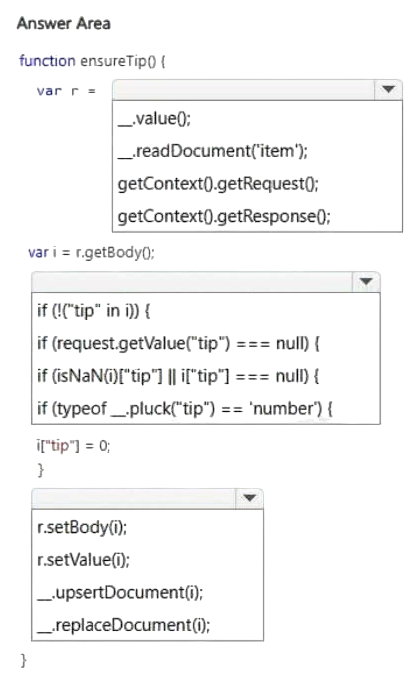
Use getContext().getRequest() to get the request, check if !("tip" in i), and then call r.setBody(i) to save the default value.
Question
You have a web service that is used to pay for food deliveries. The web service uses Azure Cosmos DB as the data store.
You plan to add a new feature that allows users to set a tip amount. The new feature requires that a property named tip on the document in Azure Cosmos DB must be present and contain a numeric value.
There are many existing websites and mobile apps that use the web service that will not be updated to set the tip property for some time.
How should you complete the trigger?
NOTE: Each correct selection is worth one point.
Key Takeaways
The question tests the ability to use JavaScript within a Cosmos DB stored procedure to check for property existence and modify the request body before persistence.
Learn how to implement a pre-trigger in Azure Cosmos DB stored procedures to enforce data integrity by setting default values for missing properties.
Common mistake: Learners often confuse trigger types or fail to understand that the `body` of the request must be explicitly updated using `setBody` to persist changes.
Expert Analysis
Why the Answer Is Correct
The solution requires identifying the correct JavaScript context and methods within an Azure Cosmos DB stored procedure. First, you must access the current operation's request object using getContext.getRequest. Next, you need to validate the document payload (typically accessed via request.getBody or directly as i in some templates) to check if the 'tip' property exists. The standard way to check for a property in a JSON-like object is if (!('tip' in i)). If the property is missing, you set a default value (e.g., 0). Finally, because the request object is immutable by default, you must call r.setBody(i) to update the request with the modified document so that the change is persisted to the database.
Why Other Candidate Answers Are Wrong
Alternative selections might involve incorrect API calls like get.Context which is syntactically invalid in this context, or failing to call setBody, which results in the modification being ignored. Some might incorrectly attempt to throw an error instead of providing a default, which would break existing clients that don't send the tip property.
Community Comment Notes
As Ja13 noted, the correct sequence involves getting the request context, checking for the key, and setting the body. MrTeacher confirmed that getContext.getRequest retrieves the operation object and r.setBody(i) overwrites the request body to ensure the new value is saved.
Exam Strategy
Review the Azure Cosmos DB stored procedure API documentation, specifically focusing on how to manipulate the request object and when to call setBody to persist changes in triggers.
Frequently Asked Questions
Why do I need to call setBody in a Cosmos DB trigger?
How do I check if a property exists in a Cosmos JS stored procedure?
Discussion 2 contributions
Compiled from public community threads and reader submissions, lightly edited for clarity. Handles and vote tallies are shown as recorded, and comments reflect the views of individual contributors.
From public community threads 2
-
MrTeacher 👍 1getContext().getRequest();: Retrieves the current operation request object in Azure Cosmos DB, which allows you to inspect and modify the document being created or updated.if (!("tip" in i)) {: Uses native JavaScript to check if the "tip" property does not exist inside the document object (i). If missing, it executes the code to initialize it to 0.r.setBody(i);: Overwrites the original request body with the modified document. Without this line, the changes made to the variable i are discarded and never saved to the database.
-
Ja13 👍 1CORRECT ANSWERS: A) get.Context().getRequest(); B) if (!("tip" in i)) { C) r.setBody(i);
Reader comments & corrections
No reader corrections yet — spotted an error or have a note? Share it below.