Azure Cosmos DB Session Consistency and TTL Configuration
Short answer
Set the account consistency level to Session Consistency and set the container's default Time to Live (TTL) property to -1.
Question
A company has an Azure Cosmos DB for NoSQL account. The account is configured for session consistency. Data is written to a single Azure region and data can be read from three Azure regions.
An application that will access the Azure Cosmos DB for NoSQL container data using an SDK has the following requirements:
• Reads from the application must return the most recent committed version of an item from any Azure region.
• The container items should not automatically be deleted.
You need to implement the changes to the Azure Cosmos DB for NoSQL account.
What should you do? To answer, select the appropriate options in the answer area.
NOTE: Each correct selection is worth one point.
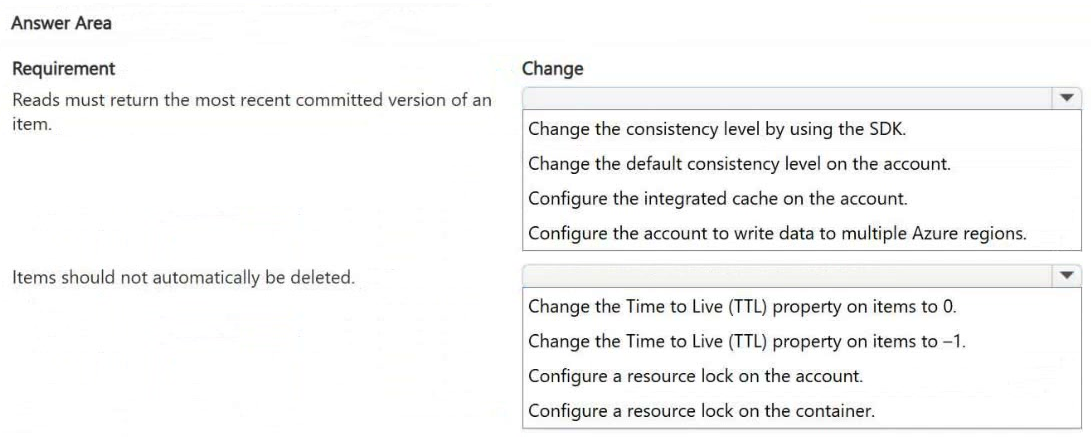
Key Takeaways
The question requires maintaining strong data visibility (Session Consistency) while preventing automatic expiration of items, which is achieved by setting the TTL property to -1.
This scenario tests configuring Azure Cosmos DB for NoSQL to ensure session consistency across regions and disabling automatic item deletion via Time to Live (TTL).
Common mistake: Learners often confuse Account-level consistency settings with Container-level TTL settings. A common error is attempting to disable TTL at the account level rather than configuring the specific container's default TTL property to -1.
Expert Analysis
Why the Answer Is Correct
To satisfy the requirement that reads return the most recent committed version from any region, the account must maintain Session Consistency. This is the default behavior but must be explicitly selected or confirmed in hotspot questions to ensure cross-region read visibility. To prevent items from being automatically deleted, you must configure the Time to Live (TTL) property on the container. Setting the default TTL to -1 explicitly disables automatic expiration for all items in that container unless individual items have a specific positive TTL value set.
Why Other Candidate Answers Are Wrong
Selecting a weaker consistency level like 'Eventual' would fail the first requirement because it does not guarantee that a read immediately after a write will see the latest committed version. Configuring the TTL to '0' or leaving it undefined (depending on the specific SDK/version context, though usually undefined means no default) might lead to confusion, whereas -1 is the definitive setting to turn off the feature. Changing the replication policy to single-region would violate the architecture described (3 regions).
Community Comment Notes
The community consensus strongly supports the solution provided by user Ja13. As Ja13 noted, "Reads must return the most recent committed version" maps directly to the consistency level settings, and "Items should not automatically be deleted" maps directly to changing the TTL property to -1. There is significant agreement on this interpretation of the hotspot slots.
Official Reference
https://learn.microsoft.com/en-us/azure/cosmos-db/consistency-levels
This link opens the official vendor documentation in a new tab.
Exam Strategy
Always distinguish between Account-level configurations (like Consistency Level) and Container-level configurations (like Default TTL). For 'no deletion' requirements in Cosmos DB, remember that -1 is the magic number for disabling TTL.
Frequently Asked Questions
What does setting TTL to -1 mean in Azure Cosmos DB?
Why is Session Consistency required for cross-region reads?
Discussion 1 contributions
Compiled from public community threads and reader submissions, lightly edited for clarity. Handles and vote tallies are shown as recorded, and comments reflect the views of individual contributors.
From public community threads 1
-
Ja13 👍 1CORRET ANSWERS: A -Reads must return the most recent committed version of an item. ------ -------- Change the default consistency level on the account. B - Items should not automatically be deleted ------------------- ----------Change the Time to Live (TTL) property on items to -1.
Reader comments & corrections
No reader corrections yet — spotted an error or have a note? Share it below.