How Do You Configure a Custom HTTPS Domain in Azure Container Apps?
DRAG DROP
You are developing several microservices to run on Azure Container Apps.
The microservices must allow HTTPS access by using a custom domain.
You need to configure the custom domain in Azure Container Apps.
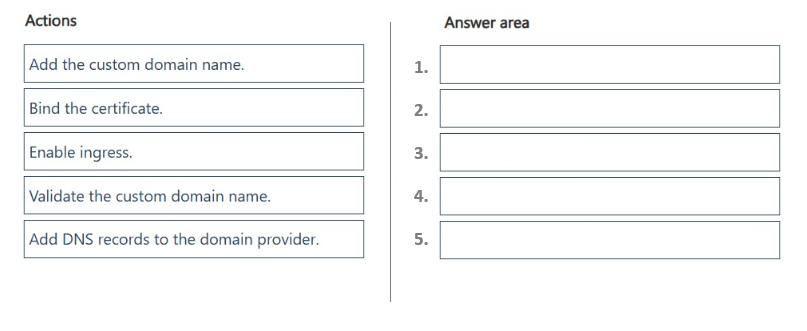
In which order should you perform the actions? To answer, move all actions from the list of actions to the answer area and arrange them in the correct order.
Community Insight
The exam tests the prerequisite chain for Azure Container Apps custom domains, and the trap is treating DNS record creation or validation as the first step before ingress and domain registration.
Configuring a custom HTTPS domain for Azure Container Apps requires enabling ingress, registering the domain, publishing DNS records, validating ownership, and binding a certificate. This guide establishes the correct five-step order and explains why each prerequisite must precede the next.
A frequent mistake is adding DNS records or validating the domain before enabling ingress and adding the custom domain name, which leaves Azure without the verification target or records it expects.
Community Discussion (5 comments)
Comments & Corrections
No comments yet — spotted an error or have a note? Share it below.
Expert Analysis
Why the Answer Is Correct
Azure Container Apps only exposes an HTTPS endpoint once ingress is enabled, so ingress is the first prerequisite. After ingress, you add the custom domain name in the Container App, which causes Azure to generate the verification values your DNS host needs. You then add the required CNAME or TXT records at the domain provider, validate the domain, and finally bind the certificate. As 130nk3r5's comment shows with the Microsoft Learn link, this sequence follows the portal's "Add a custom domain and certificate" flow. The same chain is described by insanewriters, who notes you must "Enable ingress" before any domain or certificate can be bound.Why Other Candidate Answers Are Wrong
The reversed sequence proposed by bashrin is invalid because putting ingress last means the Container App is not publicly reachable when you try to add or validate the hostname. It also places DNS record creation before the custom domain name is added, so you would not yet know which verification records Azure requires. nmatnoh's order performs validation and certificate binding before adding DNS records, which cannot succeed because validation depends on those records. These alternatives skip the prerequisite chain even though each individual action looks plausible.Community Comment Notes
insanewriters and MuhammadSaqib both focus on enabling ingress first, and 130nk3r5 explicitly lists the full five-step order and links to the Microsoft Learn custom domains and certificates article. insanewriters also explains that DNS records must be added at the domain provider before Azure can validate. bashrin's answer is a useful warning sign because it advocates "Enabling ingress" as the last step, which contradicts the documented prerequisite. nmatnoh's ordering is the clearest example of the validation-before-DNS trap.Official Reference
Exam Strategy
Anchor on prerequisites: ingress must be on before Azure can associate any hostname, and DNS records can only be created after the custom domain name is added so Azure generates the verification values. Then validate ownership before binding the managed certificate.
Frequently Asked Questions
Does Azure Container Apps ingress have to be enabled before I add a custom domain?
Yes. Ingress must expose the app before Azure Container Apps can associate a custom hostname or certificate with it, so enable ingress first.
When do I add DNS records versus validate the custom domain in Azure Container Apps?
Add the custom domain name first so Azure generates the required verification values, publish those DNS records at your provider, then validate the domain and bind the certificate.