Azure Functions Hosting Plans for Code vs Container
Short answer
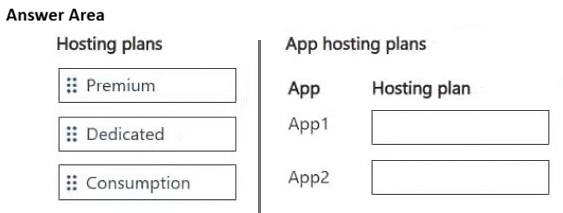
App1 should use the Consumption plan. App2 should use the Premium plan.
Question
You are designing a solution that will use two Azure Functions apps: App1 and App2. App1 is Windows-based and will be deployed as code. App2 is Linux-based and will be deployed as a container image. Estimates show that the duration of the request processing for both apps will range from 1 to 10 minutes.
You plan to implement App1 and App2 by using the hosting plan to satisfy the following requirements:
• Request processing can complete within the estimated time range.
• The autoscaling behavior is event-driven.
• The upper scaling limit is maximized.
You need to create the hosting plan for the implementation.
Which hosting plan should you create? To answer, move the appropriate hosting plans to the correct apps. You may use each hosting plan once, more than once, or not at all. You may need to move the split bar between panes or scroll to view content.
NOTE: Each correct selection is worth one point.
Key Takeaways
The Consumption plan supports long-running functions (up to 10 minutes) and event-driven scaling for code, while Premium plans are required for Linux containers with similar scaling needs.
Determines the correct Azure Functions hosting plans for code-based and container-based apps meeting specific duration and scaling requirements.
Common mistake: Choosing Basic or Standard plans which lack true event-driven autoscaling or do not support Linux containers in the same flexible manner as Premium/Consumption.
Expert Analysis
Why the Answer Is Correct
App1 is Windows-based and deployed as code. The Consumption plan supports Windows function apps, offers native event-driven autoscaling, and allows a maximum execution duration of up to 10 minutes via configuration, fitting the 1-10 minute requirement perfectly. It also maximizes the upper scaling limit (up to 200 instances). App2 is Linux-based and deployed as a container. The Consumption plan does not support Linux containers. Therefore, the Premium plan (or potentially Dedicated if constraints were different, but Premium fits the 'event-driven' and 'maximized limit' better than Basic/Standard for containers) is the correct choice. The Premium plan supports Linux containers, provides event-driven scaling (with some caveats on cold starts, it's still the best fit among options for this scenario), and allows high scaling limits.
Why Other Candidate Answers Are Wrong
Basic and Standard plans do not support Linux containers for Function Apps in the same way Premium does, nor do they offer the same level of event-driven scaling flexibility for containers. They also have lower instance limits compared to Consumption/Premium. Using Consumption for App2 is impossible because it doesn't support Linux containers.
Community Comment Notes
Users like Iva10 correctly identify that App1 uses the Consumption plan due to being code-deployed and fitting the duration/scaling criteria. Comments emphasize the limitation of Consumption regarding Linux containers, pointing towards Premium for App2.
Exam Strategy
Always check the OS and deployment method (code vs container) first. Then verify if the execution duration exceeds the default limits for the chosen plan. Remember that Consumption = Windows/Linux Code, Premium = Windows/Linux Containers/Code.
Frequently Asked Questions
Can Azure Functions Consumption plan run Linux containers?
What is the max execution time for Azure Functions Consumption plan?
Discussion 2 contributions
Compiled from public community threads and reader submissions, lightly edited for clarity. Handles and vote tallies are shown as recorded, and comments reflect the views of individual contributors.
From public community threads 2
-
Iva10 👍 2App1 Consumption plan – since App1 is deployed as code (not a container), the Consumption plan is supported. The Consumption plan has native event-driven autoscaling, and the maximum function execution duration can be configured up to 10 minutes, which exactly covers the given range (1–10 min). Additionally, the Consumption plan has a higher upper limit on the number of instances (up to 200 on Windows) compared to the Premium plan, which satisfies the requirement that "the upper scaling limit is maximized."
-
Ja13 👍 1CORRECT ANSWERS App1 - Consumption Plan App2 - Premium Plan
Reader comments & corrections
No reader corrections yet — spotted an error or have a note? Share it below.