Azure App Configuration Key-Value and Feature Flags
DRAG DROP
A company has an Azure subscription named Sub1. Sub1 contains an App Configuration store named AppConfig1.
You plan to implement an App Service web app named App1, which will be accessed by users in your organization. App1 will have a dev, test, and prod instance. Each web app instance will connect to a different back-end API endpoint. For each web app instance, you plan to assign a different layout of webpages to different groups of users based on their department.
The implementation must ensure that:
• API endpoint details are stored in the JSON format and encrypted with a custom key.
• User assignments of layout pages can be changed without any web app code modifications.
You need to configure AppConfig1 to support your implementation.
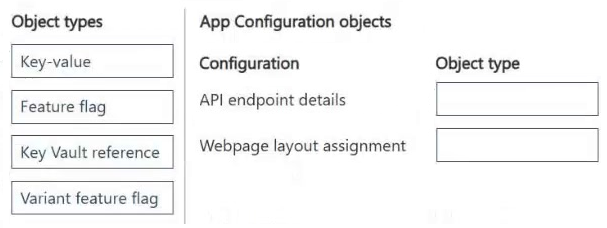
What should you create in AppConfig1? To answer, move the appropriate object types to the correct configurations. You may use each object type once, more than once, or not at all. You may need to move the split bar between panes or scroll to view content.
NOTE: Each correct selection is worth one point.
Community Insight
The question tests the distinction between static data storage (Key-Value) for encrypted secrets and dynamic UI control (Feature Flag) for A/B testing layouts without code changes.
Learn how to configure Azure App Configuration for JSON API endpoints using Key-Value pairs and dynamic layout assignments using Variant Feature Flags. This guide explains the correct drag-and-drop mapping for secure, code-free configuration management.
Learners often confuse 'Key-Value' with 'Configuration Settings' or attempt to use Feature Flags for storing raw JSON data, failing to recognize that Feature Flags are specifically designed for boolean or variant-based feature toggles.
Community Discussion (1 comments)
Comments & Corrections
No comments yet — spotted an error or have a note? Share it below.
Expert Analysis
Why the Answer Is Correct
To store API endpoint details in JSON format that are encrypted, you must create a Key-value pair. Azure App Configuration stores these as key-value pairs, and encryption is handled at the store level using customer-managed keys, which protects the values. To change webpage layouts for different user groups without modifying code, you should use a Variant feature flag. Feature flags allow you to toggle features or variants (like different layouts) dynamically based on user attributes or percentages, decoupling deployment from release.Why Other Candidate Answers Are Wrong
Other potential objects like simple 'Configuration Settings' do not offer the specific capability for variant-based A/B testing required for the layout assignment. Using Key-value pairs for layout logic would require code changes to read and interpret complex JSON structures for routing, violating the requirement for zero-code modifications. There are no other object types in App Configuration that support this specific dynamic segmentation natively.Community Comment Notes
Community consensus confirms that Key-value pairs are used for the JSON storage because they support custom content types and are protected by the store's encryption settings. As noted by user Ja13, the encryption applies to values in key-value pairs when customer-managed keys are enabled. The Variant feature flag is correctly identified for the layout assignment because it allows for splitting traffic or users into different groups seamlessly.Exam Strategy
Always match the data type to the usage pattern: use Key-Value for configuration data/secrets and Feature Flags for runtime behavior toggles. Remember that encryption in App Configuration is a store-level setting, but the container for the data is the Key-Value pair.
Frequently Asked Questions
How does Azure App Configuration encrypt Key-Value data?
Encryption is applied at the store level using Customer-Managed Keys (CMK). When enabled, all values stored in Key-Value pairs are automatically encrypted.
Can I use Key-Value pairs for A/B testing layouts?
No. While you can store layout configurations, Feature Flags are designed for dynamic toggling and segmentation. Key-Values require code changes to evaluate and apply variations.