Testing Custom API Tools in Azure AI Agents
Short answer
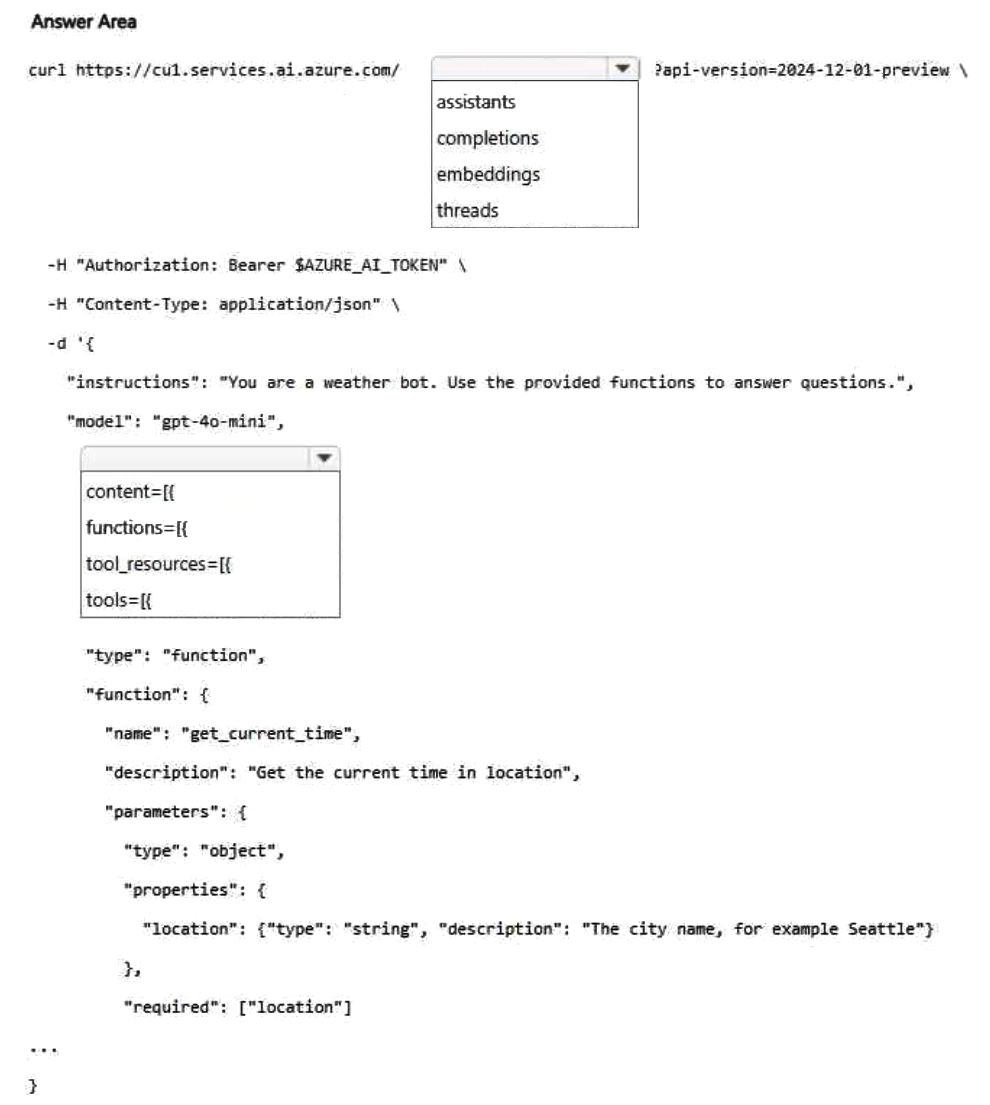
Select the option that invokes the custom tool (e.g., 'get_current_time') with the correct argument representing the location (e.g., 'location="[Location]"').
Question
You are building an agent that will retrieve the current time at a given location by using a custom API.
You need to test the functionality of the custom API.
How should you complete the command? To answer, select the appropriate options in the answer area.
NOTE: Each correct selection is worth one point.
Key Takeaways
Agents use tool definitions to call APIs; testing requires verifying the correct function name and argument structure are passed during invocation.
Learn how to test custom API integrations in Azure AI Foundry agents by correctly invoking tool functions with appropriate arguments like location.
Common mistake: Users often attempt to call the raw HTTP endpoint directly instead of using the defined tool interface, which breaks the agentic workflow and error handling.
Expert Analysis
The scenario involves building an AI agent in Azure Foundry that needs to interact with external tools, specifically a custom API to retrieve the current time. The core concept here is Function Calling (or Tool Use), where the LLM is equipped with definitions of external functions it can execute.
To test the functionality of this custom API within the agent's context, you must ensure the agent can correctly invoke the tool and process its output. In the Azure AI Foundry environment (and generally in agentic frameworks like LangChain or Semantic Kernel which underpin these scenarios), the command structure for invoking a tool typically involves specifying the tool name and the necessary arguments.
The question asks how to complete the command to test the API. The key steps are:
- Identify the Tool: The agent must know about the "get_current_time" function. This is usually defined in the system prompt or tool configuration.
- Invoke the Tool: The command to execute the tool requires the specific argument needed by the API. Since the goal is to get the time at a given location, the argument must be the location string.
Therefore, the correct selection involves choosing the option that specifies the correct tool invocation syntax with the appropriate parameter. Typically, this looks like calling the function get_current_time with a parameter such as location="New York" or similar. The "HOTSPOT" nature implies selecting the correct JSON structure or code snippet that represents this call. The critical insight is that the agent does not just call the URL directly; it calls the abstracted function defined for it, passing the required data (the location) as a structured argument.
Common mistakes include trying to hardcode the API endpoint URL directly in the LLM prompt without using the tool definition mechanism, or passing incorrect argument types. The correct approach leverages the agent's ability to map natural language requests to specific tool parameters.
Exam Strategy
When faced with HOTSPOT questions involving agent tools, focus on the interface between the LLM and the tool. Identify the tool name from the context and the mandatory arguments required by the API signature. Ensure your selected answer reflects a structured tool call (like JSON) rather than a raw HTTP request.
Frequently Asked Questions
What is the difference between a tool and an API in this context?
How do I define a custom tool in Azure AI Foundry?
Discussion 2 contributions
Compiled from public community threads and reader submissions, lightly edited for clarity. Handles and vote tallies are shown as recorded, and comments reflect the views of individual contributors.
From public community threads 2
-
vvvvvqw 👍 1How many questions you got from this set?
-
niau 👍 1found in exam today
Reader comments & corrections
No reader corrections yet — spotted an error or have a note? Share it below.
Related Analysis
Practice All AI-103 Questions
Access 88 questions with complete answers and detailed explanations.
View Full AI-103 Practice Test →