Azure Custom Vision: ordered steps to detect factory component faults
Short answer
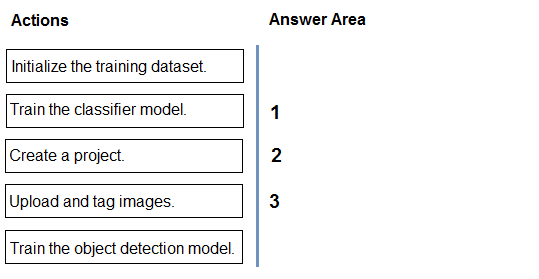
In order: create a Custom Vision project, upload and tag the component images (e.g. faulty vs non-faulty), then train the classifier model.
Question
DRAG DROP
You are developing an application that will detect faulty components produced on a factory production line. The components are specific to your business.
You need to use the Azure Custom Vision API to help detect common faults.
Which three actions should you perform in sequence? To answer, move the appropriate actions from the list of actions to the answer area and arrange them in the correct order.
Key Takeaways
The task tests the three-step Custom Vision workflow — project creation, image upload and tagging, then training — and the trap is choosing object detection instead of classification when you only need to sort components into faulty vs. non-faulty.
For business-specific faulty-component detection with the Azure Custom Vision service, you build a classification project, supply labelled images, and then train the model. The required sequence is: create a project, upload and tag images, then train the classifier model.
Common mistake: Selecting 'Train the object detection model' instead of the classifier. Object detection locates and draws bounding boxes around multiple objects within an image, whereas this scenario only requires categorizing each whole component, which is exactly what an image classifier does.
Expert Analysis
Why the Answer Is Correct
The scenario requires detecting common faults on business-specific components, which means no pre-trained model can be reused — you must train your own. Custom Vision always starts with project creation, where you choose the project type (Classification or Object Detection) and the domain that matches your content. Next you upload images of the components and apply tags such as "faulty" and "non-faulty", because the training pipeline is entirely supervised and the tags are the labels. Only after a labelled image set exists does training run, producing a classifier model that you can then query via the prediction endpoint. So the only logical order is create a project → upload and tag images → train the classifier model.Why Other Candidate Answers Are Wrong
Because this is a drag-and-drop item there are no option letters, but any sequence that begins with training or that uploads images before the project exists is invalid: a project must be created first to define the type, domain and iteration settings that the images will be attached to. Likewise, any answer placing image upload before tagging at the end, or tagging after training, misrepresents the supervised-learning dependency — the tags become the training labels, so they must be applied before the model is trained. Finally, choosing object detection over the classifier is wrong for this design: object detection is only required when you need to locate and bound multiple distinct objects inside a single image, not when every image is one component to be categorised.Community Comment Notes
Az301301X, the most up-voted contributor, gave the same ordering and explained the key reasoning: "You're classifying components (faulty vs non‑faulty), not locating multiple objects in an image, so classifier—not object detection—is the right choice." ArindamPal independently posted the identical three-step sequence, so the community consensus matches the official Custom Vision workflow with no dissenting ordering offered.Official Reference
Exam Strategy
Read the whole list before dragging: Custom Vision questions almost always hinge on the order project → labelled data → training. Also check whether the scenario needs bounding boxes around objects; if it only needs a category, always pick the classification (classifier) training action.
Frequently Asked Questions
Why do you train a classifier and not an object detection model for faulty components?
Each image contains one whole component that simply needs to be sorted into faulty or non-faulty. Object detection is only needed when you must locate and box multiple distinct objects inside an image.
Why must the images be tagged before training in Custom Vision?
Custom Vision training is supervised: the tags you apply to uploaded images become the labels the model learns from, so an untagged or untrained set cannot produce a model.
Discussion 2 contributions
Compiled from public community threads and reader submissions, lightly edited for clarity. Handles and vote tallies are shown as recorded.
From public community threads 2
-
Az301301X 👍 6Put Train the classifier model as number 3. The correct full sequence is: 1. Create a project 2. Upload and tag images 3. Train the classifier model Here you’re classifying components (faulty vs non‑faulty), not locating multiple objects in an image, so classifier—not object detection—is the right choice.
-
ArindamPal 👍 1The correct full sequence is: 1. Create a project 2. Upload and tag images 3. Train the classifier model
Reader comments & corrections
No reader corrections yet — spotted an error or have a note? Share it below.
Related Analysis
Practice All AI-103 Questions
Access 88 questions with complete answers and detailed explanations.
View Full AI-103 Practice Test →