Running Azure AI Language Containers On-Premises
Short answer
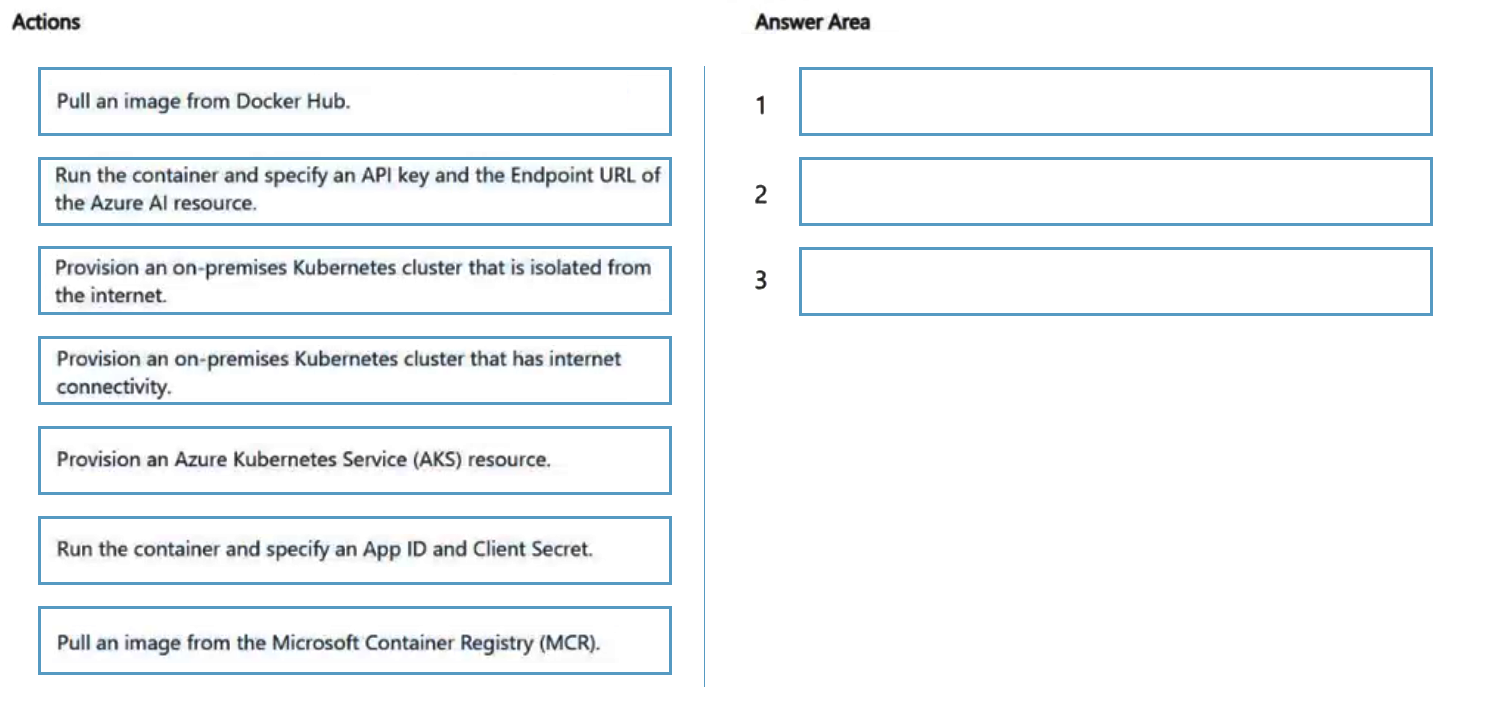
Provision an on-premises Kubernetes cluster with internet connectivity, pull the Azure AI Language container image from the Microsoft Container Registry (MCR), then run the container specifying the Azure AI resource's API key and Endpoint URL.
Question
You are building an app that will scan confidential documents and use the Azure Language in Foundry Tools service to analyze the contents.
You provision a Microsoft Foundry Service resource.
You need to ensure that the app can make requests to the Azure Language in Foundry Tools service endpoint. The solution must ensure that confidential documents remain on-premises.
Which three actions should you perform in sequence? To answer, move the appropriate actions from the list of actions to the answer area and arrange them in the correct order.
Key Takeaways
It tests knowledge of the Azure AI Language container pattern — MCR as the image source and the mandatory ApiKey plus Endpoint runtime settings — with the trap being that the internet-connected cluster must be on-premises, not AKS.
This AI-103 drag-drop tests the hybrid container deployment of Azure AI Language, where analysis runs on-premises while only authentication and usage telemetry go to Azure. The required order is: create an internet-connected on-premises Kubernetes cluster, pull the image from MCR, then run the container with the resource API key and endpoint URL.
Common mistake: Choosing Azure Kubernetes Service (AKS) or any Azure-hosted cluster, which puts document processing in the cloud and breaks the on-premises confidentiality requirement; a second common error is pulling the image from Docker Hub instead of mcr.microsoft.com.
Expert Analysis
Core requirement
The app must call the Azure AI Language endpoint while confidential documents never leave your own datacenter. The only architecture that satisfies both halves is the hybrid container deployment model: the language analysis itself runs on-premises in the container, and the container reaches Azure only to authenticate and report usage. That means the answer is an ordered three-step set: (1) provision an on-premises Kubernetes cluster that has outbound internet connectivity, (2) pull the Language container image from the Microsoft Container Registry (MCR), and (3) run the container while passing the ApiKey and the Endpoint of your Foundry (Azure AI) resource.
Why each step is required
The internet connection on the on-prem cluster is not optional — billing and usage reporting are sent to Azure, so air-gapped clusters cannot run these containers. The image comes from mcr.microsoft.com/azure-ai-*, never Docker Hub; only the container image is hosted publicly, the document content is not. At runtime the two mandatory settings are ApiKey=<your-key> and Endpoint=<your Azure AI resource endpoint>; without both the container will not start its inferencing server on the specified --add-port value.
The adjacent decision The same objective also covers the alternative: a fully managed, cloud-hosted Language resource with no container at all. Choose that when documents are not confidential and you want zero infrastructure. Choose the container path only when data residency or on-premises processing is mandated — and remember that only a subset of Language features (for example, text analytics, custom NER, PII, and language detection) is available as containers; features such as conversational language understanding and question answering are service-only in many regions. Verify the feature's container support before committing.
What would flip the answer If the question removed the "confidential documents remain on-premises" clause, an AKS or any Azure-hosted cluster would be acceptable. If it removed the internet-connectivity requirement, the deployment would fail because usage reporting cannot reach the Azure billing endpoint. Comments on this item reinforce the ordering: provision the on-prem cluster first with internet access, pull from MCR second, then run the container with the API key and endpoint URL third — and avoid AKS, which places processing in the cloud.
Operational consequence of getting it wrong Pulling from Docker Hub yields an unverified or missing image; omitting the endpoint or key causes the container to refuse startup; and hosting the workload on AKS silently violates the confidentiality requirement while appearing technically correct.
Official Reference
https://learn.microsoft.com/azure/ai-services/language-service/how-to/install-language-container
This link opens the official vendor documentation in a new tab.
Exam Strategy
For drag-drop sequencing questions, anchor on the hard constraints first: here, 'on-premises' rules out any Azure-hosted cluster, and container-based language services always require an outbound internet path for billing. Then order actions as infrastructure → artifact acquisition → execution with configuration, since the container cannot be pulled before the cluster exists and cannot serve requests before ApiKey and Endpoint are supplied. Apply the same pattern to other hybrid/AI Foundry container scenarios.
Frequently Asked Questions
Why does the on-premises Language container need internet connectivity?
Where do I get the Azure AI Language container image?
Which settings are required when starting the Language container?
Discussion 2 contributions
Compiled from public community threads and reader submissions, lightly edited for clarity. Handles and vote tallies are shown as recorded, and comments reflect the views of individual contributors.
From public community threads 2
-
MarceloManhaes 👍 6Correct sequence: - Provision an on-premises Kubernetes cluster that has internet connectivity. The container needs to have internet connectivity for billing/usage purposes - Pull an image from the Microsoft Container Registry (MCR). Azure AI Language containers are distributed through MCR, not Docker Hub. - Run the container and specify an API key and the Endpoint URL of the Azure AI resource. Language containers require: ApiKey Billing (endpoint URI) Eula=accept when started.
-
8ac3742 👍 1kubenetes with internet connection -> pull image from MCR -> run container with API key and endpoint URL Host environment selectionThe requirement explicitly states that "confidential documents remain on-premises."Azure Kubernetes Service (AKS) is a cloud-hosted managed service in Azure, so running workloads on AKS would upload/process the data in the cloud, violating the on-premises requirement.Connected Cognitive Services / Azure AI containers require outbound access to Azure for billing and metering verification. A cluster that is entirely isolated from the internet would prevent the container from communicating with the metering endpoint (Billing=...), causing it to fail startup. Therefore, you must provision an on-premises Kubernetes cluster that has internet connectivity (so billing pings succeed while document data remains local).
Reader comments & corrections
No reader corrections yet — spotted an error or have a note? Share it below.
Related Analysis
Practice All AI-103 Questions
Access 88 questions with complete answers and detailed explanations.
View Full AI-103 Practice Test →