Rotate a compromised Azure AI Search query key without downtime
Short answer
Add a new query key, then change the web app to use the new key, then delete the compromised key. The app keeps authenticating with a query key, which by design grants only read access to the documents collection.
Question
You have a web app that uses Azure AI Search.
When reviewing activity you see greater than expected search query volumes. You suspect that the query key is compromised.
You need to prevent unauthorized access to the search endpoint and ensure that users only have read only access to the documents collection. The solution must minimize app downtime.
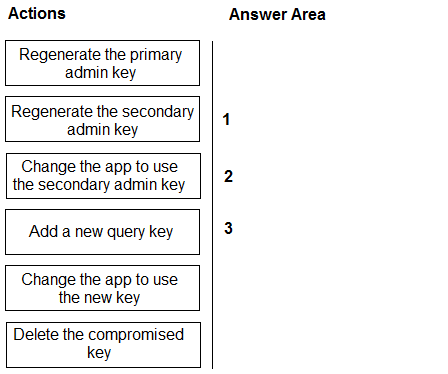
Which three actions should you perform in sequence? To answer, move the appropriate actions from the list of actions to the answer area and arrange them in the correct order.
Key Takeaways
It tests whether you sequence key rotation to avoid downtime — add the replacement before revoking — while recognising that read-only document access comes from using a query key rather than an admin key.
This AI-103 question tests zero-downtime rotation of a suspected-compromised Azure AI Search query key: create a new query key, repoint the web app to it, then delete the old key. Because query keys are inherently read-only, the same sequence satisfies the read-only requirement on the documents collection.
Common mistake: Deleting the compromised key first: the app immediately starts receiving 401 Unauthorized responses and stays down until a replacement key is generated and deployed, breaking the minimize-downtime constraint.
Expert Analysis
Where the boundary lies
The decision turns on one distinction: rotating a secret additively versus revoking it first. Azure AI Search key rotation is not atomic across the two systems involved — the search service and the web app that calls it. Adding a new query key, then repointing the app, then deleting the compromised key keeps the endpoint continuously reachable at every step. Deleting the compromised key first leaves the production app holding a credential the service no longer accepts, so every search request returns 401 Unauthorized until a replacement key exists and the app is redeployed — precisely the downtime the requirement forbids. As one learner note puts it, deleting first means the app "immediately loses access and begins throwing 401 Unauthorized errors." Zero-downtime rotation therefore always sequences add → switch → delete.
Read-only is inherent, not a separate step
The second requirement — users holding only read-only access to the documents collection — is satisfied by the key type, not by an extra permission action. In Azure AI Search, query keys are restricted to read operations (search, autocomplete, suggest, document lookup) and cannot add, update, or delete documents; admin keys carry full index and service rights. Because the app authenticates with a query key, read-only access is already enforced — the fix is to stay on a query key rather than escalate to an admin key. That is why the correct sequence contains no role or ACL step.
The correct sequence
- Add a new query key.
- Change the app to use the new query key.
- Delete the compromised key.
Official Reference
- https://learn.microsoft.com/en-us/azure/search/search-security-api-keys
- https://learn.microsoft.com/en-us/azure/search/search-security-best-practices
These links open the official vendor documentation in a new tab.
Exam Strategy
On drag-drop ordering questions, read the non-functional constraint first — here "minimize app downtime" — because it alone fixes the direction of any secret-rotation sequence: never delete before the replacement is live. Then treat the second requirement (read-only document access) as a filter on the action list: in Azure AI Search, read-only is a property of the query key itself, so discard any action that adds roles, permissions, or admin-key changes. Order remaining actions as create → apply → remove.
Frequently Asked Questions
Why not delete the compromised Azure AI Search key first?
Do I need to change permissions so users get read-only access?
Should I rotate the admin key too when a query key is compromised?
Discussion 2 contributions
Compiled from public community threads and reader submissions, lightly edited for clarity. Handles and vote tallies are shown as recorded, and comments reflect the views of individual contributors.
From public community threads 2
-
Alvarogc 👍 13The order shown could cause service disruption. To minimize downtime, the correct sequence should be: 1. Add a new query key 2. Change the app to use the new query key 3. Delete the compromised key
-
8ac3742 👍 1Add a new query key Change the app to use the new key Delete the compromised key Why Not "Delete First"?If you delete the compromised key first, your production app immediately loses access and begins throwing 401 Unauthorized errors until you generate and deploy the replacement key. That creates avoidable downtime.
Reader comments & corrections
No reader corrections yet — spotted an error or have a note? Share it below.
Related Analysis
Practice All AI-103 Questions
Access 88 questions with complete answers and detailed explanations.
View Full AI-103 Practice Test →