Polling Azure Vision Read OCR until it completes
Short answer
AD Check read_result.status and poll get_read_result inside a delayed loop until the read operation completes.
Question
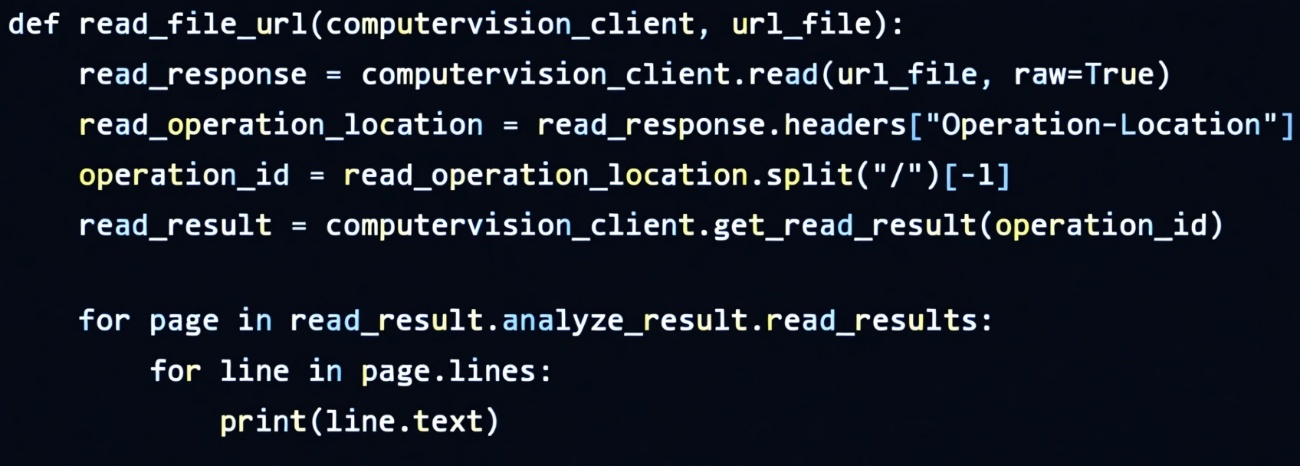
During testing, you discover that the call to the get_read_result method occurs before the read operation is complete.
You need to prevent the get_read_result method from proceeding until the read operation is complete.
Which two actions should you perform? Each correct answer presents part of the solution.
NOTE: Each correct selection is worth one point.
Key Takeaways
The exam tests the async polling pattern: the trap is assuming get_read_result blocks, or polling the operation location URL instead of the returned status.
Azure Vision Read OCR results are fetched asynchronously, so get_read_result returns before analysis finishes. The correct fix is to check read_result.status inside a loop with a delay until the operation succeeds.
Common mistake: Option B is the most tempting wrong choice: read_operation_location is just the submitted operation's URL and carries no completion signal, so verifying it never prevents premature reads.
Expert Analysis
The polling boundary. The Azure Vision Read (OCR) API is asynchronous: you start an analysis, receive an operation_id, and then call get_read_result(operation_id) to fetch the current state. That method always returns immediately with a snapshot — it never blocks until the server finishes. The trap is believing the initial call itself can be made to wait; it cannot. Waiting is the caller's responsibility, which is why option C (removing operation_id) is wrong: without the operation identifier the client cannot locate the job at all, and removing it does nothing to make the call synchronous.
What actually gates completion. The ReadResult object returned by get_read_result carries a status property with values such as notStarted, running, succeeded, and failed. Checking that value (A) is the only way to know whether OCR output is safe to read — parsing analyze_result.read_results while status is running yields empty or partial lines. Option B is the distractor: read_operation_location is the URL of the operation resource captured when the read operation was submitted; its presence tells you nothing about progress. Polling a location string rather than the returned status is a classic misreading of the SDK.
Combining both. Status checking alone only samples once, and a loop alone without the status test would either spin forever or break on a fixed count. The correct pattern is a loop with a delay (D) that repeatedly calls get_read_result and exits when read_result.status (A) is no longer notStarted/running — exactly the pattern shown in the community example: while True: … if read_result.status not in ['notStarted', 'running']: break … time.sleep(1). Both A and D are therefore required, matching the two-point multi-select instruction.
Official Reference
https://learn.microsoft.com/en-us/azure/ai-services/computer-vision/concept-ocr
This link opens the official vendor documentation in a new tab.
Exam Strategy
When a question says a call happens too early with an async service, look for two complementary controls: a state check and a retry mechanism — never assume the SDK call itself blocks. Eliminate options that reference the submission artifact (operation URL, operation_id removal) since polling must target the returned result's status property. In multi-selects, pick one option for 'when to stop' and one for 'how to wait'.
Frequently Asked Questions
Why does get_read_result return before the Read operation is complete?
What is the difference between read_result.status and read_operation_location?
Should I remove operation_id when polling get_read_result?
Community Votes
50% of anonymous learners picked answer A. Votes are pick records left by other test-takers — they are not the verified answer.
Discussion 1 contributions
Compiled from public community threads and reader submissions, lightly edited for clarity. Handles and vote tallies are shown as recorded, and comments reflect the views of individual contributors.
From public community threads 1
-
8ac3742 👍 1import time # Loop with delay (D) while checking the status (A) while True: read_result = computervision_client.get_read_result(operation_id) if read_result.status not in ['notStarted', 'running']: break time.sleep(1) # Now read_result.status == 'succeeded' and safe to parse lines if read_result.status == 'succeeded': for page in read_result.analyze_result.read_results: for line in page.lines: print(line.text)
Reader comments & corrections
No reader corrections yet — spotted an error or have a note? Share it below.
Related Analysis
Practice All AI-103 Questions
Access 88 questions with complete answers and detailed explanations.
View Full AI-103 Practice Test →