Moderate Input Text Against a Custom Blocklist in Foundry
Short answer
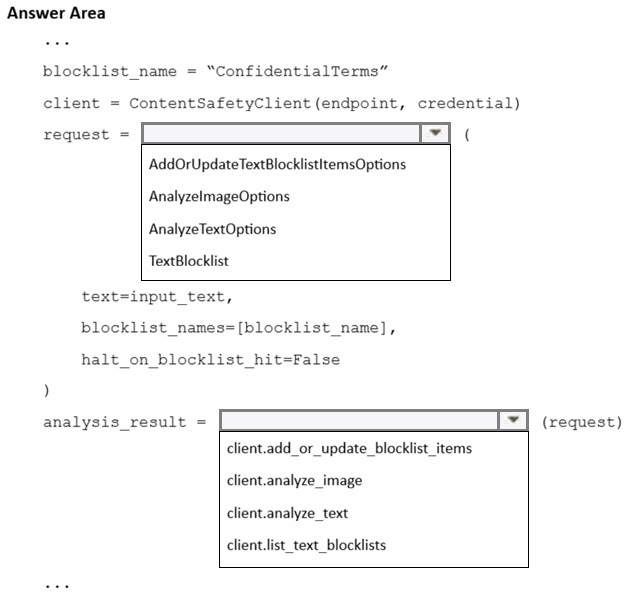
Build an AnalyzeTextOptions(text=input_text, blocklist_names=["ConfidentialTerms"], halt_on_blocklist_hit=False) request and pass it to client.analyze_text(options); inspect result.blocklists_match for hits.
Question
You have a configurable guardrail in a Microsoft Foundry project.
You have a Python application. A text blocklist named ConfidentialTerms already contains terms that must be detected in user messages. The application stores each incoming user message in a variable named input_text.
You plan to moderate input_text before the text is sent to a language model.
You need to analyze input_text by using the existing blocklist.
How should you complete the code? To answer, select the appropriate options in the answer area.
NOTE: Each correct selection is worth one point.
Key Takeaways
The trap is treating the blocklist reference as a plain string or short-circuiting the analysis; blocklist_names must be a list and the request must be run through client.analyze_text.
This AI-103 hotspot tests Content Safety custom blocklist moderation from Python. The answer is an AnalyzeTextOptions request with text, blocklist_names as a list, and halt_on_blocklist_hit False, executed by client.analyze_text.
Common mistake: Passing "ConfidentialTerms" as a single string to blocklist_names (or setting halt_on_blocklist_hit to True) — the parameter expects a list of blocklist names, and halting hides the category results the guardrail needs.
Expert Analysis
The governing capability The scenario uses Azure AI Content Safety text moderation, which Microsoft Foundry exposes as a configurable guardrail on a project. Custom text blocklists let a project owner define domain- or tenant-specific terms that the built-in harm categories cannot catch. The blocklist named ConfidentialTerms already exists in the Foundry project, so the Python code only has to request moderation that references it; it must not recreate or upload the terms in code.
The request-object pattern In the Azure AI Content Safety Python SDK, moderation is performed by building a single request object and handing it to the client method that executes it. The request object is AnalyzeTextOptions, and it is executed with client.analyze_text(options). The client itself is constructed from the Foundry project endpoint plus a credential such as DefaultAzureCredential, so the endpoint is the only project-specific configuration the application needs.
The required arguments Three properties carry the whole answer. First, text is set to input_text, the variable holding the incoming user message. Second, blocklist_names is set to the list value ["ConfidentialTerms"] — this parameter is a list of blocklist names, not a single string, which is the trap most learners fall into. Third, halt_on_blocklist_hit is set to False, which lets the service continue the analysis and return the full result set (including the built-in category scores) instead of stopping the moment a blocked term is found. Setting it to True would short-circuit the response.
Reading the result The completed call is: build AnalyzeTextOptions with text=input_text, blocklist_names=["ConfidentialTerms"], halt_on_blocklist_hit=False, then call client.analyze_text(options). Matches are reported in the response's blocklists_match collection, alongside categories_result, and the application decides whether to block, log, or flag the message before it reaches the language model.
Official Reference
- https://learn.microsoft.com/azure/ai-services/content-safety/
- https://learn.microsoft.com/azure/ai-services/content-safety/quickstart-text
These links open the official vendor documentation in a new tab.
Exam Strategy
For SDK code-completion hotspots, identify the request object and the single client method that executes it before reading the parameters. In Content Safety questions, watch the parameter shapes: names-based settings take lists, and *_hit flags control short-circuiting, not detection. Verify that the code references the existing Foundry resource rather than redefining terms locally, then confirm which response collection reports the match.
Frequently Asked Questions
What does halt_on_blocklist_hit change in AnalyzeTextOptions?
How do I detect that ConfidentialTerms matched a user message?
Does the blocklist need to exist before running the Python code?
Discussion 1 contributions
Compiled from public community threads and reader submissions, lightly edited for clarity. Handles and vote tallies are shown as recorded, and comments reflect the views of individual contributors.
From public community threads 1
-
8ac3742 👍 1AnalyzeTextOption and analyze_text AnalyzeTextOptions takes the parameters visible directly below it:text=input_text blocklist_names=[blocklist_name] halt_on_blocklist_hit=False client.analyze_text accepts an AnalyzeTextOptions request object and executes the text moderation against the specified blocklist.
Reader comments & corrections
No reader corrections yet — spotted an error or have a note? Share it below.
Related Analysis
Practice All AI-103 Questions
Access 88 questions with complete answers and detailed explanations.
View Full AI-103 Practice Test →