Updating Azure AI Custom Vision Classifier for New Products
Short answer
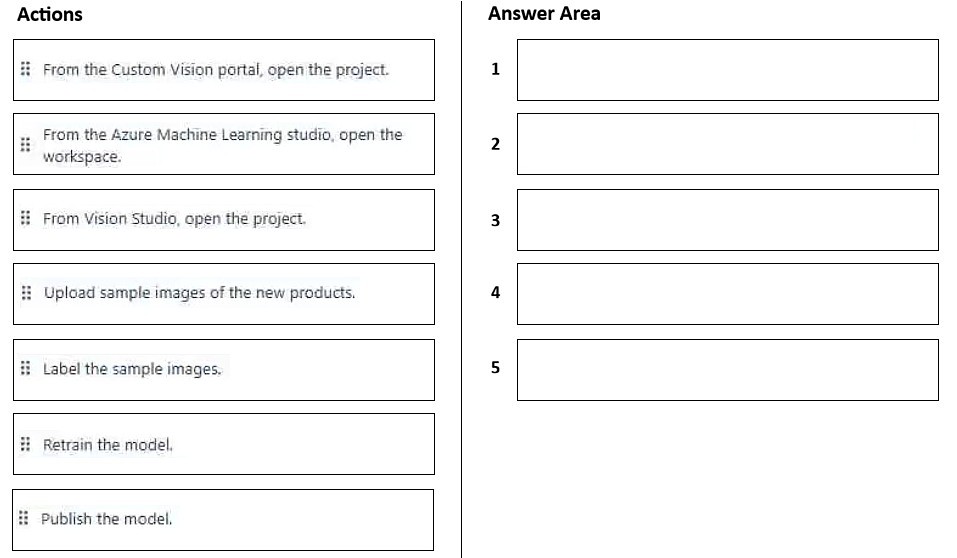
The correct sequence is: 1. From the Custom Vision portal, open the project. 2. Upload sample images of the new products. 3. Label the sample images. 4. Retrain the model. 5. Publish the model.
Question
You have an app that uses Azure AI Custom Vision and a custom trained classifier to identify products in images.
You need to add new products to the classifier. The solution must meet the following requirements:
• Minimize how long it takes to add the products.
• Minimize development effort.
Which five actions should you perform in sequence? To answer, move the appropriate actions from the list of actions to the answer area and arrange them in the correct order.
Key Takeaways
The key insight is that you cannot publish a model without first retraining it on newly labeled data, and you must upload and label before retraining.
Learn the correct sequence to update an Azure AI Custom Vision classifier with new product images while minimizing development effort and training time. This guide details the five-step workflow from uploading samples to publishing the updated model.
Common mistake: Learners often try to publish immediately after uploading or skip labeling, assuming the system auto-labels. Others might retrain before labeling, which results in an untrained model.
Expert Analysis
Why the Answer Is Correct
To add new products to an existing Azure AI Custom Vision classifier efficiently, you must follow the standard iterative training lifecycle. First, open the project to access the existing configuration. Second, upload the sample images of the new products. Third, label these images with the correct new tags (or existing ones if they are known categories, but typically 'new products' implies defining their class). Fourth, retrain the model so it learns the features of these new items. Finally, publish the trained iteration to make it available for inference via the prediction endpoint.
Why Other Candidate Answers Are Wrong
Any sequence that attempts to publish before retraining fails because the model has not learned the new data. Sequences that skip labeling leave the new images unclassified, making them useless for supervised learning. Attempting to create a new project instead of updating the existing one violates the requirement to minimize development effort.
Community Comment Notes
As Srikantha noted in the top comment, the logical flow is: Open Project -> Upload Images -> Label Images -> Retrain -> Publish. This aligns perfectly with the Azure portal's workflow for iterative model improvement.
Exam Strategy
Always remember the mantra: Data In -> Label -> Train -> Publish. When asked to 'update' a model, never start from scratch; use the existing project and iteration mechanism.
Frequently Asked Questions
Can I skip labeling if I already have tagged images?
Why do I need to retrain instead of just adding images?
Discussion 1 contributions
Compiled from public community threads and reader submissions, lightly edited for clarity. Handles and vote tallies are shown as recorded, and comments reflect the views of individual contributors.
From public community threads 1
-
Srikantha 👍 41: From the Custom Vision portal, open the project. 2: Upload sample images of the new products. 3: Label the sample images. 4: Retrain the model. 5: Publish the model.
Reader comments & corrections
No reader corrections yet — spotted an error or have a note? Share it below.
Related Analysis
Practice All AI-103 Questions
Access 88 questions with complete answers and detailed explanations.
View Full AI-103 Practice Test →