Deploy Custom Speech Model on Docker Host
Short answer
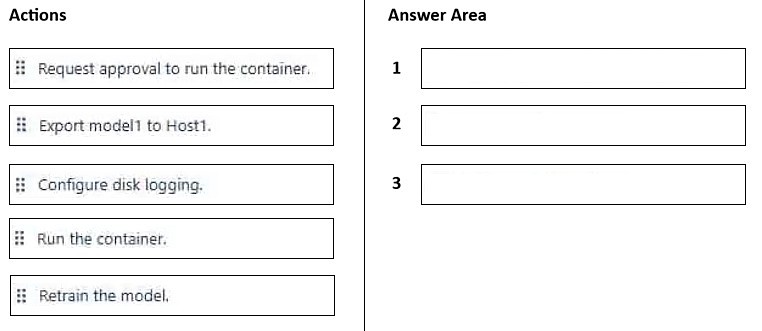
1. Request approval to run the container. 2. Export model1 to Host1. 3. Run the container.
Question
You have a Docker host named Host1 that contains a container base image.
You have an Azure subscription that contains a custom speech-to-text model named model1.
You need to run model1 on Host1.
Which three actions should you perform in sequence? To answer, move the appropriate actions from the list of actions to the answer area and arrange them in the correct order.
Key Takeaways
The key trap is assuming direct deployment; Azure AI Speech containers require explicit approval from Microsoft before any image can be pulled or run.
This scenario addresses the deployment of a custom Azure AI Speech model on an external Docker host, focusing on the specific access control and containerization steps required.
Common mistake: Learners often attempt to export and run the model immediately, failing to recognize that Azure AI Speech services are gated behind a mandatory access request process.
Expert Analysis
Why the Answer Is Correct
To run a custom speech-to-text model (model1) on an external Docker host (Host1), you must first obtain permission from Microsoft because Azure AI Speech containers are not publicly available by default. The correct sequence begins with requesting approval to run the container. Once approved, you can export the model artifacts to the host. Finally, you run the container using the exported model. This ensures compliance with Azure's distribution policies for specialized AI models.
Why Other Candidate Answers Are Wrong
Actions like 'Run Container' or 'Export Model' cannot occur before 'Request Approval' because the container image is not accessible without it. Attempting to configure disk logging or other operational settings before the container is successfully running and approved is premature and logically invalid in this deployment workflow.
Community Comment Notes
As Srikantha noted, the steps involve requesting approval, exporting the model, and then running the container. Another user, Kalut, suggested exporting, running, and configuring logging, which misses the critical initial approval step required for Azure AI Speech services.
Exam Strategy
Remember that Azure AI Speech containers are 'gated' services. Always look for 'Request Access' or 'Submit Form' as a prerequisite step before any technical deployment actions like pulling images or running containers.
Frequently Asked Questions
Why do I need approval to run Azure AI Speech containers?
Can I use a standard speech container without approval?
Discussion 5 contributions
Compiled from public community threads and reader submissions, lightly edited for clarity. Handles and vote tallies are shown as recorded, and comments reflect the views of individual contributors.
From public community threads 5
-
Srikantha 👍 4To run the custom speech-to-text model on Host1, perform the following actions in sequence: Request approval to run the container. Export model1 to Host1. Run the container. Explanation of Steps: Step 1: Azure AI Speech containers are gated services that require submitting an access request form to receive approval from Microsoft before deploying the container image. Step 2: The custom speech model (model1) must be exported/downloaded from Speech Studio and copied locally to the host directory so it can be mounted into the container. Step 3: Execute the docker run command on Host1 with the necessary billing parameters, API key, and local volume mount path to start the container instance.
-
adilkhan 👍 1• Request approval to run the container: Azure Speech containers (including those utilizing Custom Speech-to-Text models) are gated services. You must submit a request form and get authorization from Microsoft before the container can validate its billing and initialization. • Export model1 to Host1: Because you are deploying a custom speech-to-text model, you must use the Azure AI Speech Studio portal or CLI to explicitly package and download/export your trained custom model artifacts (model1) to the destination Docker host. • Run the container: Once approval is granted and the model files are locally available on Host1, you execute the docker run command with volume mounts linking to the exported model files to spin up the local endpoint.
-
dinizingrid 👍 1Answer: Request approval → Export model1 to Host1 → Run the container Export model1: the custom speech-to-text container takes the model ID (ModelId) in docker run. The model is downloaded on the first run and persisted on the host with a volume mount. Run the container: docker run requires Eula, Billing and ApiKey; without all three, the container won’t start. Not needed: disk logging is optional, and model1 is already trained, so no retraining. Note: per current docs, approval is only required for disconnected containers. The question reflects older guidance, when Speech containers were gated even in connected mode, but it’s still the only valid three-step sequence among the options.
-
8ac3742 👍 1approval -> export -> run Step 1: Submit Approval Request & Gather Azure Credentials You can get the Microsoft intake form for gated Speech services to enable container access for your Azure subscription https://aka.ms/csgate Before filling the form, Go to the Azure Portal and retrieve your Speech resource credentials Step 2: Download Your Custom Model (If using Custom Speech) In Speech Studio, go to Custom Speech > your project > Train Custom Models. Select your trained model and choose Export for Container. Download the resulting .zip / model package and extract it to a directory on your Docker host Step 3: Pull and Run the Docker Container
-
Kalut 👍 1Export model Run Container Configure disk logging
Reader comments & corrections
No reader corrections yet — spotted an error or have a note? Share it below.
Related Analysis
Practice All AI-103 Questions
Access 88 questions with complete answers and detailed explanations.
View Full AI-103 Practice Test →