Deploy the Azure AI Language sentiment container with Docker
Short answer
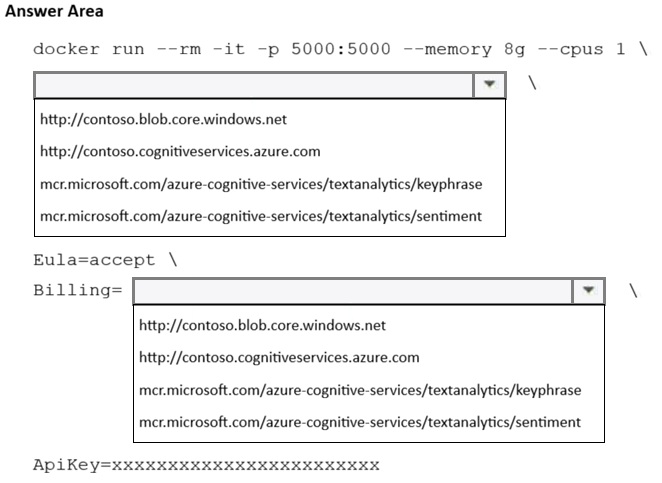
Run the container with the image mcr.microsoft.com/azure-cognitive-services/textanalytics/sentiment and pass Eula=accept, Billing=http://contoso.cognitiveservices.azure.com, and ApiKey=<resource key> as parameters (e.g., docker run --rm -it -p 5000:5000 --memory 8g --cpus 1 <image> Eula=accept Billing=http://contoso.cognitiveservices.azure.com ApiKey=<key>).
Question
You plan to deploy a containerized version of an Azure AI Language service that will be used for sentiment analysis.
You configure https://contoso.cognitiveservices.azure.com as the endpoint URI for the service.
You need to run the container on an Azure virtual machine by using Docker.
How should you complete the command? To answer, select the appropriate options in the answer area.
NOTE: Each correct selection is worth one point.
Key Takeaways
It tests the exact container image and required runtime parameters for a self-hosted Language container; the trap is choosing a generic text-analytics image or passing the endpoint as the HTTPS portal URL instead of the HTTP billing endpoint.
This AI-103 hotspot asks how to run the Azure AI Language sentiment analysis container on a VM with Docker. The answer is the sentiment image from Microsoft Container Registry plus Eula=accept, the HTTP Billing endpoint http://contoso.cognitiveservices.azure.com, and the resource's ApiKey.
Common mistake: Selecting the wrong container image (for example, the general text-analytics image or another cognitive service image) and/or passing Billing=https://contoso.cognitiveservices.azure.com. Each Language container is task-specific, and the billing endpoint must be the HTTP form of the endpoint URI, or the container will not authorize requests.
Expert Analysis
What the hotspot is really testing
The scenario is the standard on-premises/Azure VM deployment pattern for an Azure AI Language (Text Analytics) container. You must supply four things in the docker run command: the container image from Microsoft Container Registry, an accepted EULA, the billing endpoint, and the subscription key. The command shape that satisfies the exam is:
docker run --rm -it -p 5000:5000 --memory 8g --cpus 1 mcr.microsoft.com/azure-cognitive-services/textanalytics/sentiment Eula=accept Billing=http://contoso.cognitiveservices.azure.com ApiKey=<your-key>
The image reference
The sentiment analysis container image is mcr.microsoft.com/azure-cognitive-services/textanalytics/sentiment. The trap is selecting the generic text-analytics image or a different cognitive service image (for example, a qnamaker or luis image). Each Language container is task-specific, so sentiment requests only work with the sentiment image; language detection, PII recognition and key phrase extraction each have their own images. Some newer documentation reorganizes these images under an azure-ai-language path, but the exam's reference pattern is the azure-cognitive-services/textanalytics/sentiment image.
The billing endpoint and API key
Billing= must be the service endpoint URI, and Microsoft documents it as the HTTP form of the endpoint — http://contoso.cognitiveservices.azure.com — even though the portal shows https://. Learner notes on this question reflect exactly this: they pair Eula=accept, Billing=http://contoso.cognitiveservices.azure.com, and ApiKey=xxxx… after the image. Without Eula=accept the container refuses to start; without a valid Billing value and matching ApiKey the container starts but every request fails authorization. Note also that if the Azure resource's key access is disabled for programmatic access, the container cannot authenticate.
The adjacent decision
The scenario that would flip the answer: if the requirement were speech instead of sentiment, you would use the Speech-to-Text container and pass SpeechKey= plus the regional endpoint (SpeechEndpoint=), not Billing=/ApiKey=. Similarly, adding Logs=stdout enables diagnostics when the container runs headless on a VM. Operationally, getting this wrong means the container silently rejects sentiment requests while appearing healthy — a costly troubleshooting detour, so verify image name, HTTP billing endpoint and key in that order.
Official Reference
- https://learn.microsoft.com/azure/ai-services/language-service/how-to/run-language-container
- https://learn.microsoft.com/azure/ai-services/language-service/overview
These links open the official vendor documentation in a new tab.
Exam Strategy
For container-deployment hotspots, match the image to the exact cognitive task named in the scenario, then verify the three mandatory parameters: Eula=accept, Billing with the service endpoint, and ApiKey with the resource key. Remember that speech containers use SpeechKey/SpeechEndpoint instead, so a container question about speech will not use Billing and ApiKey. When the endpoint is given as HTTPS, supply its HTTP form for Billing, as Microsoft documents.
Frequently Asked Questions
Why does the Billing parameter use http:// instead of the https:// endpoint shown in the portal?
Which container image do I use for Azure AI Language sentiment analysis?
What happens if I omit Eula=accept or the ApiKey in the docker run command?
Discussion 1 contributions
Compiled from public community threads and reader submissions, lightly edited for clarity. Handles and vote tallies are shown as recorded, and comments reflect the views of individual contributors.
From public community threads 1
-
8ac3742 👍 1base image and billing org docker run --rm -it -p 5000:5000 --memory 8g --cpus 1 \ mcr.microsoft.com/azure-cognitive-services/textanalytics/sentiment \ Eula=accept \ Billing=http://contoso.cognitiveservices.azure.com \ ApiKey=xxxxxxxxxxxxxxxxxxxxxxxxxxxxxxxx
Reader comments & corrections
No reader corrections yet — spotted an error or have a note? Share it below.
Related Analysis
Practice All AI-103 Questions
Access 88 questions with complete answers and detailed explanations.
View Full AI-103 Practice Test →