Azure AI Search Knowledge Store Projections: JSON vs Extracted Text
Short answer
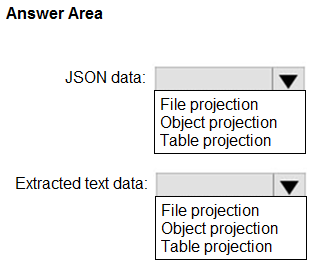
For the unstructured JSON data, use Object projection. For the extracted text from scanned PDF documents, use Table projection.
Question
You are creating an enrichment pipeline that will use Azure AI Search. The knowledge store contains unstructured JSON data and the text from scanned PDF documents.
Which projection type should you use for each data type? To answer, select the appropriate options in the answer area.
NOTE: Each correct selection is worth one point.
Key Takeaways
The main trap is confusing File projection (for binary images) with Object or Table projections; remember that JSON stays as an Object, while extracted text becomes a Table.
Learn which Azure AI Search knowledge store projection type to use for unstructured JSON (Object) versus extracted text from PDFs (Table).
Common mistake: Learners often incorrectly select File projection for both, thinking all enriched data is 'file-like,' or they choose Object for text, missing the relational benefit of Table storage for extracted content.
Expert Analysis
Unstructured JSON requires Object Projection The first data source is unstructured JSON. Azure AI Search uses Object projection to store complex, hierarchical JSON documents directly into the knowledge store as individual blob files. This preserves the original structure and allows downstream applications to consume the raw JSON without parsing it from a table row.
Extracted Text from Scanned PDFs requires Table Projection The second data source is text extracted from scanned PDF documents. While the input was binary, the enrichment pipeline has already performed OCR (Optical Character Recognition) to extract text. The resulting text is typically stored in a structured format. In the context of Azure AI Search knowledge stores, extracting content like text or key-value pairs from documents is best handled by Table projection, which stores the extracted data in relational tables for efficient querying and indexing.
Why File Projection is Incorrect File projection is specifically designed for storing normalized, binary image files (e.g., resizing images or extracting thumbnails). It is not used for JSON data or extracted text strings. Using file projection for text would be inefficient and incorrect because text is not a binary image file.
Addressing Common Confusion Some learners might consider "Object projection" for the text if they view it as just another string payload. However, since the text is extracted content intended for search indexing, storing it in a table via Table projection aligns with how Azure AI Search indexes and queries structured data. The JSON, being inherently hierarchical and unstructured, remains an object.
Official Reference
https://learn.microsoft.com/en-us/azure/search/knowledge-store-projection-overview
This link opens the official vendor documentation in a new tab.
Exam Strategy
When faced with knowledge store projection questions, first identify the data format after enrichment. If the data is hierarchical JSON, choose Object projection. If the data is extracted text or key-value pairs meant for indexing, choose Table projection. Avoid File projection unless the question explicitly mentions binary images or resized media.
Frequently Asked Questions
What is the difference between Object and Table projection in Azure AI Search?
When should I use File projection in a knowledge store?
Discussion 2 contributions
Compiled from public community threads and reader submissions, lightly edited for clarity. Handles and vote tallies are shown as recorded, and comments reflect the views of individual contributors.
From public community threads 2
-
Alvarogc 👍 51. Object projection 2. Object projection It should be Object projection for both answers. There's no specified relational structure on the question, so second one may not be Table projection; but File projection is only for normalized, binary image files. Reference: https://learn.microsoft.com/en-us/azure/search/knowledge-store-projection-overview
-
fa62dd5 👍 1Answer: JSON data: Object projection Extracted text data: Table projection
Reader comments & corrections
No reader corrections yet — spotted an error or have a note? Share it below.
Related Analysis
Practice All AI-103 Questions
Access 88 questions with complete answers and detailed explanations.
View Full AI-103 Practice Test →