Copilot Chat Grounding with Sensitivity Labels
Short answer
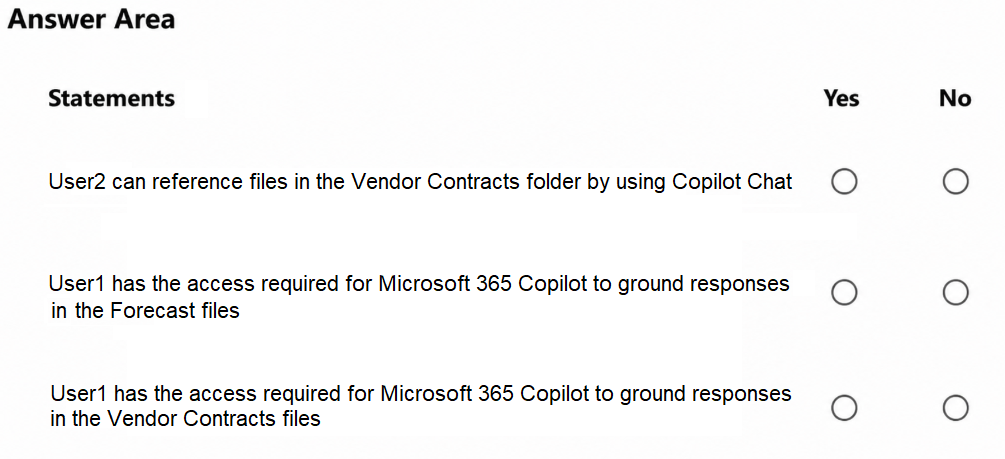
Statement 1 is Yes; Statement 2 is No. User2 can reference unlabeled Vendor Contracts files as an internal user, while User1 cannot reference encrypted Forecast files restricted to Group1.
Question
You have a Microsoft 365 subscription that contains the resources shown in the following table.

Microsoft SharePoint contains the folders shown in the following table.

For each of the following statements, select Yes if the statement is true. Otherwise, select No.
NOTE: Each correct selection is worth one point.
Key Takeaways
Copilot grounding requires both user access and unencrypted content; sensitivity labels restricting access to specific groups prevent Copilot from referencing those files for unauthorized users.
Determines whether Microsoft Copilot Chat can reference SharePoint files based on user access rights and Purview sensitivity label encryption status.
Common mistake: Assuming that any file accessible to an internal user can be referenced by Copilot, ignoring that sensitivity label encryption blocks AI processing for users outside the designated group.
Expert Analysis
This Hotspot question tests the intersection of Microsoft Purview sensitivity labels, SharePoint access controls, and Copilot Chat grounding capabilities. The core concept is understanding how encryption restrictions impact AI data retrieval.
Analysis of Statement 1: "User2 can use Copilot Chat to reference files in the Vendor Contracts folder."
- Verdict: Yes.
- Reasoning: The "Vendor Contracts" folder has the setting "Everyone except external users." User2 is an internal user, so they have access to these files. Crucially, the comment indicates these files are unlabeled. Unlabeled files do not have encryption restrictions preventing Copilot from reading them. Therefore, Copilot can ground its responses on this content for User2.
Analysis of Statement 2: "User1 can use Copilot Chat to reference files in the Forecast folder."
- Verdict: No.
- Reasoning: The "Forecast" folder is protected by a sensitivity label that grants usage rights exclusively to Group1. User1 is explicitly stated to be outside of Group1. Because the files are encrypted/restricted by this label, User1 cannot access the underlying content directly. More importantly for Copilot, if the user cannot access the file due to sensitivity label encryption, Copilot generally cannot ground its answers on that specific protected content because it cannot retrieve the text to process it securely within the user's context. The restriction prevents the necessary data flow for Copilot grounding.
Key Takeaway: Copilot can only reference (ground) content that the user has permission to access and that is not blocked by sensitivity label encryption policies. Internal access + no encryption = Grounding possible. Restricted access/encryption = Grounding prevented.
Official Reference
https://learn.microsoft.com/en-us/purview/sensitivity-labels
This link opens the official vendor documentation in a new tab.
Exam Strategy
When evaluating Copilot scenarios, always check two layers: 1) Does the user have direct access to the file? 2) Is the file encrypted by a sensitivity label that restricts AI usage? If either layer blocks access, Copilot cannot ground the response. Prioritize checking the sensitivity label settings first, as they override standard access for AI purposes.
Frequently Asked Questions
Can Copilot read files if I am an admin?
What happens if a file is labeled but not encrypted?
Discussion 1 contributions
Compiled from public community threads and reader submissions, lightly edited for clarity. Handles and vote tallies are shown as recorded, and comments reflect the views of individual contributors.
From public community threads 1
-
linux_admin 👍 1Answer: Yes Explanation: User2 is an internal user with access to the Vendor Contracts folder under the Everyone except external users setting, enabling Copilot Chat to reference these unlabeled files. Answer: No Explanation: The Forecast files are encrypted by a sensitivity label that grants usage rights exclusively to Group1, preventing User1 who is outside Group1 from decrypting or grounding Copilot responses in them. Answer: Yes Explanation: User1 is assigned a Microsoft 365 Copilot license and has access to the Vendor Contracts folder through the Everyone except external users setting.
Reader comments & corrections
No reader corrections yet — spotted an error or have a note? Share it below.