Which table properties enable audit history and change tracking?
Short answer
Enable auditing at the table level to maintain a history of changes, and enable change tracking at the table level so external systems can detect data updates.
Question
HOTSPOT
A company must be able to monitor changes to records and support integration with external systems. The solution must provide the following functionality:
• Maintain a history of changes to records.
• Allow external systems to detect data updates.
You need to configure table properties.
How should you configure the properties? To answer, select the appropriate options in the answer area.
NOTE: Each correct selection is worth one point.
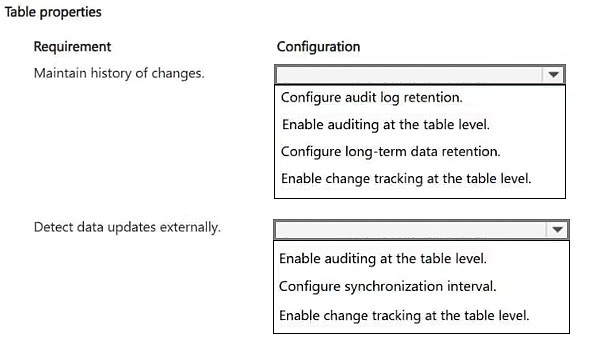
Key Takeaways
The item tests the split between Dataverse auditing (who changed what, when) and change tracking (delta detection for integration); the trap is assuming change tracking alone provides a retained history of changes.
Dataverse table properties control record change history and external integration notifications. This page establishes that auditing must be enabled at the table level to retain a change history, while change tracking must be enabled at the table level so external systems can detect data updates.
Common mistake: Learners select only change tracking, believing it covers both requirements, or they enable auditing at the environment level only. Change tracking merely flags rows as modified for delta queries and does not store an auditable record history, and table-level auditing is what satisfies the stated requirement.
Expert Analysis
Why the Answer Is Correct
Requirement one, maintaining a history of changes to records, maps directly to Dataverse auditing: you turn on auditing for the table (and the columns you need tracked), and Dataverse then writes creation, update, and deletion records to the audit log that can be viewed in the record's Audit History. Requirement two, allowing external systems to detect data updates, maps to change tracking on the table, which flags modified rows so integrations can retrieve only deltas via change tracking queries or notifications rather than polling all data. Both are distinct table-level property settings, so the correct configuration is enabling auditing at the table level and enabling change tracking at the table level.Why Other Candidate Answers Are Wrong
Turning on auditing alone satisfies history but leaves external systems unable to efficiently discover which rows changed, because change tracking is the feature that makes delta retrieval possible. Enabling change tracking alone gives integrations a way to see modified rows but does not retain who changed which column and when, so the audit history requirement is unmet. Setting audit retention or enabling auditing only at the environment level without the table enabled does not record changes for that table's columns, and assuming a cloud flow with a row-modified trigger equals auditing confuses process automation with the platform's built-in audit log.Community Comment Notes
The single community answer mirrors this verdict, stating "1. Enable auditing at the table level 2. Enable change tracking at the table level." No other comments contested that pairing, and no vote distribution was recorded to weigh against it. Because the comment provides no elaboration on why change tracking is required separately, learners should confirm the reasoning against Microsoft's own auditing and change-tracking documentation.Official Reference
Exam Strategy
When a hotspot asks for table properties, read each stated requirement as a separate feature rather than looking for one setting that does everything. Map verbs like 'maintain history' to auditing and 'detect updates externally' to change tracking, then confirm each selection is made at the table level where the prompt specifies.
Frequently Asked Questions
Why do I need both auditing and change tracking on a Dataverse table?
Auditing writes a retained history of create, update, and delete actions for the table's columns, while change tracking flags modified rows so integrations can pull only the changed data. They solve two different requirements.
Does change tracking keep a history of record changes?
No. Change tracking only indicates which rows have changed since a point in time for synchronization; the durable history of who changed what is stored by auditing in the audit log.
Discussion 1 contributions
Compiled from public community threads and reader submissions, lightly edited for clarity. Handles and vote tallies are shown as recorded.
From public community threads 1
-
exam_upskill 👍 11. Enable auditing at the table level 2. Enable change tracking at the table level
Reader comments & corrections
No reader corrections yet — spotted an error or have a note? Share it below.