Configure Business Process Flow Branching and Automation
Short answer
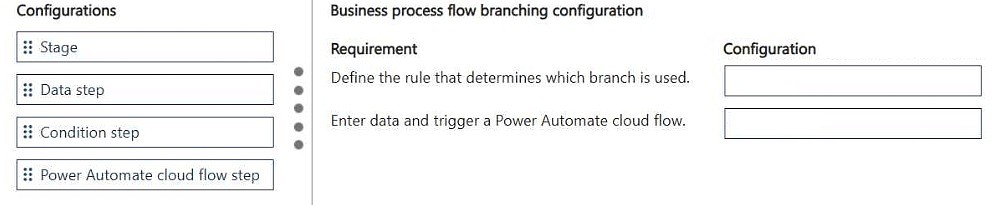
For the revenue threshold requirement, add a Condition step. For the additional data entry and flow trigger requirement, add a Power Automate Cloud Flow step.
Question
DRAG DROP
A company uses a business process flow to manage sales opportunities.
The business process flow has the following requirements:
• The process must follow one path when the estimated revenue is below a threshold and a different path when the estimated revenue meets or exceeds that threshold.
• If the estimated revenue is above a certain threshold, users must be able to enter data into additional columns and trigger a Power Automate cloud flow before moving forward.
You need to configure the business process flow.
What should you add for each requirement? To answer, move the appropriate configurations to the correct requirements. You may use each configuration once, more than once, or not at all. You may need to move the split bar between panes or scroll to view content.
NOTE: Each correct selection is worth one point.
Key Takeaways
Tests understanding of Business Process Flow (BPF) steps: using a Condition step for branching logic based on field values and a Power Automate Cloud Flow step for triggering external automation before proceeding.
Learn how to configure Microsoft Dynamics 365 business process flows with conditional branching for revenue thresholds and integration with Power Automate. This page explains the correct drag-and-drop configuration for handling complex sales opportunity workflows.
Common mistake: Learners often confuse the 'Condition' step with standard 'Stage' transitions or attempt to use a 'Choice' step, which is not available in BPFs for dynamic branching like this scenario requires.
Expert Analysis
Why the Answer Is Correct
The first requirement involves branching the path based on a data value (estimated revenue). In a Business Process Flow, this is achieved by inserting a Condition step between stages. This step evaluates a condition (e.g., Revenue > Threshold) and directs the flow down one of two paths. The second requirement involves triggering a cloud flow. BPFs support direct integration with Power Automate via the Power Automate Cloud Flow step type, allowing you to execute a workflow before moving to the next stage.Why Other Candidate Answers Are Wrong
Other potential configurations like 'Stage', 'Action', or 'Choice' are incorrect because 'Stage' is just a container, 'Action' typically refers to form actions or specific entity operations not suited for flow branching/triggering in this context, and 'Choice' is a canvas app control, not a BPF step type. Standard transitions do not allow for branching logic or automated triggers without these specific step types.Community Comment Notes
As exam_upskill noted, the solution involves placing a Condition step for the branch and a Power Automate Cloud Flow step for the trigger. This aligns with Microsoft's documentation on extending business process flows with automation and decision points.Exam Strategy
Focus on recognizing when to use a 'Condition' step for branching logic versus a 'Power Automate Cloud Flow' step for triggering background processes within a Business Process Flow. Remember that BPFs have limited step types compared to Canvas Apps.
Frequently Asked Questions
Can I use a Choice control in a Business Process Flow?
No, Choice controls are used in Canvas Apps forms. Business Process Flows use specific step types like Condition, Stage, and Power Automate Cloud Flow.
How do I trigger a cloud flow from a BFF?
You must insert a 'Power Automate Cloud Flow' step into the BFF sequence. This step allows you to select an existing flow to run before the user proceeds to the next stage.
Discussion 1 contributions
Compiled from public community threads and reader submissions, lightly edited for clarity. Handles and vote tallies are shown as recorded.
From public community threads 1
-
exam_upskill 👍 21. Condition step 2. Power automate cloud flow step
Reader comments & corrections
No reader corrections yet — spotted an error or have a note? Share it below.