How to Configure Manager and Position Hierarchy in Power Apps?
Short answer
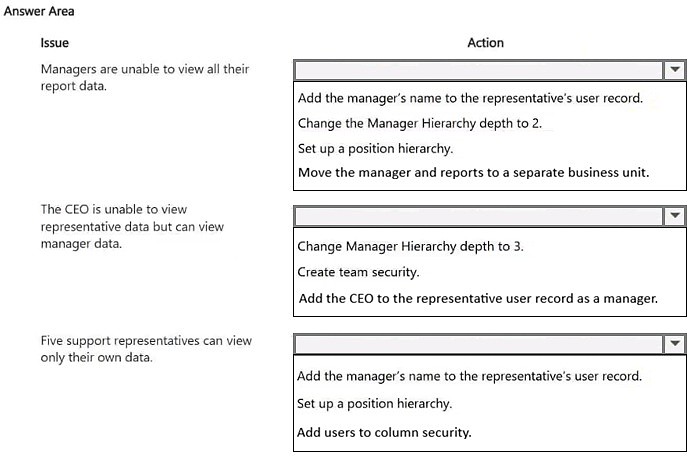
Add the manager's name to the representatives' user records, set the Manager Hierarchy depth to 3, and set up a position hierarchy to allow representatives to view each other's data.
Question
You are setting up Power Apps security for a company. The company has a CEO, two vice presidents, and 10 managers. Five support representatives report to each manager.
You set up Manager Hierarchy so managers are able to view data only for the representatives who report to them. The CEO must be able to view all data for everyone. All support representatives must be able to view customer information in each other’s data across all managers.
You need to resolve issues that arise during testing.
What should you do? To answer, select the appropriate options in the answer area.
NOTE: Each correct selection is worth one point.
Key Takeaways
Manager Hierarchy only provides downward access, requiring depth configuration for top-level users and a separate Position Hierarchy for peer-to-peer visibility across different branches.
This scenario covers configuring Dataverse security hierarchies to meet complex organizational visibility requirements. The page establishes how to properly use Manager Hierarchy depth and Position Hierarchy to grant appropriate data access to CEOs, managers, and peer representatives.
Common mistake: A common mistake is assuming Manager Hierarchy provides peer access or that depth defaults to include all levels; users must explicitly set the depth and configure Position Hierarchy for lateral visibility.
Expert Analysis
Why the Answer Is Correct
Adding the manager's name to the representatives' user records establishes the reporting structure required for Manager Hierarchy to function. Setting the Manager Hierarchy depth to 3 allows the CEO to view records down three levels (VPs, Managers, Representatives). Setting up a Position Hierarchy correctly enables lateral peer access, allowing support representatives to view each other's data across different managers, which Manager Hierarchy cannot do.Why Other Candidate Answers Are Wrong
Using only Manager Hierarchy cannot solve the peer visibility requirement because it only cascades permissions downward, not sideways. Setting the hierarchy depth to 1 or 2 would restrict the CEO's visibility to only VPs or Managers, preventing them from seeing representative data. Failing to link users via the manager field breaks the hierarchy chain entirely, rendering depth settings ineffective.Community Comment Notes
The community consensus aligns with these three specific actions: adding the manager to the user record, adjusting the hierarchy depth, and implementing a position hierarchy. As exam_upskill noted, the necessary steps are "Add the Managers name to the representatives user record", "Change manager Hierarchy depth to 3", and "Setup a position hierarchy".Official Reference
https://learn.microsoft.com/en-us/power-platform/admin/hierarchy-security
This link opens the official vendor documentation in a new tab.
Exam Strategy
When dealing with Dataverse hierarchy security, remember that Manager Hierarchy is strictly top-down and requires the Manager field on the user record to be populated. For any lateral peer-to-peer access requirements, Position Hierarchy is the correct solution to configure.
Discussion 1 contributions
Compiled from public community threads and reader submissions, lightly edited for clarity. Handles and vote tallies are shown as recorded, and comments reflect the views of individual contributors.
From public community threads 1
-
exam_upskill 👍 11. Add the Managers name to the representatives user record 2. Change manager Hierarchy depth to 3 3. Setup a position hierarchy
Reader comments & corrections
No reader corrections yet — spotted an error or have a note? Share it below.