Which Form Components Support Inline Editing and Related Data?
Short answer
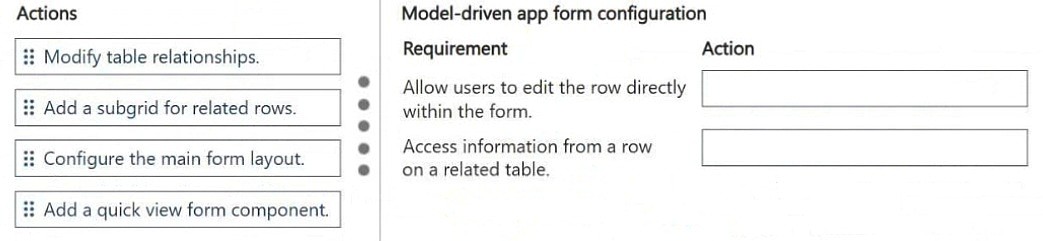
To let users edit the record directly within the form, add a Form component; to access information from a row on a related table, add a Quick view form component.
Question
DRAG DROP
You are designing forms for a model-driven app. Account managers use the app to access customer records.
The account managers require the following app functionality:
• Allow users to edit the row directly within the form.
• Access information from a row on a related table.
You need to configure form components.
Which actions should you perform? To answer, move the appropriate actions to the correct requirements. You may use each action once, more than once, or not at all. You may need to move the split bar between panes or scroll to view content.
NOTE: Each correct selection is worth one point.
Key Takeaways
You must pair each requirement with the component that matches its scope: the Form component enables editing the embedded record itself, and the Quick view form displays read-only fields from one related-table row, while a subgrid is the trap answer because it lists many rows.
This AB-410 drag-and-drop item tests model-driven app form components, matching each account manager requirement to the right component. The page establishes that direct in-row editing inside a form is delivered by a Form component, while pulling information from a row on a related table is delivered by a Quick view form component.
Common mistake: Learners drag 'Add a sub-grid for related rows' to the editing requirement, assuming a grid implies inline editing; a subgrid only displays a view of many related records and does not let users edit the single record's form in place.
Expert Analysis
Why the Answer Is Correct
Requirement one — allowing users to edit the row directly within the form — maps to adding a Form component, because a form component embeds another table's model-driven form so the record can be edited in place without navigating away. Requirement two — accessing information from a row on a related table — maps to adding a Quick view form component, which renders selected fields from a single related record in the context of the current record. Together these two components cover exactly the two stated behaviors: in-form editing of a record and display of one related row's data. Neither behavior is fulfilled by a subgrid, which is a list-style view of many rows rather than a single record's details.Why Other Candidate Answers Are Wrong
A subgrid for related rows shows a collection of records from a related table in a grid, so it does not provide an embedded editable form for a single row and cannot satisfy the direct-edit requirement. A quick create form is used to add new records through a dialog, not to edit an existing row already displayed in the form. A quick view form is read-only by design, so it cannot serve the editing requirement even though it is correct for viewing related-table information. Web resources, spacers, and chart placements address presentation or layout rather than record editing or related-row data access.Community Comment Notes
The single community comment proposed "1. Add a sub-grid for related rows 2. Add a quick view form component", which places the subgrid against the direct-editing requirement. That mapping is only half right: the quick view form component is correctly paired with accessing related-table information, but a subgrid does not let a user edit the row within the form. Exam takers should treat such vote- or comment-based suggestions cautiously, since the wording of the requirement — 'edit the row directly within the form' — points to an embedded editable Form component instead.Official Reference
Exam Strategy
Read each requirement for a verb and a scope: 'edit' signals an embedded Form component, while 'information from a row on a related table' signals a Quick view form. On drag-and-drop items, place the actions you are certain of first, then use the leftover distractors only if a slot remains.
Frequently Asked Questions
Why isn't a subgrid the right choice for editing a row inside a model-driven form?
A subgrid displays a view of many related records and is not an embedded editable form for a single row. Editing the record in place requires a Form component.
When should I use a Quick view form component instead of a subgrid?
Use a Quick view form when you need read-only fields from one related-table record shown alongside the current record. Use a subgrid when you need a list of related rows.
Discussion 1 contributions
Compiled from public community threads and reader submissions, lightly edited for clarity. Handles and vote tallies are shown as recorded.
From public community threads 1
-
exam_upskill 👍 11. Add a sub-grid for related rows 2. Add a quick view form component
Reader comments & corrections
No reader corrections yet — spotted an error or have a note? Share it below.