Which fix resolves each Power Automate cloud flow failure?
Short answer
Reauthenticate the existing connection for the flow idle more than 90 days; add input validation or condition checks for records with incomplete data.
Question
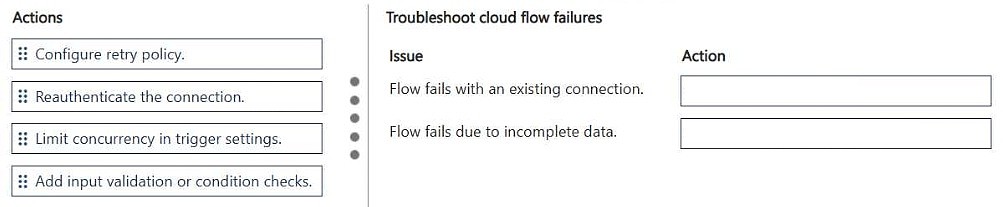
DRAG DROP
You are troubleshooting multiple production Power Automate cloud flows for a company. The cloud flows connect to Microsoft Dataverse by using Microsoft Entra ID authentication.
You analyze the following issues:
• A flow that has not executed for more than 90 days fails when performing actions that rely on an existing connection configuration.
• A flow fails for records containing incomplete data.
You need to resolve flow failures.
Which actions should you perform? To answer, move the appropriate actions to the correct issues. You may use each action once, more than once, or not at all. You may need to move the split bar between panes or scroll to view content.
NOTE: Each correct selection is worth one point.
Key Takeaways
The item tests whether you can map symptom to root cause — a stale/expired connection versus bad input data — and the trap is applying the data-quality fix to the connection problem or vice versa.
This AB-410 drag-and-drop pairs two Power Automate flow failures with their fixes: a cloud flow idle for more than 90 days must have its existing Microsoft Entra ID-backed connection reauthenticated, while flows failing on incomplete Dataverse records must gain input validation or condition checks before the failing action.
Common mistake: The most common wrong move is routing 'add input validation or condition checks' to the 90-day idle flow, since it sounds like a general hardening step; validation cannot repair a connection whose credentials have expired, and reauthentication cannot make null or missing Dataverse field values valid.
Expert Analysis
Why the Answer Is Correct
A flow that has not run for more than 90 days fails specifically on actions that depend on an existing connection configuration, which is the classic signature of an expired or deauthorized connector reference: the OAuth token backing the Microsoft Entra ID connection is no longer valid, so the action cannot authenticate to Dataverse. The correct remedy is therefore to reauthenticate (refresh/re-create) that connection so the flow's connection reference resolves again. The second flow fails only for records with incomplete data, meaning the inputs themselves are the problem, so inserting a condition or input validation step that checks for null/missing values before the action is what resolves it. Both fixes are one-to-one matches with the stated symptoms, and each action maps cleanly to one issue.Why Other Candidate Answers Are Wrong
Adding condition checks to the idle flow does nothing about an expired credential — the action will still fail at the connector handshake no matter how many data guards precede it. Likewise, reauthenticating the connection for records with incomplete data leaves the underlying null or partially populated Dataverse fields untouched, so those records will continue to fail on the same action. Selecting a fix that modifies the trigger, or that changes the Dataverse schema, addresses neither the connection lifetime nor the record-level data quality described in the two issues. Because the actions may be reused or left unused, the trap is assuming a fix must apply broadly rather than matching it to the specific failure mode.Community Comment Notes
The single posted comment from exam_upskill correctly pairs the remedies, listing "Reauthenticate the connection" for the idle flow and "Add input validation or condition checks" for the incomplete-data flow. That matches the vendor's own guidance that connection references to Microsoft Entra ID-backed connectors must be refreshed after long periods of inactivity. The comment offers no alternative pairing, so there is no competing community position to reconcile here.Official Reference
Exam Strategy
For drag-and-drop items, anchor each fix to the exact wording of the symptom: keywords like 'not executed for more than 90 days' and 'existing connection configuration' point to connection health, while 'incomplete data' points to input handling. Never reuse a fix across panes unless the symptom genuinely repeats.
Frequently Asked Questions
Why does a Power Automate flow fail after sitting idle for 90+ days?
Connections backed by Microsoft Entra ID can expire after long periods without use, so actions relying on that existing connection configuration can no longer authenticate to Dataverse. Reauthenticating the connection restores it.
How do I stop a cloud flow failing on Dataverse records with incomplete data?
Insert a condition or input validation step before the failing action to check for null or missing values, then branch incomplete records to an error path instead of letting the action run and fail.
Discussion 1 contributions
Compiled from public community threads and reader submissions, lightly edited for clarity. Handles and vote tallies are shown as recorded.
From public community threads 1
-
exam_upskill 👍 21. Reauthenticate the connection 2. Add input validation or condition checks
Reader comments & corrections
No reader corrections yet — spotted an error or have a note? Share it below.