Which Components Provide Field-Level Security in Dataverse?
Short answer
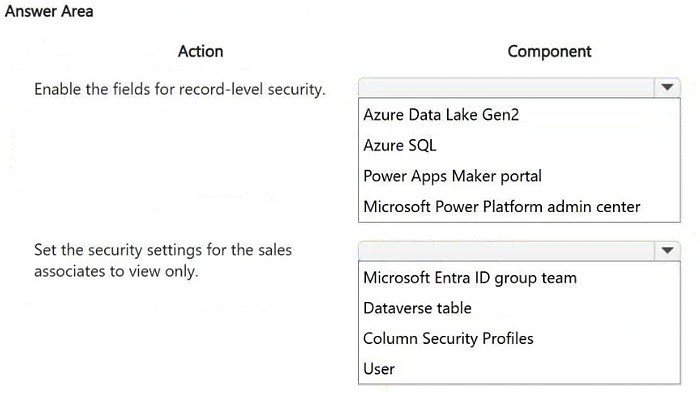
Use the Power Apps maker portal to enable field security on the required contacts columns, and use column security profiles (with only Read access granted) assigned to the sales associates to make those columns view-only.
Question
HOTSPOT
A customer uses Power Apps to view and maintain their contacts that are stored in Microsoft Dataverse.
Several columns must be configured to ensure the security settings for sales associates are view only.
You need to configure the access restrictions.
Which component for field-level security should you use? To answer, select the appropriate options in the answer area.
NOTE: Each correct selection is worth one point.
Key Takeaways
The item tests whether you can pair the configuration surface (the Power Apps maker portal, where field security is switched on per column) with the enforcement component (a column security profile with Read-only column privileges) — the trap is reaching for a Dataverse security role or app-level sharing instead.
For Power Apps contacts stored in Dataverse, view-only access for specific columns is enforced with Dataverse column-level (field-level) security. The answer selects the Power Apps maker portal as the place where column security is enabled on a column, and column security profiles as the component assigned to the sales associates' users or teams to grant read-only access.
Common mistake: The most common wrong approach is trying to restrict the columns with a Dataverse security role or by sharing the canvas app with limited permissions. Security roles control table-level (create/write/delete/append) privileges and cannot limit individual columns; only a column security profile, enabled on the column itself, produces read-only behavior at the field level.
Expert Analysis
Why the Answer Is Correct
Column-level security in Dataverse is switched on per column from the Power Apps maker portal (Data > Tables > Contacts > Columns > the column's properties, where Field security is set to Yes), so the maker portal is the correct first selection. Once a column is secured, only principals holding a column security profile can see it, and the profile itself is defined in the Power Apps maker portal under Security > Column security profiles. To make the columns view-only for sales associates, you grant that profile Read access on Column without Read/Write/Create/Delete privileges, then assign the profile to the sales associates' user records or to their Dataverse team. Because the contacts live in Dataverse and are displayed in Power Apps, this configuration applies consistently regardless of which app or view renders the record.Why Other Candidate Answers Are Wrong
A Dataverse security role is the wrong component because roles grant privileges across an entire table — they cannot make an individual column read-only while leaving others editable. Sharing the Power App or using the app's share permissions is also wrong: app sharing controls who can run the app and co-own it, not which data columns are rendered as locked. Power Fx formulas such as Disable/DisplayMode set to View in the canvas app are only a cosmetic layer, since the underlying data remains writable through other clients and the API. Dataverse auditing, dataflows, and environment variables likewise never restrict read or write at the field level.Community Comment Notes
The single community submission answered exactly with "1. Power Apps Maker Portal 2. Column security profiles," which matches the Microsoft-documented workflow for enabling field security on a column and then applying a profile. There is no dissenting comment in the thread, so the vote record offers no counter-position to weigh. That alignment between the one posted answer and the official column-level security procedure gives additional confidence in this verdict, though it is the documentation, not the vote, that establishes it.Official Reference
Exam Strategy
Read each hotspot row as a separate decision: the first slot asks where you enable field security on the column, and the second asks which security object enforces it. On AB-410, whenever the goal is "restrict these specific columns," look for column/field security profile wording rather than security roles or app sharing.
Frequently Asked Questions
How do I enable column-level security on a Dataverse column in Power Apps?
In the maker portal, open Data > Tables > Contacts > Columns, select the column, and set Field security to Yes. The column then becomes editable only through a column security profile.
What privileges does a column security profile need for view-only access?
Grant the profile Read on the secured column, and leave Create, Update (Write), and Delete unselected so users can see but not modify the value.
Discussion 1 contributions
Compiled from public community threads and reader submissions, lightly edited for clarity. Handles and vote tallies are shown as recorded.
From public community threads 1
-
exam_upskill 👍 11. Power Apps Maker Portal 2. Column security profiles
Reader comments & corrections
No reader corrections yet — spotted an error or have a note? Share it below.